
Feature Flag Operations in the IDE: A Safe Workflow for AI Coding Agents
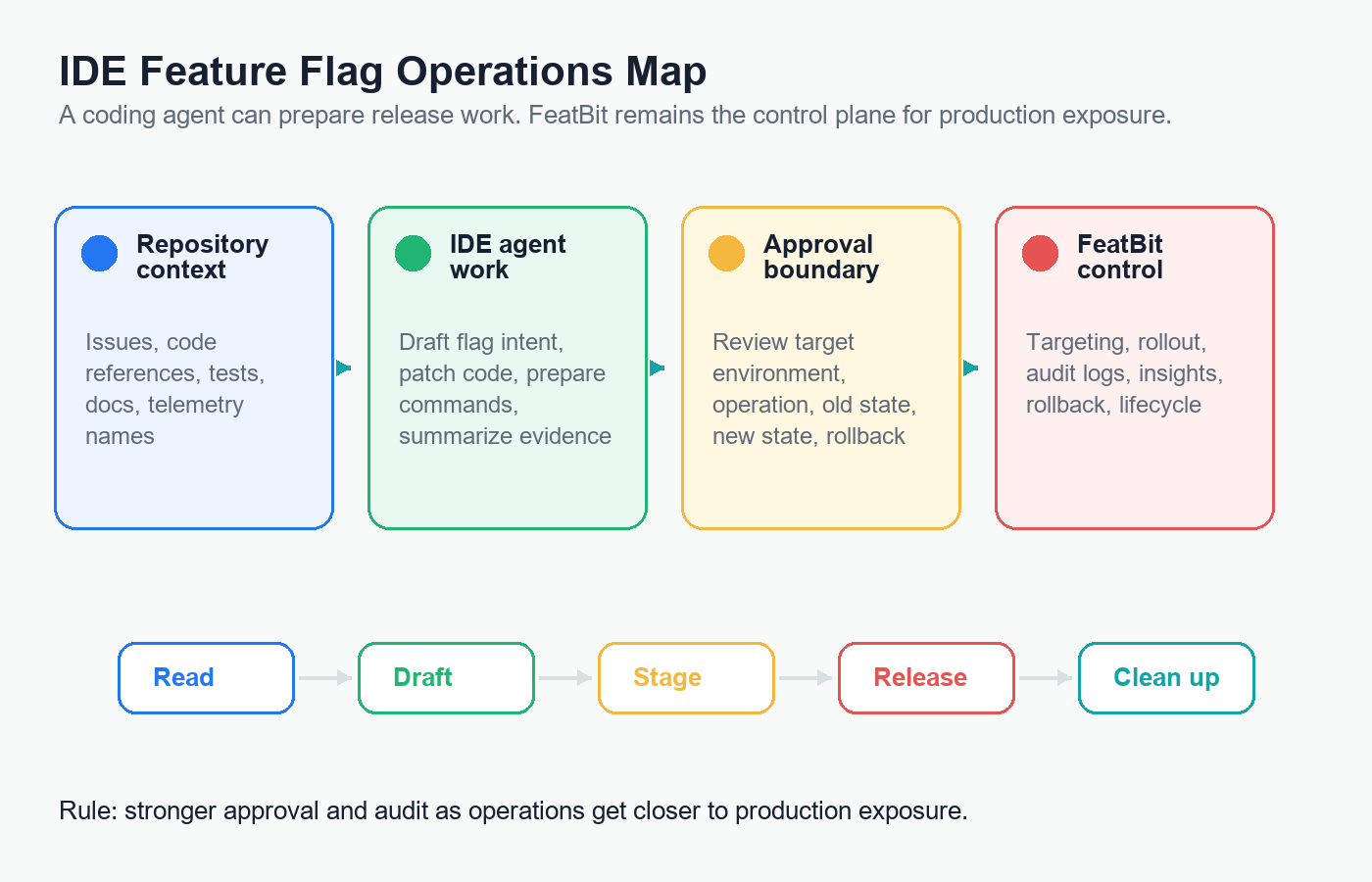
Feature flag operations in the IDE should make release work faster without turning the IDE into the production release authority. The useful pattern is simple: let the coding agent inspect context, draft flag intent, prepare code changes, generate safe commands, and summarize evidence. Keep flag state, targeting, rollout percentage, audit history, telemetry, rollback, and cleanup decisions in FeatBit.
That boundary matters because feature flag operations are production operations. Creating a disabled flag for a staging test is different from widening production exposure. Archiving a stale release flag is different from deleting a long-lived operational control. A good IDE workflow makes those differences explicit before an agent can act.
This article is vendor-neutral. For tool-specific walkthroughs, see FeatBit's guides to feature flag management with GitHub Copilot and feature flag management with Cursor. This playbook focuses on the operating model that should hold across VS Code, Cursor, JetBrains, Copilot, Windsurf, Claude Code, or any IDE-like agent surface.
The Reader Job Behind Feature Flag Operations in the IDE
Developers searching for "feature flag operations in IDE" usually want to know which flag tasks can move into their daily coding environment:
- Can the IDE agent find existing flags and code references?
- Can it create a new flag without switching to the flag dashboard?
- Can it draft a rollout or cleanup plan?
- Can it toggle staging or production?
- Can it use MCP, CLI, or API access without leaking secrets or bypassing approvals?
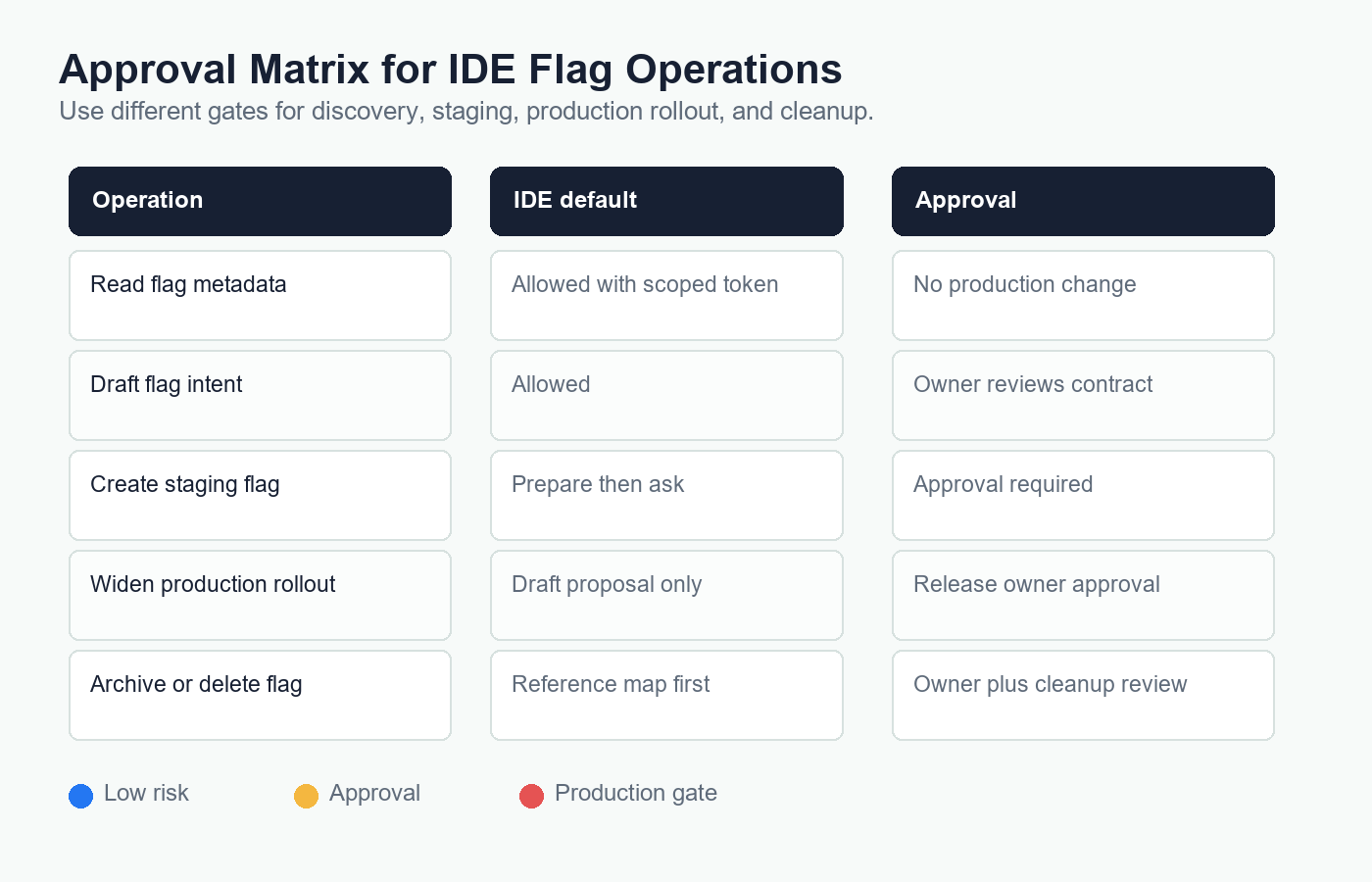
The answer is yes, but not with one universal permission. Treat IDE-based flag work as an operations ladder.
| Operation level | Good IDE agent role | Required release control |
|---|---|---|
| Read context | Search code, docs, existing flags, audit history, and rollout state. | Scoped read token and trusted MCP, CLI, or API configuration. |
| Draft intent | Propose key, type, fallback, owner, rollout stages, metrics, and cleanup condition. | Human review before creating or changing any flag. |
| Implement code | Add the smallest evaluated flag boundary and tests. | Repository rules, CI, code review, and explicit fallback behavior. |
| Prepare commands | Generate FeatBit MCP, CLI, or API operations for review. | Commands are shown before execution and tied to a target environment. |
| Non-production mutation | Create or update disabled flags in development or staging. | Approval, audit trail, and narrow credentials. |
| Production mutation | Change targeting, percentage rollout, variation, archive state, or kill switch. | Release-owner approval, evidence, rollback plan, and audit review. |
This ladder is the difference between "AI can manage feature flags" and "AI can assist feature flag operations safely."
Start With an Operations Contract
Before connecting an IDE to FeatBit, write down what the agent may do. Keep it short enough to enforce in code review and tool approval.
ide_flag_operations:
  default_access: read_only
  allowed_without_approval:
    - search repository flag references
    - read FeatBit project and flag metadata
    - summarize audit history
    - draft flag intent
    - prepare non-executed CLI or API commands
  approval_required:
    - create a flag in development or staging
    - update a rollout rule
    - toggle a flag
    - archive a flag
  production_approval_required:
    - create a production flag
    - widen production targeting
    - change a production variation
    - enable or disable a production kill switch
    - archive or delete a production flag
  never_allow_from_auto_run:
    - production rollout expansion
    - flag deletion
    - broad token creation
    - cleanup without code reference review
Put the contract where the IDE agent can read it: AGENTS.md, .cursor/rules, .github/copilot-instructions.md, workspace documentation, or an internal platform guide. The exact file depends on the tool. The important part is that the policy is durable context, not a one-off prompt.
For FeatBit projects, this aligns with feature flag lifecycle management: every flag should have a purpose, owner, evidence rule, release decision, and cleanup path. IDE operations should maintain that lifecycle record instead of scattering unmanaged toggles through code.
Use MCP, CLI, and API for Different Jobs
IDE agents can reach feature flag systems through several interfaces. Do not treat them as interchangeable.
| Interface | Best use inside an IDE | Main risk |
|---|---|---|
| MCP server | Natural-language discovery, flag lookup, guided operations, and context-aware workflows. | Tool calls can mutate production if credentials are too broad. |
| CLI | Repeatable commands in terminals, CI jobs, scripts, and reviewed runbooks. | Shell execution can hide target environment or token scope if not explicit. |
| REST API | Platform automation, internal portals, validation pipelines, and controlled service workflows. | Ad hoc API calls can bypass normal review unless wrapped in policy. |
FeatBit supports all three paths. The FeatBit MCP server lets AI coding agents manage feature flags through natural language while forwarding FeatBit API credentials with each request. The FeatBit CLI supports project lookup, flag listing, creation, toggling, archiving, rollout updates, audit-log lookup, and user evaluation. The FeatBit REST API guide is the foundation for custom workflows.
Use a simple selection rule:
- Use MCP when the agent needs context and a reviewable proposed action.
- Use CLI when the action should be repeatable in a terminal, runbook, or CI gate.
- Use REST API when building a controlled internal workflow with validation and policy checks.
In all three cases, the IDE should display the target organization, project, environment, flag key, operation, and expected state change before anything mutates FeatBit.
Configure IDE Tool Access as a Release Surface
Modern IDEs increasingly support MCP and agent tools. VS Code documentation describes MCP servers as a way to connect chat agents to external tools and services, including configuration through workspace or user mcp.json files. GitHub's Copilot documentation similarly describes MCP as an open standard for sharing context with LLMs and notes that organizations can govern MCP use through Copilot policy.
That means an IDE configuration file can become part of your release surface.
Use these controls before enabling write operations:
| Control | Why it matters |
|---|---|
| Workspace configuration review | A shared .vscode/mcp.json or similar file can affect everyone who opens the repo. |
| Environment-variable secrets | API keys should not be pasted into prompts, source files, screenshots, or MCP tool arguments. |
| Narrow tokens | Read-only discovery, staging mutation, and production rollout should not share one token. |
| Tool allowlists | The agent should only see tools needed for the current workflow. |
| Approval prompts | Tool calls that change flag state should require explicit review. |
| Audit trail | FeatBit should record who changed the flag and when. |
| Rollback command | Every production mutation should show the reverse operation before execution. |
The official Model Context Protocol security guidance emphasizes consent, least privilege, and clear tool boundaries. Treat feature flag tools with the same caution you would apply to deployment, database, or infrastructure tools. A flag operation can change live user experience even when no code is deployed.
A Safe Workflow for IDE-Based Flag Operations
Use this workflow when adding a new flagged change from an IDE.
1. Ask for a flag decision, not a flag creation
Start with the reader's job or issue:
Review this change and decide whether it needs a feature flag.
If yes, draft a flag intent with key, type, fallback, owner, environments,
first audience, rollout stages, exposure event, primary metric, guardrails,
rollback trigger, and cleanup condition.
Do not create or modify any flag yet.
The output should be a reviewable contract:
flag_intent:
  key: checkout_v2_release
  type: release
  variation_type: boolean
  fallback: false
  owner: payments-platform
  initial_production_state: disabled
  first_audience: internal staff
  rollout_stages:
    - staging only
    - internal staff
    - 5 percent canary
    - 25 percent after review
    - full rollout after release decision
  evidence:
    exposure_event: checkout_v2_exposed
    primary_metric: payment_completed
    guardrails:
      - checkout_error_rate
      - payment_failed
  rollback_trigger: checkout errors or payment failures exceed the agreed guardrail
  cleanup_condition: remove old checkout branch after full rollout and rollback window
If the agent cannot fill the owner, fallback, metric, or cleanup fields, the flag is not ready for creation.
2. Implement the smallest code boundary
Ask the IDE agent to keep flag evaluation boring:
Find the checkout entry point and propose the smallest code change that
passes an evaluated boolean flag into the checkout selection function.
Keep SDK evaluation outside pure business logic.
Add tests for fallback behavior.
Do not change FeatBit state.
The code should be easy to review and easy to remove later.
type CheckoutExperience = "classic" | "v2";

export function selectCheckoutExperience(
  isCheckoutV2Enabled: boolean
): CheckoutExperience {
  return isCheckoutV2Enabled ? "v2" : "classic";
}
The FeatBit-specific evaluation belongs at the application boundary for your stack. In this website, for example, feature flag rules say server components evaluate flags once per request and pass evaluated values to client components as props. Your IDE instructions should encode the same local rule for your repository.
3. Create or update non-production first
When the contract and code are reviewed, let the agent prepare a command or MCP action for the lowest useful environment.
Using the approved flag intent, prepare the FeatBit operation to create a
disabled boolean flag in staging. Show organization, project, environment,
flag key, fallback, tags, and description before calling any tool.
For production, change the prompt from "prepare the operation" to "prepare a rollout proposal." The release owner should approve the actual mutation.
4. Turn rollout into evidence, not a chat response
Before each expansion, ask the IDE agent to summarize evidence from code, FeatBit state, audit history, and telemetry.
Review checkout_v2_release before increasing production rollout from
internal staff to 5 percent. Summarize current FeatBit state, recent audit
changes, exposure volume, guardrail signals, rollback command, and evidence gaps.
Return go, wait, or rollback candidate. Do not update rollout.
FeatBit's targeting rules, percentage rollouts, flag insights, and audit logs are the product primitives behind that review.
5. Make cleanup part of the same IDE workflow
After the release decision, ask the IDE agent for a cleanup plan before it deletes anything:
The flag checkout_v2_release is fully released. Find all code references,
tests, telemetry references, docs, dashboards, and runbooks. Identify the
permanent behavior and draft a cleanup pull request plan. Do not delete code yet.
This connects IDE operations to AI feature flag code references. The agent can search broadly. The owner still decides the permanent path.
What Should Never Be Automatic
Some feature flag operations should stay out of unattended IDE automation:
- widening production rollout;
- changing a production fallback variation;
- changing experiment metrics after exposure begins;
- archiving a flag without code-reference review;
- deleting a flag before the permanent behavior is confirmed;
- reusing an old flag key for a new purpose;
- granting the IDE one broad token for every environment;
- treating MCP tool approval as a replacement for release ownership.
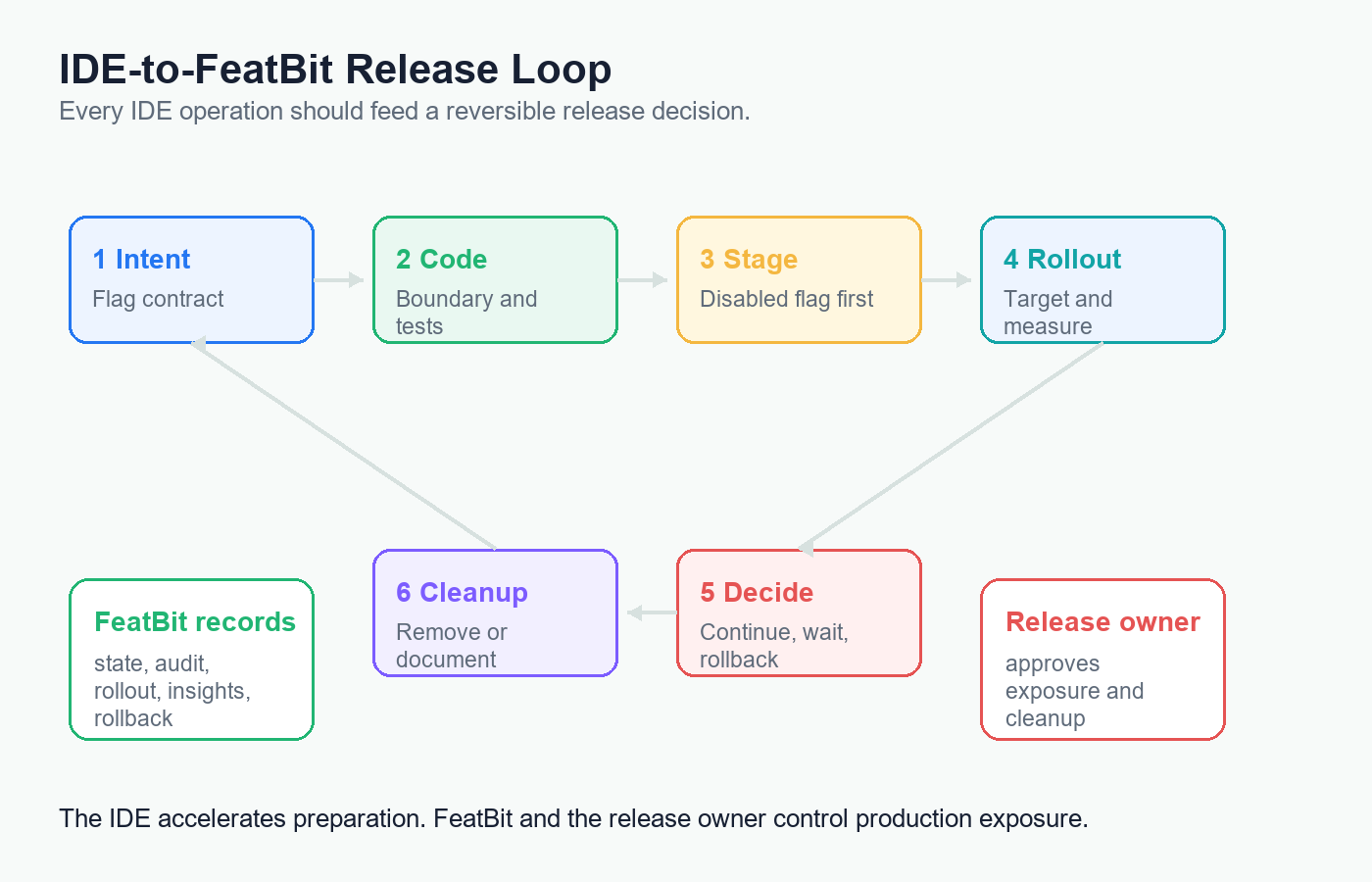
These actions are release decisions. The IDE can collect evidence, draft the operation, and show the rollback path. FeatBit and the release owner should control exposure.
FeatBit's Role in IDE-Native FeatureOps
FeatBit's point of view is that feature flags are release-decision infrastructure. Bringing operations into the IDE does not change that. It only changes where the developer starts the work.
Use the IDE agent for:
- repository search and code-reference maps;
- flag intent drafting;
- implementation changes and tests;
- MCP, CLI, or API command preparation;
- rollout evidence summaries;
- cleanup pull request planning.
Use FeatBit for:
- project and environment state;
- flag type, variation, fallback, and targeting rules;
- percentage rollout and segment targeting;
- audit logs and release history;
- insights, exposure data, and integration events;
- rollback without redeploying;
- lifecycle ownership and cleanup decisions.
That separation is also what makes the workflow portable. A team can use GitHub Copilot in VS Code, Cursor rules, a terminal-based coding agent, or a custom internal IDE extension. The release-control model stays the same.
Common Mistakes
Starting with tool access instead of a policy. If the team has not defined what the IDE may read, draft, stage, or mutate, the first MCP integration will become an accidental permission model.
Using one credential for every environment. Production rollout authority should be separate from read-only discovery and staging creation.
Creating flags without lifecycle fields. A flag created from the IDE still needs owner, type, fallback, metric, rollout stage, rollback trigger, and cleanup condition.
Letting code generation define release behavior. The agent can write an if statement. It should not decide who sees the new path.
Skipping audit review. If a tool changed a flag, the release owner should be able to reconstruct the tool, user, environment, old state, new state, and reason.
Treating cleanup as a string search. Cleanup needs code references, tests, telemetry, docs, dashboards, and a confirmed permanent behavior.
A Starting Checklist
Before enabling feature flag operations in an IDE, verify:
- The repository has durable agent instructions for feature flags.
- FeatBit access is scoped by environment and operation.
- Read-only discovery works before write access is granted.
- The IDE can show the exact FeatBit operation before execution.
- Production mutations require explicit release-owner approval.
- Every production mutation includes a rollback path.
- Audit logs are reviewed for tool-driven changes.
- The rollout workflow includes exposure, success, and guardrail evidence.
- Cleanup prompts require code-reference review before deletion.
- Permanent operational flags are documented as permanent, not stale.
Feature flag operations in the IDE should reduce context switching, not accountability. The safe version lets agents do the mechanical work around release control while FeatBit remains the system that records, governs, measures, and reverses production exposure.
Source Notes
- IDE and MCP context: Microsoft VS Code documentation on adding and managing MCP servers and GitHub documentation on extending Copilot Chat with MCP servers.
- Protocol safety context: the Model Context Protocol security best practices.
- FeatBit implementation context: FeatBit MCP, FeatBit CLI, FeatBit REST API, targeting rules, percentage rollouts, audit logs, and flag insights.
- Related FeatBit reading: AI-assisted flag management, feature flag management with GitHub Copilot, feature flag management with Cursor, AI feature flag code references, and feature flag lifecycle management.
Image And Open Graph Notes
- Use
/images/blogs/feature-flag-operations-in-ide/cover.pngas the Open Graph image because it summarizes IDE agent work feeding into FeatBit release control. - Use
/images/blogs/feature-flag-operations-in-ide/ide-operations-map.pngnear the opening because it shows the main boundary between IDE assistance and FeatBit authority. - Use
/images/blogs/feature-flag-operations-in-ide/approval-matrix.pngnear the tool-access section because it clarifies which operations need approval. - Use
/images/blogs/feature-flag-operations-in-ide/ide-release-loop.pngnear the workflow section because it turns the article's operating model into a release loop.