
Feature Flag Management with Cursor: A Practical Workflow for Release Control
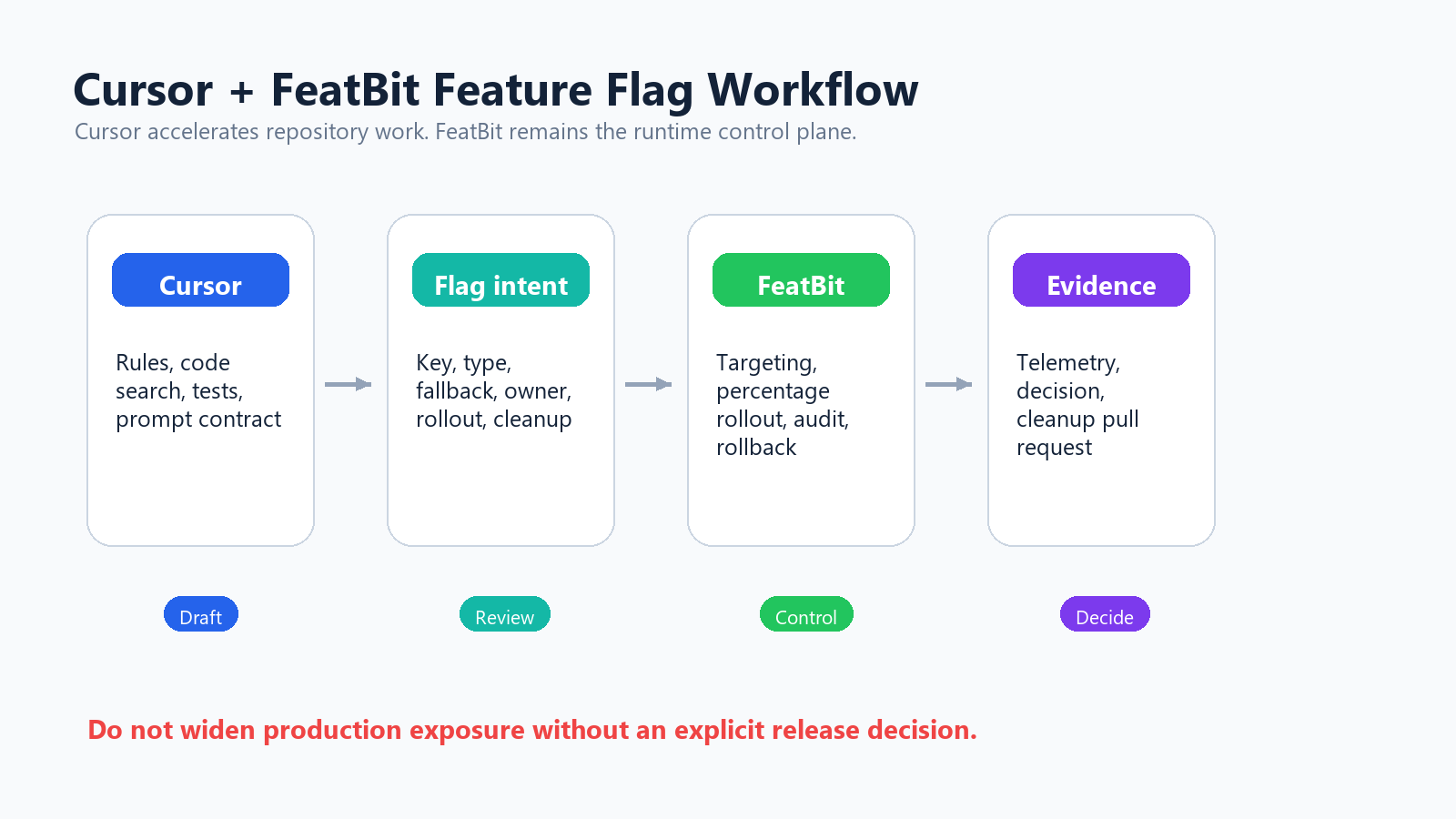
Feature flag management with Cursor works best when Cursor is the drafting and execution assistant, not the production release authority. Let Cursor read the repository, follow project rules, propose flag intent, draft code changes, call approved MCP tools, and prepare cleanup plans. Keep feature flag state, targeting, rollout percentage, audit history, telemetry, and rollback decisions in a control plane such as FeatBit.
That boundary is the difference between useful AI-assisted delivery and unsafe chat-driven release management. Cursor can reduce the manual work around flags, but a flag still changes who sees production behavior.
The Reader Job Behind This Query
Someone searching for "feature flag management with Cursor" is usually trying to answer a practical question:
Can Cursor help me create, modify, roll out, and clean up feature flags without losing control of production?
The answer is yes, if the workflow separates four responsibilities:
| Responsibility | Cursor should help with | FeatBit should remain responsible for |
|---|---|---|
| Repository understanding | Find code paths, wrappers, tests, docs, and telemetry references. | Store runtime flag state and environment configuration. |
| Flag design | Draft key, type, fallback, owner, rollout plan, metric events, and cleanup rule. | Enforce targeting, percentage rollout, audit log, and environment-level control. |
| Implementation | Insert small reviewable SDK calls and tests. | Serve evaluated variations through SDK, API, or OpenFeature provider patterns. |
| Release decision | Summarize evidence and prepare a recommended next step. | Record who changed the flag, who was exposed, and how rollback works. |
This makes the article distinct from a general AI-assisted flag management guide. The focus here is the Cursor operating model: rules, MCP configuration, approval boundaries, prompt contracts, and reviewable pull requests.
Start By Encoding Cursor Rules
Cursor's rules system gives Agent persistent project instructions. Its documentation describes project rules in .cursor/rules, team rules, user rules, and AGENTS.md as ways to put reusable guidance into the model context. For feature flags, use those instructions to make flag work reviewable before Cursor edits code or calls a tool.
A lightweight AGENTS.md section can be enough:
## Feature flag workflow

- Do not create, toggle, archive, or widen production feature flags unless the user explicitly asks.
- Before adding a flag, produce a flag intent with key, type, fallback, owner, environments, rollout plan, metrics, and cleanup condition.
- Keep SDK evaluation outside pure business logic when possible.
- Add tests for fallback behavior and both active branches.
- Prefer existing FeatBit wrappers and typed registries over new ad hoc SDK calls.
- After implementation, summarize code references and cleanup risk.
For larger teams, split this into .cursor/rules/feature-flags.mdc and scope it to application files that evaluate flags. Cursor's own guidance for rules emphasizes focused, actionable rules with concrete examples and referenced files rather than broad style guides. That is exactly what feature flag work needs: small repeatable constraints that stop vague prompts from becoming vague production controls.
Connect Cursor To FeatBit Through MCP Carefully
Cursor supports Model Context Protocol servers through mcp.json. Cursor's MCP documentation describes local stdio, SSE, and Streamable HTTP transports; project configuration in .cursor/mcp.json; global configuration in ~/.cursor/mcp.json; environment-variable interpolation; and approval for MCP tool calls by default.
FeatBit publishes a FeatBit MCP server that lets AI coding agents manage FeatBit feature flags through natural language. The repository documents a hosted endpoint and a local setup path for teams that need to point the server at a self-hosted FeatBit instance.
For Cursor, a minimal global configuration can look like this:
{
  "mcpServers": {
    "featbit": {
      "url": "https://mcp.featbit.co/mcp",
      "headers": {
        "Authorization": "${env:FEATBIT_API_KEY}",
        "Organization": "${env:FEATBIT_ORGANIZATION_ID}"
      }
    }
  }
}
Keep secrets in environment variables. Do not paste long-lived API keys into prompts, source files, or shared screenshots. For sensitive deployments, use a local MCP server against your own FeatBit API base URL and a token scoped to the project and environment the assistant actually needs.
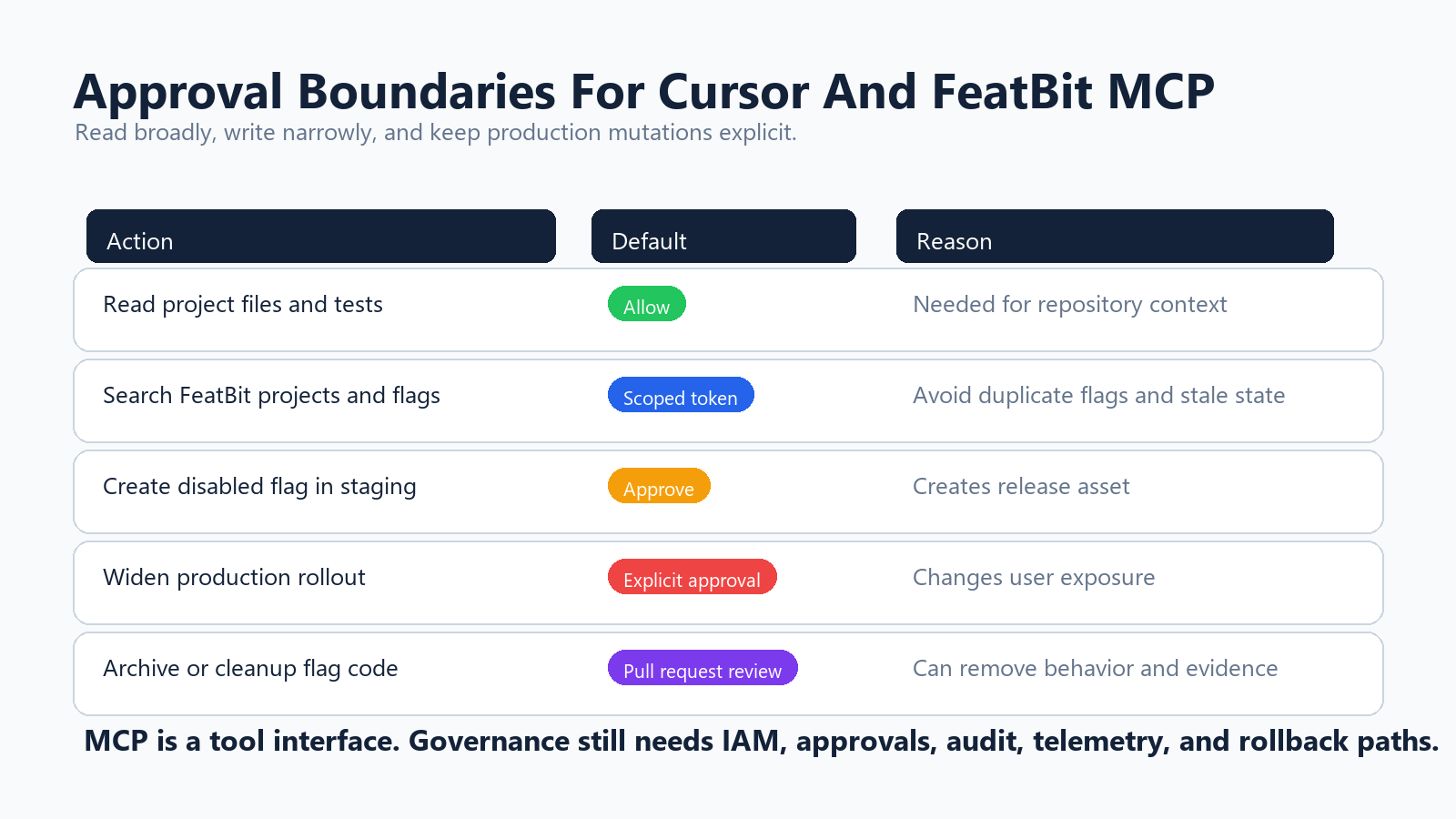
The FeatBit MCP repository documents tools for listing projects, reading flags, creating a disabled boolean flag, toggling, archiving, updating rollout assignments, reading audit logs, and evaluating flags for a given end user. That is powerful enough to affect production behavior, so the operating rule should be simple: read broadly, write narrowly, and require explicit approval before any production mutation.
Use A Flag Intent Before Cursor Creates Anything
The safest first prompt is not "add a feature flag." It is a request for a reviewed intent:
Review this change and decide whether it needs a feature flag.
If yes, draft a flag intent with key, type, fallback, owner, environments,
initial production state, rollout plan, metric events, rollback trigger,
and cleanup condition. Do not create or modify any flag yet.
A useful output should be structured enough for humans and tools:
flag_intent:
  key: checkout_v2_release
  type: release
  variation_type: boolean
  fallback: false
  owner: payments-platform
  environments:
    - development
    - staging
    - production
  initial_production_state: disabled
  first_target: internal staff and beta accounts
  rollout_plan:
    - internal segment
    - 5 percent
    - 25 percent
    - full rollout after review
  evidence:
    exposure_event: checkout_v2_exposed
    primary_metric: payment_completed
    guardrails:
      - checkout_error_rate
      - payment_failed
  cleanup_condition: remove old checkout path after full rollout and rollback window
This makes Cursor useful before it becomes operational. It can find missing fields, ask for owner clarification, identify telemetry gaps, and warn that the flag looks like an entitlement, experiment, release, or operational control.
If the intent is unclear, do not let Cursor proceed to implementation. A vague flag key becomes long-term release debt.
Keep The Code Change Small And Reviewable
Cursor can search the repository and propose the smallest insertion point. Keep the prompt narrow:
Find the checkout entry point and propose the smallest change that passes an
evaluated FeatBit boolean flag into the checkout selection function. Keep SDK
evaluation outside pure business logic. Include tests for fallback behavior.
Do not change production flag state.
The code should make evaluation and behavior separate:
type CheckoutExperience = "classic" | "v2";

export function selectCheckoutExperience(
  isCheckoutV2Enabled: boolean
): CheckoutExperience {
  return isCheckoutV2Enabled ? "v2" : "classic";
}
Then the framework boundary can evaluate once per request, job, session, or user context, depending on the application. That pattern keeps business logic testable and makes future cleanup easier.
For broader AI-assisted code review, use the same discipline described in AI feature flag code references: record the wrapper, fallback, evaluation location, exposure event, tests, owner, and cleanup condition. Cursor can draft that reference map, but the reviewer should confirm it before rollout.
Separate Flag Creation From Production Rollout
Creating a disabled flag is not the same as releasing a feature. Treat them as separate actions in Cursor.
For creation:
Using the approved flag intent, prepare a FeatBit MCP action to create a disabled
boolean flag in staging. Return the project, environment, key, name, description,
and tags before calling any tool.
For production rollout:
Read the current production flag state and audit history for checkout_v2_release.
Prepare a rollout proposal for the internal beta segment only. Include rollback
instructions and evidence gaps. Do not update rollout until I approve.
This matches Cursor's own security framing: AI agents can behave unexpectedly, and sensitive actions require guardrails and approval. Cursor's MCP docs also note that tool calls are approved by default and that teams can configure allowed tools. Do not make production flag writes part of a blanket auto-run setup.
Use this approval boundary:
| Cursor action | Good default |
|---|---|
| Read project files and tests | Allow |
| Search existing flags through FeatBit MCP | Allow with scoped credentials |
| Create a disabled flag in development or staging | Approval required |
| Toggle or widen production targeting | Explicit approval required |
| Archive a flag | Explicit approval plus code-reference review |
| Delete code guarded by a flag | Pull request review required |
This is not bureaucracy. It preserves the difference between a code assistant and a release manager.
Let Cursor Build The Rollout Checklist
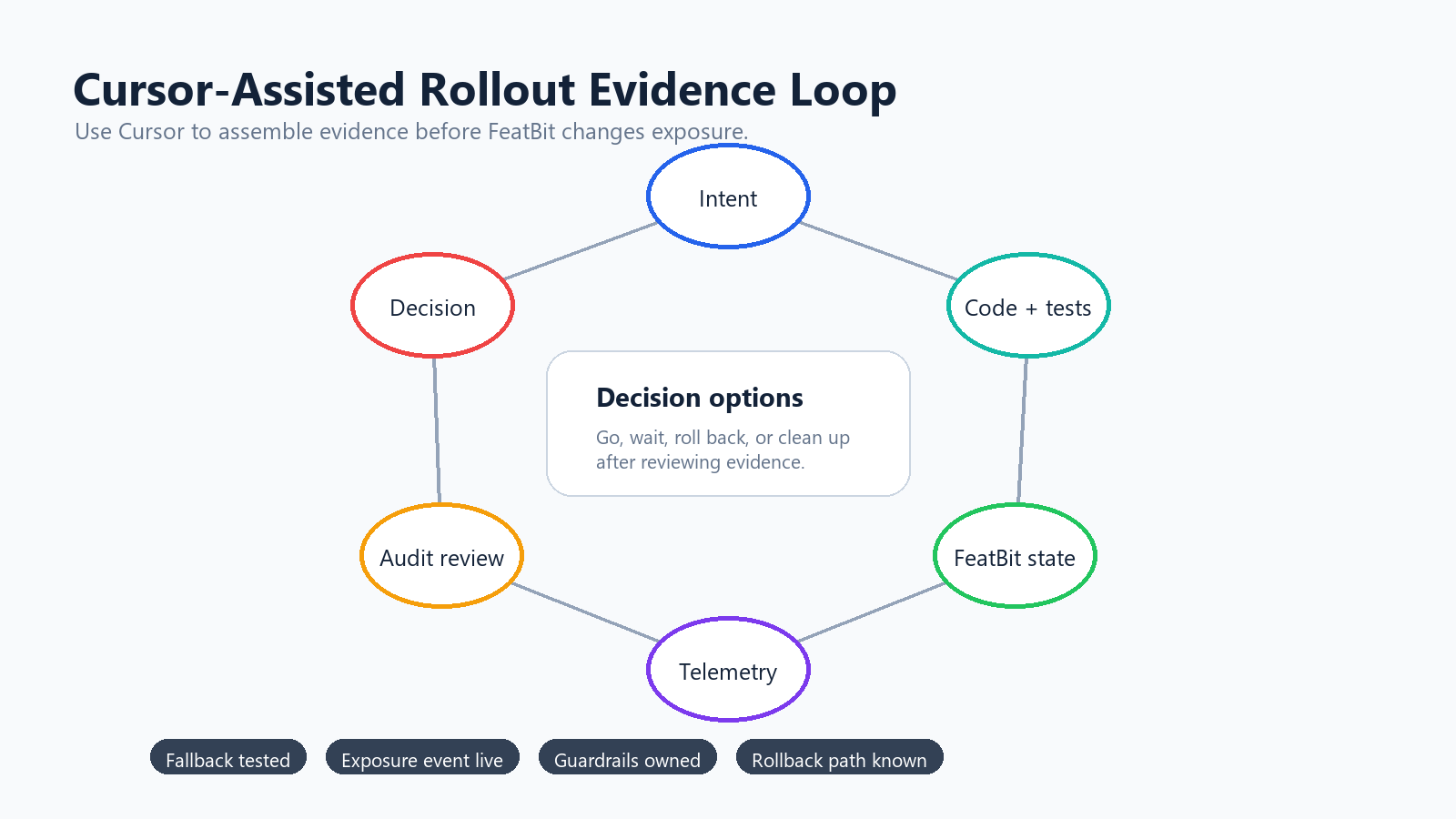
Cursor is especially useful before exposure increases. Ask it to compare the code diff, flag intent, tests, and FeatBit state:
Before increasing checkout_v2_release from internal beta to 5 percent,
review the code diff, tests, current FeatBit state, audit history, and metric plan.
Return a go, wait, or rollback recommendation with evidence gaps.
The checklist should include:
- the flag is disabled or narrowly targeted by default in production;
- the fallback path has been tested;
- the target segment is defined and understandable;
- exposure events and outcome metrics exist before rollout;
- guardrail signals have owners;
- support and incident owners know the rollback path;
- the cleanup condition is recorded before broad release.
FeatBit's targeting rules, percentage rollouts, flag insights, and audit logs are the product primitives behind this workflow. For the metric side, FeatBit's measurement design guidance helps separate the primary decision metric from guardrails that stop expansion.
Use Cursor For Cleanup While The Context Is Fresh
AI coding tools can increase the number of flags a team creates. Without lifecycle rules, that speed becomes stale flag debt.
Make cleanup part of the first prompt and the last pull request:
The flag checkout_v2_release is fully rolled out. Find all code references,
tests, telemetry references, docs, dashboards, and runbooks. Identify the
permanent behavior and draft a cleanup pull request plan. Do not delete code yet.
Cursor should return:
- every direct flag key reference;
- wrapper functions and aliases;
- tests that cover old and new branches;
- telemetry events and dashboards tied to the flag;
- documentation or runbook references;
- the permanent behavior to keep;
- risks that need owner review.
FeatBit's feature flag lifecycle management model is useful here because it treats a flag as a release asset with type, owner, evidence, decision, and cleanup expectations. The related FeatBit docs on cleaning up feature flags with coding agents give a practical next step for agent-assisted cleanup.
Common Mistakes In Cursor-Based Flag Management
Letting Cursor create flags without a lifecycle contract. A flag without owner, fallback, rollout plan, metric events, and cleanup condition is incomplete.
Giving one token every permission. Read-only discovery, staging creation, production rollout, and archive operations should not share the same level of access.
Treating MCP as governance. MCP is a tool interface. It does not replace IAM, approval policy, audit review, metric evidence, or rollback planning.
Putting the SDK call everywhere Cursor suggests. Prefer a wrapper or a small evaluation boundary. Raw scattered keys are harder to test and harder to remove.
Letting production rollout run in auto mode. Cursor's approval and run-mode features are useful, but production exposure changes deserve an explicit human decision.
Cleaning up by string search only. Cursor should search more than the raw key: wrappers, tests, telemetry, docs, dashboards, tickets, and runbooks can all be part of the release record.
A Practical Starting Workflow
Use this sequence for the first Cursor plus FeatBit pilot:
- Add
AGENTS.mdor.cursor/rules/feature-flags.mdcinstructions for feature flag work. - Configure FeatBit MCP with environment-variable secrets and the narrowest practical token.
- Start in read-only discovery or a non-production environment.
- Ask Cursor for a flag intent, not an immediate flag creation.
- Review the intent with the feature owner.
- Let Cursor implement the smallest guarded code path and tests.
- Create the flag disabled by default.
- Roll out through FeatBit targeting and percentage controls.
- Ask Cursor to prepare evidence summaries before each expansion.
- Use Cursor to draft cleanup after the release decision is complete.
This is the useful version of feature flag management with Cursor: faster repository work, stronger review notes, less manual cleanup, and no loss of production release discipline.
Source Notes
- Cursor context comes from official Cursor documentation on Agent, Rules, MCP, and Agent Security. This article uses those docs for the current Cursor concepts around rules, MCP configuration, tool approval, and agent capabilities.
- FeatBit implementation context comes from the FeatBit MCP repository, FeatBit REST API guide, targeting rules, percentage rollouts, audit logs, and feature flag lifecycle management.
- Protocol security context comes from the official Model Context Protocol security best practices. The article treats MCP as a tool integration layer, not a substitute for release governance.
- Related FeatBit reading: AI-assisted flag management, AI feature flag code references, AI control layer, and feature flag lifecycle management.
Image And Open Graph Notes
- Cover image:
/images/blogs/feature-flag-management-with-cursor/cover.pngis the social preview for this Cursor-specific workflow. - Body image:
/images/blogs/feature-flag-management-with-cursor/cursor-flag-workflow.pngshows the end-to-end path from Cursor context to FeatBit control, rollout evidence, and cleanup. - Body image:
/images/blogs/feature-flag-management-with-cursor/approval-boundaries.pngvisualizes which Cursor and MCP actions should require approval. - Body image:
/images/blogs/feature-flag-management-with-cursor/rollout-loop.pngsupports the rollout checklist and evidence loop.