
Feature Flags for Generative AI Applications: A Runtime Control Guide
Feature flags for generative AI applications should control the runtime decisions that change what users receive: the entry point, prompt profile, retrieval scope, model route, tool authority, guardrail mode, rollout audience, fallback path, and measurement contract. The flag is not a magic safety layer. It is the release-control point that lets a team expose a generative behavior gradually, observe what happened, and reverse the decision without redeploying the application.
That distinction matters because generative AI behavior changes in more places than normal application code. A small prompt edit, retrieval filter, model route, token budget, or agent tool mode can change quality, latency, cost, user trust, and operational risk. A useful flag design makes those changes targetable, measurable, reversible, and clean enough to remove after the release decision.
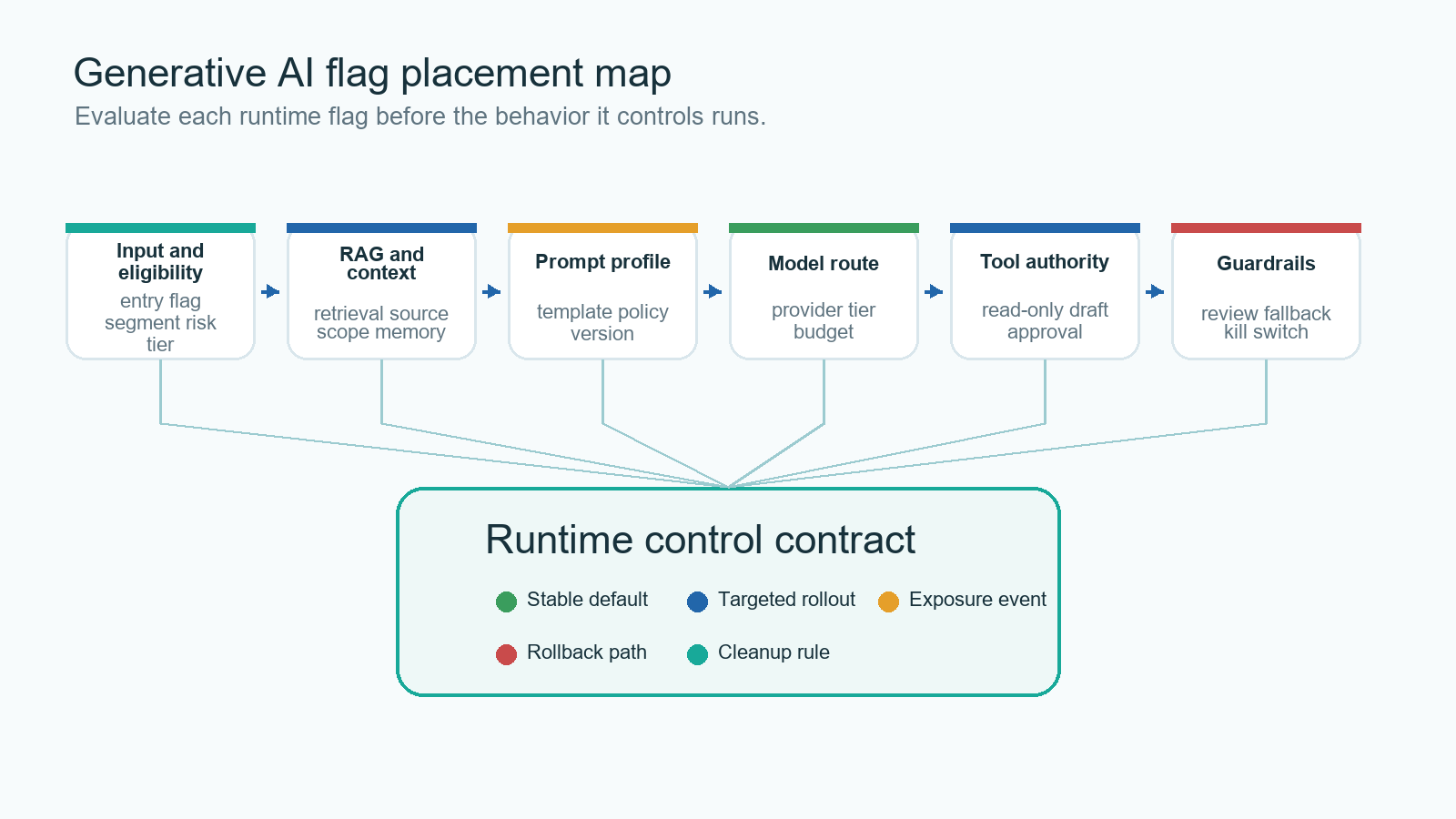
The Reader Job: Place Flags Where Generation Decisions Happen
The search phrase "feature flags for generative AI applications" is not only asking whether an AI feature can be put behind an on-off switch. The real job is architecture: where should runtime controls sit inside a generative application so the team can ship safely?
Start with the AI behavior boundary, not the dashboard. A support assistant, search assistant, code assistant, recommendation explainer, content generator, or agent workflow usually has several controllable surfaces:
| Generative AI surface | What a flag can control | Why it matters |
|---|---|---|
| Entry point | hidden, internal, beta, public | Controls who can start the AI experience. |
| Prompt profile | baseline, candidate, citation-first, conservative | Changes output style, instruction priority, and failure modes. |
| Retrieval profile | verified sources, expanded corpus, tenant-scoped memory | Changes grounding, data scope, latency, and answer quality. |
| Model route | stable route, candidate route, low-cost route, fallback route | Changes quality, cost, latency, and provider dependency. |
| Tool authority | disabled, read-only, draft-write, approval-required | Changes whether the system can cause side effects. |
| Guardrail mode | standard, strict, review-required, incident fallback | Changes blocking, escalation, fallback, and review behavior. |
| Experiment assignment | control, candidate, segment-specific variant | Keeps exposure stable while evidence is collected. |
| Kill switch | on, fallback-only, off | Reduces blast radius when a risky behavior is spreading. |
This is why one global ai_enabled flag is usually too coarse. It can be useful as an emergency switch, but it does not let the team roll back a bad retrieval profile while keeping a stable prompt, or move high-risk tool calls into approval mode while keeping read-only generation available.
FeatBit's AI control layer frames this as runtime control for AI decision points. This article narrows the idea to the implementation map a product or platform team can use inside a generative AI application.
Design A Flag Contract Before Creating Keys
A generative AI flag should describe the release decision, not only the flag name. The contract should answer four questions:
- What behavior surface does this flag control?
- Which context decides targeting and rollout?
- Which evidence will decide expansion, pause, or rollback?
- What happens to the flag after the decision is made?
A minimal contract might look like this:
flag: support-answer-route
owner: support-ai-platform
behavior_surface: answer_generation_route
assignment_unit: account_id
default_variation: stable
variations:
  stable:
    prompt_profile: support_v3
    retrieval_profile: verified_docs
    model_route: balanced
    tool_mode: read_only
  candidate:
    prompt_profile: support_v4_citation_first
    retrieval_profile: verified_docs_reranked
    model_route: candidate
    tool_mode: read_only
  fallback:
    prompt_profile: support_v3
    retrieval_profile: verified_docs
    model_route: stable_fast
    tool_mode: disabled
first_audience:
  environment: production
  segment: internal_support_users
guardrails:
  - answer_acceptance_rate
  - human_correction_rate
  - p95_latency
  - fallback_rate
  - cost_per_completed_task
rollback_action: serve_fallback_to_affected_accounts
cleanup_rule: promote_winner_or_remove_candidate_branch
The contract makes an important truth visible: this is not a pure prompt test if the candidate changes prompt, retrieval, and model route together. That may be the right product decision, but the release record should name it as an answer-route decision rather than pretending the result belongs to one isolated variable.
OpenFeature's flag evaluation specification is useful category context here because it describes typed flag evaluation with a flag key, default value, evaluation context, and optional detailed evaluation metadata. Those concepts map well to generative AI releases: the application needs a stable key, a safe default, a context object, and enough evaluation detail to connect runtime behavior to evidence.
Evaluate Flags Before The AI Path Runs
The flag must be evaluated before the behavior it controls can affect the user. That sounds obvious, but it is a common source of unreliable AI rollouts.
Evaluate before prompt assembly if the flag controls a prompt profile. Evaluate before retrieval if it controls source scope or memory. Evaluate before model routing if it controls provider, tier, budget, or fallback. Evaluate before tool execution if it controls agent authority. Evaluate before review escalation if it controls approval mode.
For most generative AI applications, that means server-side, edge-side, model-gateway, or tool-router evaluation. Browser-side evaluation can still control a visible UI entry point, but sensitive behavior such as retrieval scope, model routing, tool authority, and incident fallback should run in a trusted runtime.
type AnswerRoute = "stable" | "candidate" | "fallback" | "off";

type GenerationContext = {
  accountId: string;
  userId: string;
  region: string;
  workflow: "support_answer";
  riskTier: "standard" | "high";
};

async function answerSupportQuestion(question: string, context: GenerationContext) {
  const route = await flags.string<AnswerRoute>(
    "support-answer-route",
    {
      key: context.accountId,
      userId: context.userId,
      region: context.region,
      workflow: context.workflow,
      riskTier: context.riskTier
    },
    "fallback"
  );

  if (route === "off") {
    return handoffToHumanSupport(question);
  }

  const profile = answerProfiles[route] ?? answerProfiles.fallback;
  const response = await runGenerationPipeline(question, profile);

  await telemetry.track("support_answer_exposed", {
    flagKey: "support-answer-route",
    accountId: context.accountId,
    userId: context.userId,
    workflow: context.workflow,
    variation: route,
    promptProfile: profile.promptProfile,
    retrievalProfile: profile.retrievalProfile,
    modelRoute: profile.modelRoute
  });

  return response;
}
The exact SDK and telemetry calls depend on your stack. The operating rule is stable: evaluate once before the AI action, execute the selected behavior, and record exposure when the selected behavior actually runs.
For a narrower architecture discussion, see the FeatBit guide to server-side evaluation for AI feature flags. The same placement principle applies here, but generative AI applications often need more than one flag boundary.
Keep One Assignment Key Across Evaluation, Exposure, And Outcome
Generative AI products often have multi-step interactions. A user may trigger a generation, revise a prompt, read citations, accept a draft, ask a follow-up question, or escalate to a human reviewer. If assignment changes halfway through that chain, the evidence becomes hard to trust.
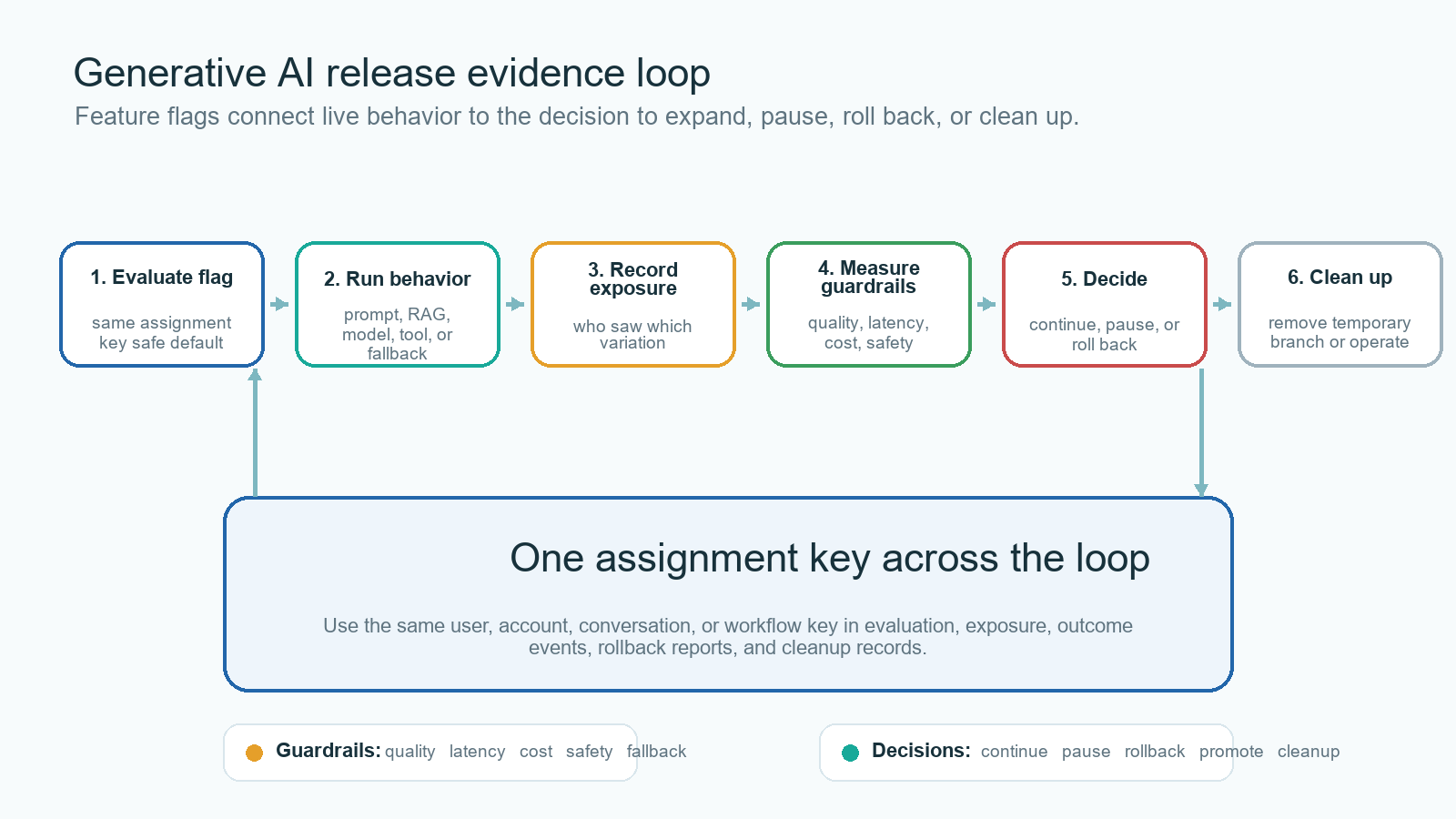
Choose the assignment unit that matches the decision:
| Decision type | Common assignment unit | Why |
|---|---|---|
| User-facing AI feature access | user or account | Access should remain stable during the rollout. |
| Support answer behavior | account or conversation | Multi-turn context should not switch routes unexpectedly. |
| Enterprise retrieval policy | account, tenant, or region | Data scope and governance usually follow account boundaries. |
| Agent tool authority | workflow, agent identity, or risk tier | The decision depends on task authority and side-effect risk. |
| Prompt or model experiment | user, account, conversation, or session | The unit should match the outcome metric and avoid contamination. |
Then use the same key in flag evaluation, exposure events, outcome events, guardrail dashboards, rollback reports, and cleanup notes. If the flag evaluates by request but outcomes are measured by conversation, a model or prompt can appear better or worse because the evidence join is inconsistent.
Use Flags With Evals, Guardrails, And Hard Boundaries
Feature flags do not replace model evaluation, security controls, content filters, observability, or human review. They make approved behavior controllable in production.
NIST's AI Risk Management Framework is useful background because it treats AI risk management as work that spans design, development, use, and evaluation. For release teams, the practical translation is that control must remain active after deployment, not only during prelaunch review.
OWASP's guidance for large language model applications also names risk areas such as prompt injection, sensitive information disclosure, and excessive agency. A feature flag does not solve those risks by itself. It can limit exposure, route high-risk segments to stricter behavior, require approval for tool use, or roll back a candidate route while the underlying issue is fixed.
Use feature flags for:
- targeted rollout by user, account, region, workflow, risk tier, or percentage;
- prompt, retrieval, model, guardrail, and tool-policy variants;
- live experiments and staged expansion;
- fallback and rollback;
- auditability of release-control changes;
- cleanup after temporary release branches.
Use hard controls for:
- identity, authentication, authorization, and scoped credentials;
- data access boundaries and tenant isolation;
- sandboxing and approval for side-effecting tools;
- provider secret management;
- legal, privacy, or domain expert review where required.
The boundary is simple: flags decide which approved behavior is active for a context. They should not be the only thing preventing an unauthorized system from reaching data, tools, or irreversible actions.
A Practical Rollout Pattern For Generative AI Applications
A safe rollout path should answer a different question at each stage.
| Stage | Audience | Release question | Exit signal |
|---|---|---|---|
| Offline and replay | fixed examples, historical requests, test accounts | Is the candidate eligible for live exposure? | No known blocker, fallback exists, telemetry schema is ready. |
| Internal | employees or internal test accounts | Does the behavior work in production paths? | No severe quality, latency, cost, or guardrail failures. |
| Beta segment | selected accounts, workflows, or regions | Does the behavior help real users without unacceptable guardrail movement? | Primary metric and guardrails meet the release rule. |
| Canary | small eligible traffic percentage | Does the behavior remain healthy under real load? | Stable exposure events, acceptable p95 latency, cost, quality, and fallback rate. |
| Experiment or expansion | larger split or progressive rollout | Should the candidate become the default? | Continue, pause, rollback candidate, or inconclusive decision is recorded. |
| Default and cleanup | broad audience | Is the release decision complete? | Old branch removed or intentionally converted into an operational control. |
FeatBit supports this operating model with targeting rules, percentage rollouts, flag insights, audit logs, and the Track Insights API. For the broader release pattern, FeatBit's safe AI deployment page covers internal targeting, canary exposure, metric gates, full release, and rollback.
What FeatBit Adds To The Workflow
FeatBit's point of view is that feature flags are release-decision infrastructure. For generative AI applications, that means a flag is not only a code switch. It is a runtime control for a production decision that should have an owner, audience, evidence trail, rollback path, and cleanup condition.
In practice, FeatBit helps teams:
- target AI behavior by user, account, segment, environment, region, or rollout percentage;
- use boolean, string, number, or JSON variations for more than on-off AI switches;
- keep a stable fallback variation available while a prompt, retrieval profile, model route, or tool mode is under evaluation;
- record which users received which variation and connect that to product, quality, cost, latency, and guardrail metrics;
- audit flag changes and release decisions;
- manage flag lifecycle so temporary AI release controls do not become stale product logic.
For private deployment, FeatBit's self-hosted feature flag platform is relevant when AI targeting data, release telemetry, and governance evidence need to stay under the team's infrastructure control.
Common Mistakes
Using one flag for the whole AI system. A global switch is too blunt for normal release work. Separate entry point, prompt profile, retrieval profile, model route, tool authority, guardrail mode, fallback, and experiment assignment when they carry different risks.
Evaluating after generation. If the model, retrieval query, or tool call already ran, the flag cannot prevent exposure. Evaluate at the decision boundary.
Tracking eligibility instead of exposure. A user who was eligible for a candidate did not necessarily receive it. Track exposure when the controlled behavior actually runs.
Changing too many variables without naming the bundle. Bundled changes can be valid when the product decision is about the full route. Name the route honestly so the release record does not overclaim causality.
Treating flags as security permissions. A flag can narrow active behavior for an approved context. It should not replace IAM, scoped credentials, tenant isolation, or tool authorization.
Keeping temporary AI flags forever. Prompt, model, retrieval, and experiment flags accumulate quickly. Promote the winner, remove the loser, or document the flag as a permanent operational control.
Starting Checklist
Before adding feature flags to a generative AI application, confirm:
- Each flag maps to one named behavior surface or one honestly bundled route.
- The fallback value is safe if evaluation fails.
- Evaluation happens before the prompt, retrieval, model, tool, guardrail, or fallback decision runs.
- The assignment key matches the release decision and outcome metric.
- Exposure events are emitted only when the AI behavior actually executes.
- Primary metric and guardrails are defined before traffic expands.
- Rollback can return affected users to the stable route without redeployment.
- Security and authorization boundaries remain outside the flag.
- Audit records can reconstruct who changed the control and which audience changed.
- Temporary release flags have cleanup criteria.
The bottom line: feature flags for generative AI applications make AI behavior changes operable. They let teams ship prompts, RAG paths, model routes, tool authority, and guardrail modes as controlled release decisions instead of one-way production bets.
Source Notes
- OpenFeature's flag evaluation specification and evaluation context specification support the article's discussion of typed evaluation, defaults, context, and metadata.
- NIST's AI Risk Management Framework is used as voluntary risk-management context, not as a certification or compliance claim.
- OWASP's Top 10 for Large Language Model Applications is used as risk context for why runtime containment should sit beside hard security controls.
- FeatBit implementation references: targeting rules, percentage rollouts, flag insights, audit logs, Track Insights API, server-side evaluation for AI feature flags, AI control layer, and safe AI deployment.
Image And Open Graph Notes
- Use
/images/blogs/feature-flags-for-generative-ai-applications/cover.pngas the Open Graph image. - Use
generation-control-map.pngnear the opening because it identifies where flags sit inside the generative AI runtime path. - Use
release-evidence-loop.pngin the evidence section because it shows how evaluation, exposure, metrics, rollback, and cleanup share one assignment key.