
Generative AI App Feature Flags: A Starter Kit for Runtime Control
Generative AI app feature flags are the runtime controls that decide which approved AI behavior is active for a user, account, workflow, or rollout stage. In a real application, that usually means more than one ai_enabled switch. A useful starter kit gives the team separate controls for the entry point, prompt profile, model route, retrieval scope, tool access, guardrail mode, fallback behavior, experiment assignment, and cleanup.
This article is for teams building or operating a generative AI app and asking, "Which flags should we create first?" The answer is not a long list of toggles. Start with a small catalog of release decisions, give every flag an owner and fallback, evaluate the flag before the AI behavior runs, and connect the evaluated variation to telemetry so rollout and rollback decisions are based on evidence.
Start With The App Decisions That Can Change User Outcomes
A generative AI app can change behavior through many surfaces that are invisible to the user interface. A support assistant may keep the same chat box while changing its prompt, retrieval source, model route, guardrail policy, or tool authority. A document workflow may keep the same button while changing whether the AI drafts, suggests, escalates, or acts.
Create a feature flag when a decision needs at least one of these capabilities:
- targeted exposure by user, account, environment, region, workflow, plan, or risk tier;
- staged rollout from internal users to beta users, canary traffic, and broader release;
- fast rollback without redeploying the application;
- measurement that joins the served AI behavior to quality, latency, cost, safety, and business outcomes;
- auditability for who changed the active behavior and which audience was affected;
- lifecycle cleanup after the release decision is complete.
Do not create a flag for every possible AI parameter. The starter kit should make operations clearer, not turn production into a loose settings panel.
For a broader placement guide, see feature flags for generative AI applications. This article narrows the job to the first flag catalog a team can put into a generative AI app.
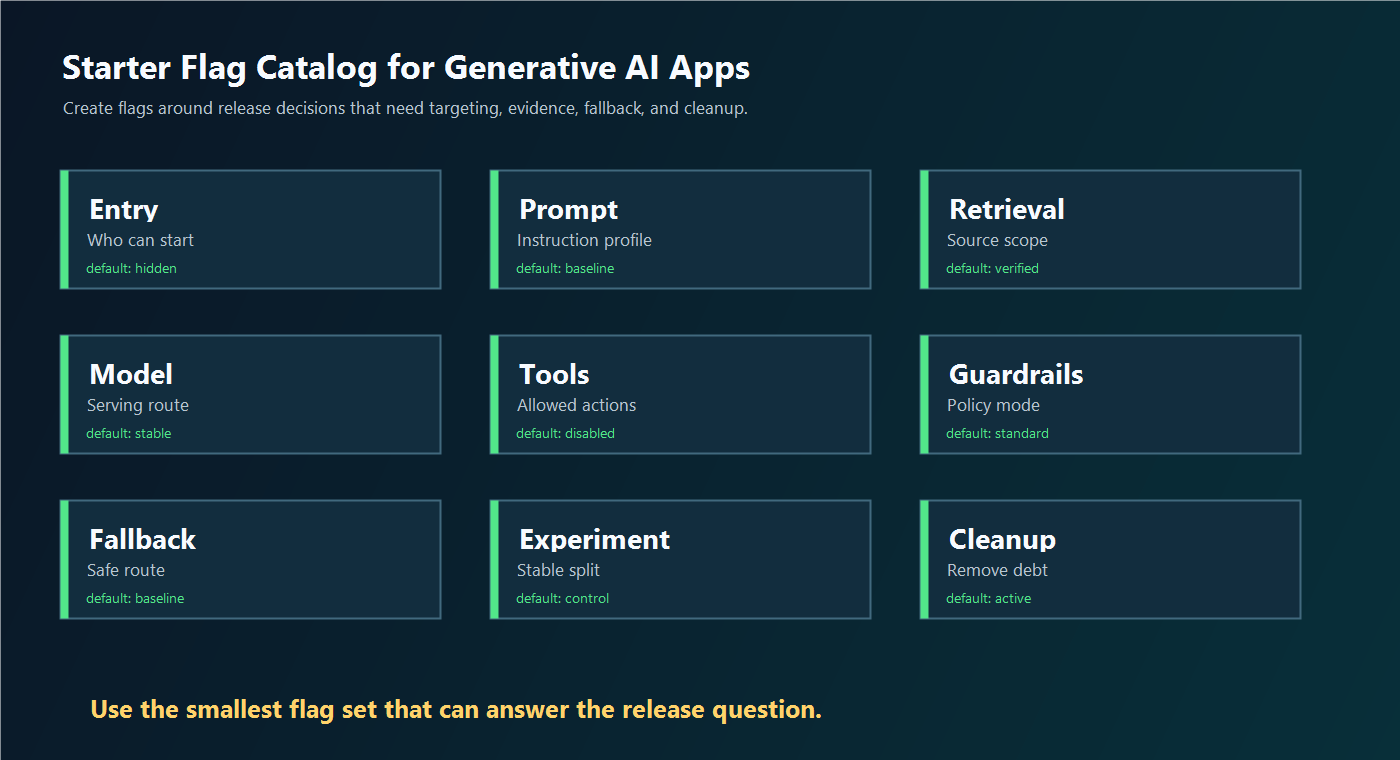
The Starter Flag Catalog
Use this catalog as a default starting point. Keep the flag count small until the team has a reason to split a control into a more specific release decision.
| Flag | What It Controls | Typical Variations | Safe Default |
|---|---|---|---|
| Entry point | Whether the AI feature is reachable | hidden, internal, beta, public |
hidden |
| Prompt profile | Which instruction set or response style runs | baseline, candidate, citation_first |
baseline |
| Model route | Which model, provider, tier, or reasoning profile serves the request | stable, candidate, low_cost, fallback |
stable |
| Retrieval profile | Which sources, index, memory, or region-specific corpus is available | verified_docs, tenant_scoped, expanded |
verified_docs |
| Tool mode | What side effects the app or agent can attempt | disabled, read_only, draft, approval_required |
disabled |
| Guardrail mode | Which review, blocking, escalation, or policy behavior applies | standard, strict, review_required, incident |
strict or standard |
| Fallback route | What users receive when the AI path fails or risk rises | baseline, cached, human_queue, off |
baseline |
| Experiment route | Stable assignment for a live comparison | control, candidate_a, candidate_b |
control |
| Cleanup state | Whether the flag is temporary, permanent, or ready for removal | active, decision_pending, cleanup_ready |
active |
The catalog is intentionally practical. It separates user-visible access from behavior inside the AI path. That matters because a bad prompt should not force you to disable the entire app, and a risky tool mode should not block a safe read-only answer.
FeatBit's AI control layer frames each of these as a runtime decision point. FeatBit's multivariate flag documentation is relevant because boolean flags are not enough for prompt profiles, model routes, guardrail modes, and structured fallback decisions.
Turn Each Flag Into A Release Contract
A generative AI app flag needs a release contract. The contract should be short enough to review, but explicit enough that product, engineering, security, support, and operations know what the flag owns.
flag: support_answer_route
owner: support-ai-platform
surface: generated_support_answer
assignment_unit: account_id
variations:
  control:
    prompt_profile: support_v3
    model_route: stable
    retrieval_profile: verified_docs
    tool_mode: read_only
  candidate:
    prompt_profile: support_v4_citation_first
    model_route: candidate
    retrieval_profile: verified_docs_reranked
    tool_mode: read_only
  fallback:
    prompt_profile: support_v3
    model_route: stable_fast
    retrieval_profile: verified_docs
    tool_mode: disabled
first_audience: internal_support_users
guardrails:
  - answer_acceptance_rate
  - human_correction_rate
  - p95_latency
  - fallback_rate
  - cost_per_completed_task
rollback: serve_fallback_to_affected_accounts
cleanup: promote_winner_or_remove_candidate_branch
This contract avoids a common mistake: pretending one flag changes only one variable when it actually changes a route. If the candidate variation changes prompt, retrieval, and model together, call it an answer-route decision. If the team needs to learn which part caused the result, split the release into smaller experiments.
Evaluate Before The AI Behavior Runs
The flag must resolve before the application assembles a prompt, queries retrieval, selects a model, invokes a tool, or decides whether to fall back. If the evaluation happens after the AI call, the flag cannot control cost, latency, data scope, tool authority, or user-visible behavior.
OpenFeature's specification is useful neutral context because it defines typed flag evaluation for boolean, numeric, string, and structure values, with a flag key, default value, evaluation context, and optional evaluation options. Its evaluation-context model also explains how contextual data can support targeting and fractional rollout.
For generative AI apps, common evaluation context fields include:
| Context Field | Why It Matters |
|---|---|
userId |
Stable user assignment and user-level targeting. |
accountId |
Account-level rollout, rollback, and enterprise beta control. |
environment |
Separation between development, staging, and production. |
region |
Regional rollout, data boundary, or latency control. |
workflow |
Different behavior for support answer, document draft, search answer, or agent action. |
riskTier |
Stricter controls for high-impact workflows. |
conversationId |
Stable assignment across a multi-turn interaction when the decision is conversation-scoped. |
type AiRoute = "control" | "candidate" | "fallback" | "off";

type AiContext = {
  userId: string;
  accountId: string;
  environment: "production" | "staging";
  region: string;
  workflow: "support_answer";
  riskTier: "standard" | "high";
};

async function answerSupportQuestion(question: string, context: AiContext) {
  const route = await flags.string<AiRoute>(
    "support_answer_route",
    {
      key: context.accountId,
      userId: context.userId,
      accountId: context.accountId,
      environment: context.environment,
      region: context.region,
      workflow: context.workflow,
      riskTier: context.riskTier,
    },
    "fallback"
  );

  if (route === "off") {
    return handoffToHumanSupport(question);
  }

  const profile = supportAnswerProfiles[route] ?? supportAnswerProfiles.fallback;
  const response = await runGenerationPipeline(question, profile);

  await telemetry.track("support_answer_exposed", {
    flagKey: "support_answer_route",
    variation: route,
    accountId: context.accountId,
    workflow: context.workflow,
    promptProfile: profile.promptProfile,
    modelRoute: profile.modelRoute,
    retrievalProfile: profile.retrievalProfile,
  });

  return response;
}
The code shape will vary by SDK and architecture. The operating rule should not vary: evaluate before the AI behavior runs, use a safe default, execute the selected route, and record exposure when that route actually affects the user.
For a deeper placement discussion, use the FeatBit guide to server-side evaluation for AI feature flags.
Connect The Catalog To Rollout Evidence
Feature flags become useful for generative AI apps when exposure and outcome evidence use the same assignment unit. If the flag evaluates by request but the outcome is measured by conversation, a candidate prompt can look better or worse because users switch routes halfway through the task.
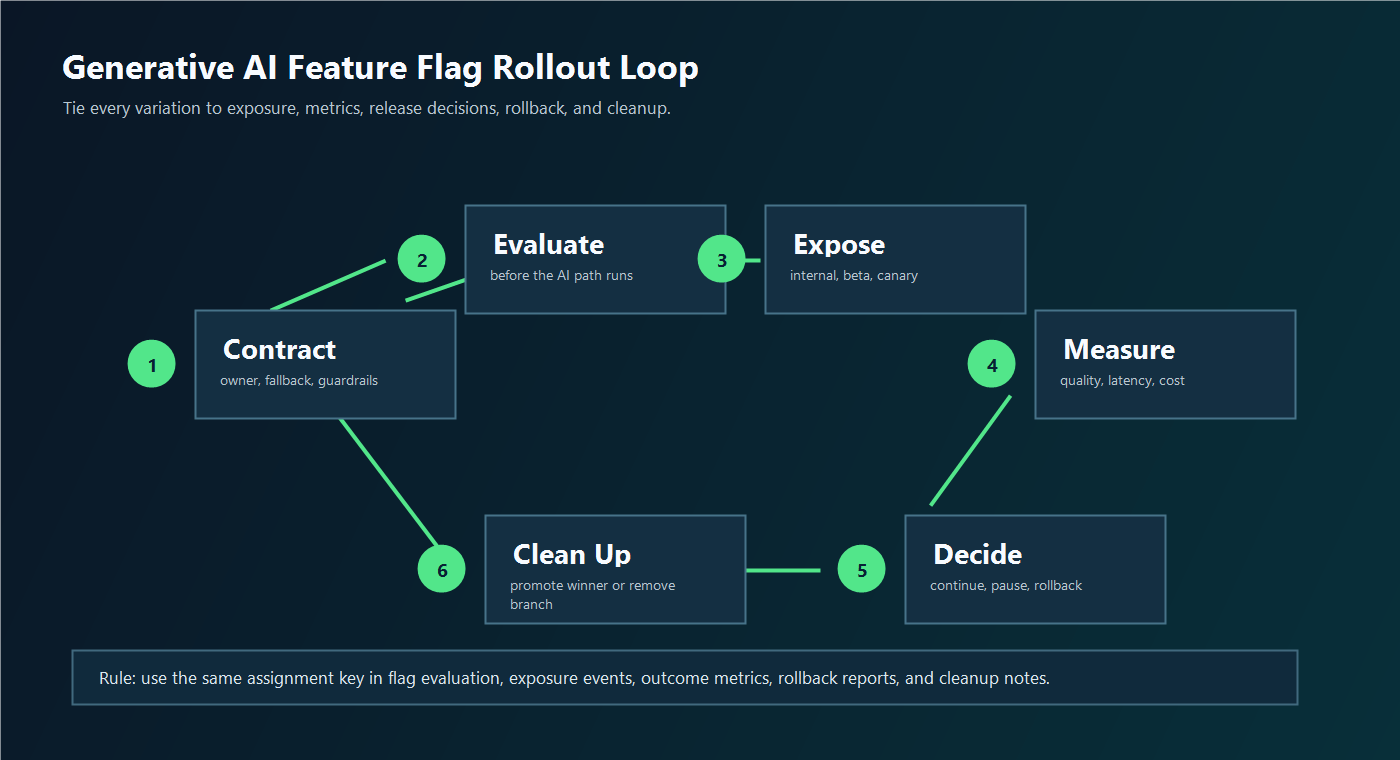
Use the same join keys across:
- flag evaluation;
- exposure events;
- generated behavior metadata, such as prompt profile, model route, retrieval profile, and tool mode;
- outcome events, such as accepted answer, edit distance, conversion, escalation, correction, or completion;
- guardrails, such as p95 latency, fallback rate, unsafe output report, error rate, and cost per completed task;
- release decisions, such as continue, pause, rollback candidate, inconclusive, or cleanup.
FeatBit implementation references include targeting rules, percentage rollouts, flag insights, audit logs, and the Track Insights API.
A Safe Rollout Sequence For The Starter Kit
Use a small ladder before broad release.
| Stage | Audience | What To Prove | Typical Action |
|---|---|---|---|
| Local and replay | Fixtures, historical requests, test accounts | The route is eligible for live traffic and has a fallback. | Keep candidate off for real users. |
| Internal | Employees or internal accounts | Prompt, retrieval, model, and telemetry work in production paths. | Fix blockers before beta. |
| Beta segment | Selected accounts, workflows, or regions | The behavior helps real users without unacceptable guardrail movement. | Expand, pause, or adjust route. |
| Canary | Small eligible traffic percentage | Quality, latency, cost, and fallback remain healthy under load. | Continue or roll back candidate. |
| Experiment or expansion | Larger split or staged rollout | The candidate is better enough to become default. | Record release decision. |
| Default and cleanup | Broad audience | Temporary flags and branches are no longer needed. | Promote winner or remove dead paths. |
This sequence keeps the decision reversible. It also prevents a common pattern where the team ships an AI feature behind a flag, expands it, and then leaves the prompt branch, model route, and rollout flag in code forever.
FeatBit's feature flag lifecycle management guidance is relevant here because generative AI app flags can become release debt quickly. The flag should preserve intent, owner, evidence, decision, and cleanup condition.
What Feature Flags Should Not Replace
Feature flags are runtime release controls. They should not be treated as the security boundary for a generative AI app.
Use feature flags for:
- controlling which approved AI behavior is active for a context;
- staged exposure and rollback;
- fallback and incident modes;
- experiment assignment and evidence;
- auditability of release-control changes;
- lifecycle cleanup after the decision.
Use hard controls for:
- identity, authorization, tenant isolation, and scoped credentials;
- provider secret management;
- data access boundaries and retrieval permissions;
- sandboxing for tool use or code execution;
- model evaluation, red teaming, content filtering, and output validation;
- privacy, legal, security, or domain expert review where required.
OWASP's Top 10 for LLM and generative AI applications lists risk areas such as prompt injection, sensitive information disclosure, excessive agency, vector and embedding weaknesses, misinformation, and unbounded consumption. A feature flag does not solve those risks by itself. It can limit exposure, reduce authority, activate fallback, and pause expansion while the underlying control is fixed.
NIST's AI Risk Management Framework is also useful background because it frames AI risk management as work across design, development, use, and evaluation of AI products and systems. For app teams, the practical lesson is that the release control should remain active after deployment, not only during prelaunch review.
FeatBit Perspective
FeatBit's point of view is that feature flags are release-decision infrastructure. For generative AI apps, that means a flag is not just a code branch. It is the production decision point where audience, variation, evidence, rollback, audit, and cleanup meet.
Start with one complete AI route, not every possible flag:
- Choose a real app workflow, such as support answer generation, document summarization, search answer generation, or draft reply assistance.
- Define the starter catalog for that workflow.
- Create only the flags needed for the first reversible release decision.
- Evaluate on the server before the AI behavior runs.
- Record exposure and outcome events with the same assignment unit.
- Expand only when the evidence supports the decision.
- Clean up the losing branch or convert a permanent control into a documented operational flag.
That is the difference between "we put AI behind a feature flag" and "we can operate generative AI behavior after deployment."
Source Notes
- OpenFeature specification: Evaluation Context and Flag Evaluation API provide neutral vocabulary for typed flag evaluation, defaults, evaluation context, and targeting inputs.
- OWASP Gen AI Security Project: 2025 Top 10 Risk and Mitigations for LLMs and Gen AI Apps is used as security risk context, not as a claim that feature flags replace security controls.
- NIST: AI Risk Management Framework is used as risk-management context and is described cautiously as voluntary guidance.
- FeatBit implementation context: AI control layer, server-side evaluation for AI feature flags, feature flag lifecycle management, targeting rules, percentage rollouts, flag insights, audit logs, and Track Insights API support the release-control workflow described here.
- De-duplication note: this article focuses on the first flag catalog and release contract for a generative AI app. The related article on feature flags for generative AI applications focuses on where flags sit inside the generative pipeline.
Image And Open Graph Recommendations
- Use
cover.pngas the Open Graph image because it summarizes the article as a starter kit for generative AI app feature flags. - Use
flag-catalog.pngnear the starter catalog because it gives readers a visual map of the minimum flag set. - Use
starter-rollout-loop.pngnear rollout evidence because it shows how a flag moves from contract to exposure, metrics, decision, rollback, and cleanup.