
LLM-Powered Coding Assistants Need Release Control, Not Blind Trust
LLM-powered coding assistants should be managed as a delivery system, not only as developer tools. They can draft code, explain unfamiliar modules, open pull requests, suggest fixes, call external tools, and help clean up old code. That makes them useful. It also means their output can become production behavior faster than the release process was designed to absorb.
The right control model is not "trust the assistant" or "ban the assistant." It is route, compare, roll out, observe, and roll back. Treat assistant capability as something that can be targeted by repository, team, task type, risk tier, and environment. Treat generated code as something that can be released gradually behind flags. Treat every expansion decision as evidence-based, not enthusiasm-based.
What LLM-Powered Coding Assistants Change
Traditional autocomplete helped one developer write a line faster. LLM-powered coding assistants change more than keystrokes. Modern assistants can work across files, follow repository instructions, call tools, update pull requests, and use external context. GitHub documents Copilot coding agent workflows that include custom instructions, model choice, MCP servers, hooks, and skills. OpenAI describes Codex as an agent for tasks such as routine pull requests, refactors, migrations, tests, and code review support.
Those capabilities move AI from local suggestion to delivery participant. A coding assistant may now influence:
- which implementation path is written;
- which dependency, API, or framework pattern is used;
- which tests are added or skipped;
- which feature flag is created or reused;
- which tool is called during an agent workflow;
- which pull request reaches human review;
- which generated branch becomes visible to users.
That is why the release question matters. The assistant is not only helping the developer work. It is creating more candidate changes for the delivery system to judge.
The Risk Is Not The Assistant. It Is Uncontrolled Exposure.
LLM-powered coding assistants create risk when generated behavior moves from "candidate change" to "broad user exposure" without a separate release decision. A pull request can be useful, reviewed, and still risky in production because it changes a workflow, integration, permission path, model route, cost profile, or fallback behavior.
Use this distinction:
| Layer | What it decides | Typical control |
|---|---|---|
| Assistant access | Who can use which assistant capability | Team policy, repo policy, identity, budget, tool scope |
| Task routing | Which tasks are appropriate for AI help | Risk tiers, repository instructions, review requirements |
| Model or profile routing | Which model, prompt profile, or coding mode handles a task | Remote config, feature flags, allowlists |
| Tool access | Which external actions the assistant can call | MCP permissions, scoped tokens, approval gates |
| Pull request review | Whether the generated diff is acceptable | Human review, CI, security checks, review memory |
| Runtime release | Who experiences the generated behavior | Feature flags, targeting, percentage rollout, rollback |
| Lifecycle cleanup | Whether temporary controls are removed | Owner, evidence, cleanup condition, archive process |
The mistake is collapsing those layers into one yes-or-no policy. "Engineers may use AI" is too broad. "Generated code must be reviewed" is necessary but incomplete. The stronger model asks where the assistant is allowed to act, how the result is compared, and how exposure is controlled after merge.
Build A Control Plane Around Assistant Work
A control plane for LLM-powered coding assistants does not have to be a new platform. It can start as a small set of explicit controls that the assistant, reviewer, and release owner all understand.
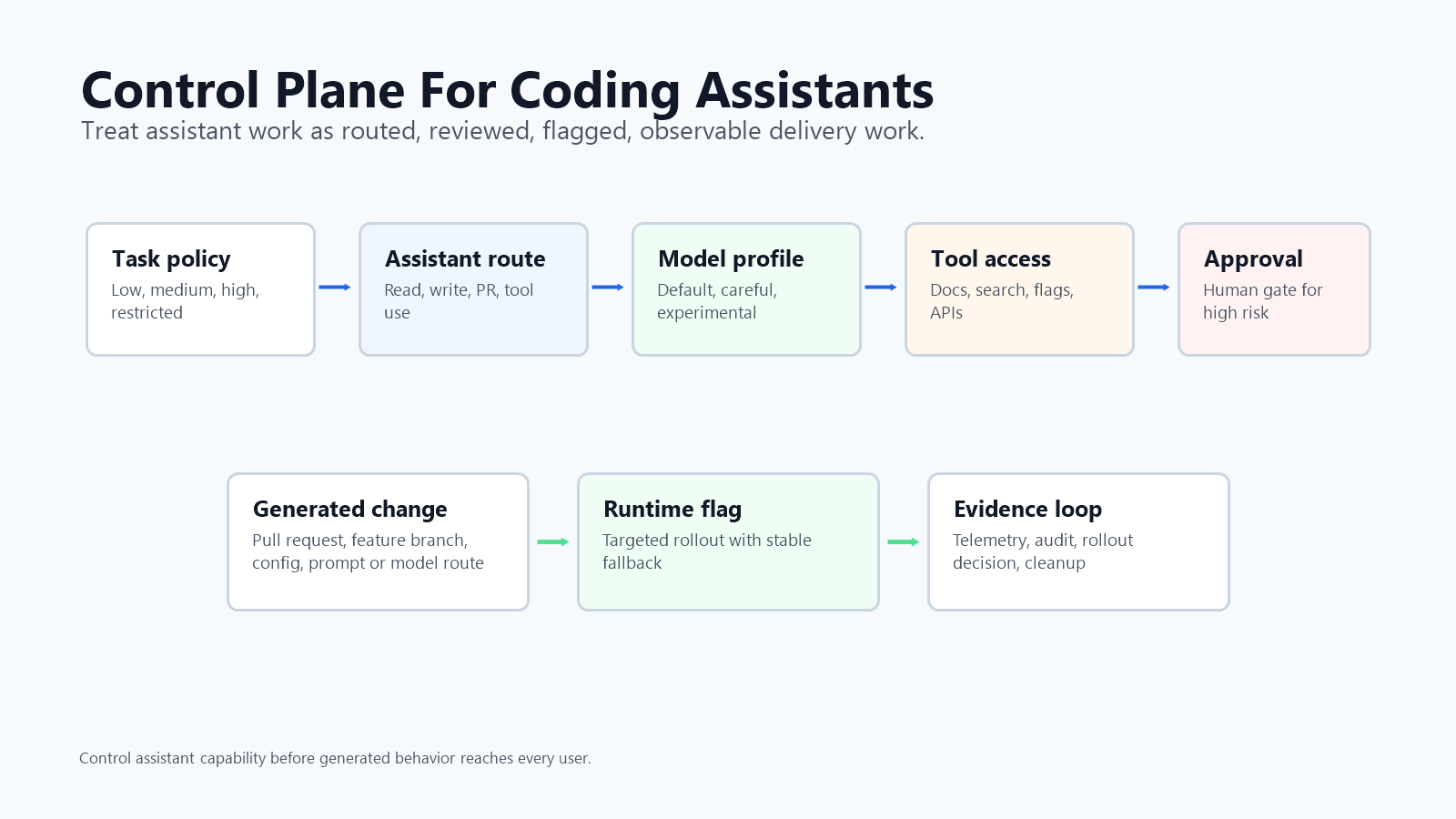
The minimum useful control plane has six parts:
- Task policy. Define which tasks are low, medium, high, or restricted risk. Documentation, tests, copy changes, and local refactors are not the same as payment, security, permission, data migration, or customer-facing workflow changes.
- Assistant routing. Decide which assistant mode, model profile, or tool set can handle each task type. A read-only explanation mode needs different controls than an agent allowed to edit files and call APIs.
- Repository instructions. Store durable rules where agents can read them: flag conventions, SDK patterns, testing expectations, security limits, and cleanup requirements.
- Review memory. Require AI-assisted pull requests to explain intent, assumptions, risk, verification, rollout plan, rollback plan, and cleanup condition.
- Runtime release control. Put generated behavior that changes production behind a feature flag or equivalent control surface with a stable fallback.
- Telemetry and audit. Connect assistant activity, pull request metadata, flag variations, rollout history, and operational signals so teams can learn from real outcomes.
FeatBit's AI release engineering viewpoint is that AI-era software needs release-decision infrastructure. For coding assistants, that means the team should not only ask "did the assistant produce code?" It should ask "which controlled release decision turns that code into user-visible behavior?"
Route Assistant Work By Risk
Routing is the first safety control. It prevents the team from using the same assistant mode for every task.
| Task type | Good assistant role | Release expectation |
|---|---|---|
| Documentation, comments, examples | Draft and revise | Normal review |
| Unit tests, fixtures, small bug reproduction | Draft and run local checks | Normal review plus test verification |
| Local refactor with no behavior change | Propose patch and summarize affected paths | Review for architecture and regressions |
| User-facing workflow change | Implement behind a flag | Internal or beta rollout before expansion |
| Integration, billing, permission, or data path | Draft only or require paired review | Human approval, staged rollout, stop signal |
| Agent tool access, model route, prompt profile | Propose control point and tests | Flagged rollout, audit trail, fast rollback |
| Regulated, financial, legal, or irreversible action | Research or draft plan only | Separate policy review before implementation |
This is where feature flags can control more than product features. If your engineering platform exposes assistant capabilities through an internal portal, agent gateway, CLI wrapper, MCP server, or developer workflow service, use flags to target assistant modes by team, repository, environment, or risk tier. A platform team can start with read-only assistant help, then gradually enable file editing, tool calls, pull request creation, or production-aware actions only for the groups that are ready.
The same principle applies to generated application code. If an assistant changes production behavior, deploy the code with the generated path disabled by default. Then target internal users, beta accounts, or a small percentage cohort before broad release.
Compare Assistants With Release Evidence
Teams often compare LLM-powered coding assistants by asking developers which tool feels faster. That feedback matters, but it is not enough for operational rollout. The better comparison is evidence tied to the delivery system.
For a pilot, compare assistant variants with questions like:
- Did the assistant reuse existing patterns or create duplicate abstractions?
- Did the pull request stay within the requested scope?
- Which review comments were about local syntax, architecture, security, or missing context?
- Which generated changes needed rework after CI, staging, or production exposure?
- Which changes required rollback, hotfix, flag disablement, or cleanup?
- Did the assistant create a flag contract when production behavior changed?
- Did the generated code leave a cleanup path that a future engineer or agent can follow?
Those signals are more useful than a generic "AI saved time" claim because they connect assistant performance to delivery quality. The goal is not to rank tools universally. The goal is to decide which assistant, profile, or workflow is appropriate for your codebase and risk model.
FeatBit can support this kind of comparison when assistant-enabled features, generated branches, or model routes are expressed as flag variations. Use targeting rules, percentage rollouts, and flag insights to see which users saw which behavior. Pair that with normal engineering telemetry, pull request review data, and incident signals.
Roll Out Coding Assistants Like A Product Capability
LLM-powered coding assistants should have rollout stages. The assistant may live inside the editor, but its effects reach the product delivery system.
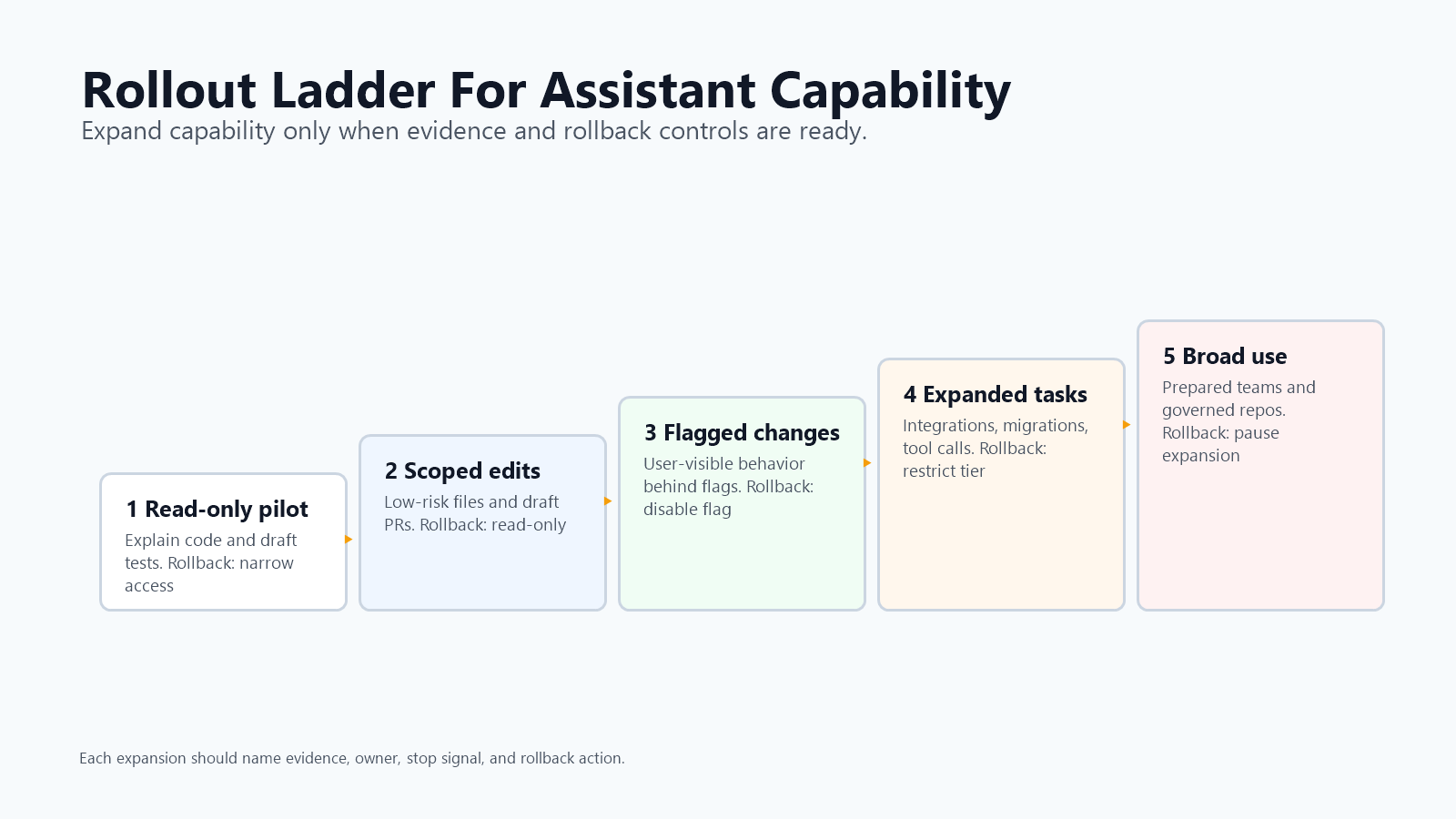
A practical rollout looks like this:
| Stage | Assistant capability | Evidence to collect | Rollback action |
|---|---|---|---|
| Read-only pilot | Explain code, summarize issues, draft tests | Developer feedback, accuracy notes, security concerns | Disable assistant access or narrow repositories |
| Scoped edits | Modify low-risk files and open draft PRs | CI pass rate, review comments, rework type | Return to read-only or require manual patching |
| Flagged product changes | Implement behavior behind a feature flag | Rollout health, fallback behavior, flag contract quality | Disable the feature flag or stop assistant mode |
| Expanded task set | Add integrations, migrations, model routes, or tool calls | Incident rate, rollback rate, lead time, cleanup load | Restrict task tier, model profile, or tool access |
| Broad availability | Make assistant workflow normal for prepared teams | Sustained quality, review load, stale flag cleanup | Pause expansion or revert to approved cohorts |
This staged model separates assistant adoption from production exposure. A team can allow an assistant to draft a change without allowing the generated behavior to reach every user. A team can allow a model profile for tests and documentation without allowing it to change payment code. A team can allow MCP read tools without allowing write tools.
The Model Context Protocol tools documentation describes tool capabilities exposed to AI applications. That is exactly why rollout discipline matters. A tool surface is an operational interface. If it can mutate code, tickets, flags, deployments, or data, it should have scoped credentials, clear tool descriptions, and human approval for high-impact actions.
Roll Back Assistant Capability Before You Roll Back People
Rollback should be designed before the assistant is broadly enabled. The rollback target is not only application behavior. It may be an assistant capability, a model route, a prompt profile, a tool permission, a repository cohort, or a generated code path.
Useful rollback controls include:
- disable assistant write access while keeping read-only explanation available;
- move high-risk repositories back to human-only implementation;
- route a task class to a safer model profile or manual review queue;
- revoke MCP write tools while keeping documentation and search tools;
- pause assistant-created flags until the owner review catches up;
- disable a generated feature path through a feature flag;
- reduce rollout percentage for users seeing generated behavior;
- archive or remove temporary flags after the release decision is complete.
This is the same operating pattern as feature flag rollback: reduce blast radius first, diagnose second, expand only when evidence is healthy. The team does not need to decide whether AI coding is good or bad in the abstract. It needs enough controls to pause a specific risky capability without freezing every useful assistant workflow.
How FeatBit Fits
FeatBit is the release-control layer in this model. It does not replace code review, CI, security scanning, or human judgment. It gives teams a runtime control surface for the behavior that survives those gates.
In a FeatBit-centered workflow, a platform team can:
- use flags or remote config to target assistant capabilities by team, repo, environment, or pilot cohort;
- ask coding agents to follow existing feature flag conventions through repository instructions and FeatBit-specific skills;
- ship generated product behavior behind flags with stable fallbacks;
- use segments and percentage rollout to expand exposure gradually;
- use audit logs, webhooks, OpenTelemetry integration, and flag insights to connect exposure to evidence;
- use lifecycle rules so assistant-created or assistant-modified flags do not become permanent debt.
For implementation context, start with FeatBit docs on targeted progressive delivery, testing in production, flag lifecycle management, and webhooks. For agent-specific context, read feature flags as the AI control layer and MCP server for feature flag operations.
Checklist For Adopting LLM-Powered Coding Assistants
Use this checklist before expanding an assistant beyond a small pilot.
| Check | Pass condition |
|---|---|
| Task tiers exist | The team knows which tasks are low, medium, high, or restricted risk. |
| Assistant modes are scoped | Read, write, PR creation, tool calls, and production-aware actions have separate permissions. |
| Repository instructions are durable | Agents can read coding conventions, flag rules, testing rules, and cleanup expectations. |
| AI-assisted PRs have review memory | Intent, assumptions, risk, verification, rollout, rollback, and cleanup are visible. |
| Generated behavior is controllable | User-visible generated changes have a feature flag or equivalent release gate. |
| Expansion is staged | New assistant capabilities reach internal users or low-risk repos before broad rollout. |
| Stop signals are named | The team knows which quality, security, latency, cost, or incident signal pauses expansion. |
| Rollback is independent | The team can disable a capability, narrow a cohort, or turn off generated behavior without waiting for a redeploy. |
| Cleanup is owned | Temporary flags, generated branches, and pilot settings have owners and removal conditions. |
If any of those rows are missing, keep the pilot narrow. The assistant may still be useful, but broad enablement is premature.
Source Notes And Internal Link Plan
This article is a standalone operating model for the query "LLM-powered coding assistants." It differs from FeatBit's feature flags for AI-generated code, which focuses on wrapping one generated production change, and from AI-generated code governance, which focuses on policy tiers and governance evidence. This article focuses on rolling out the coding assistant capability itself: routing tasks, comparing assistant variants, controlling tool access, and rolling back assistant modes or generated behavior.
- FeatBit implementation sources: AI release engineering, AI control layer, targeted progressive delivery, targeting rules, percentage rollouts, flag insights, audit logs, webhooks, and feature flag lifecycle management.
- External category sources: GitHub Docs on Copilot coding agent customization, OpenAI on Codex, Model Context Protocol documentation on server concepts and tools, OpenFeature on evaluation context, and Unleash documentation on feature toggles.
- FeatBit reader journey links: AI coding productivity paradox, feature flags for AI-generated code, AI-generated code governance, MCP server for feature flag operations, and AI flag owner review workflow.
- Image and Open Graph recommendation: use
cover.pngas the Open Graph image. Use the control-plane diagram near the opening model and the rollout ladder near the staged rollout section because both summarize guidance that is fully available in crawlable text.
Next Step
Pick one assistant capability that is currently enabled broadly: pull request creation, repository writes, MCP tools, model routing, or generated feature implementation. Write its rollout contract: who can use it, which tasks it may handle, which signals pause expansion, what rollback action exists, and which FeatBit flag or release control gates the behavior it creates.