
What Regulated Industries Care About in Feature Flags
Regulated industries care less about whether a feature flag can turn code on and off, and more about whether the flag can be operated as a controlled release decision. The buyer question is: can this platform prove who changed production behavior, who was exposed, which safeguards were active, how rollback works, and where the release data lives?
Feature flags do not make a product compliant by themselves. Healthcare, financial services, public sector, insurance, education, energy, and other regulated teams still need legal, privacy, security, risk, and audit programs. A feature flag platform can support those programs when it gives the team access control, change history, data-boundary control, evidence capture, and reversible rollout.
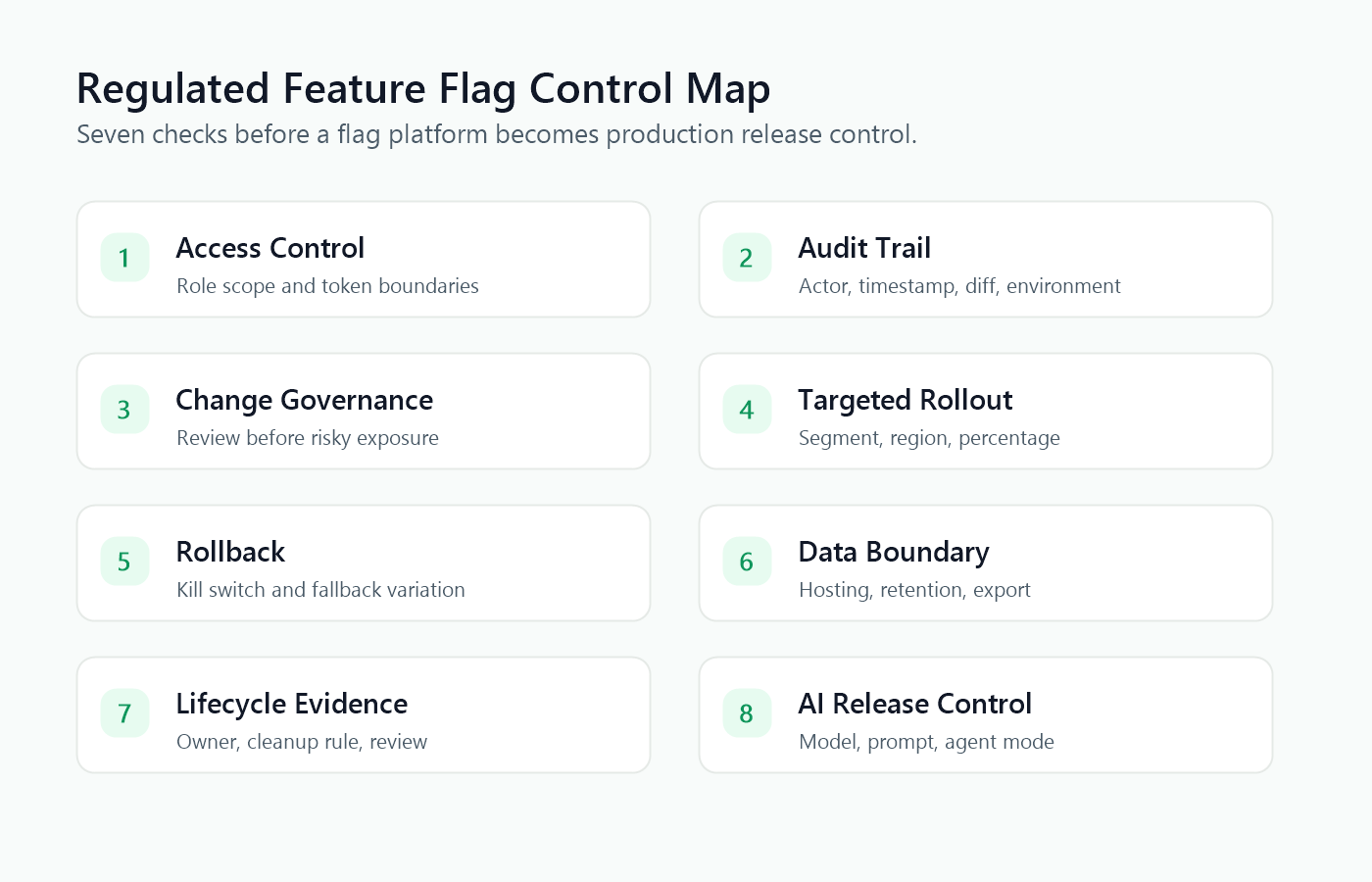
The Short Answer
When regulated teams evaluate feature flags, they usually care about seven controls:
| Control area | What the team wants to know | Why it matters |
|---|---|---|
| Access control | Who can create, edit, approve, or enable production flags? | A flag change can become a production change without a deployment. |
| Audit trail | Can the team reconstruct who changed what, when, and in which environment? | Incident response and audit review need a durable evidence path. |
| Change governance | Can risky flag changes require review, approval, or staged exposure? | Production behavior should not change through an unreviewed dashboard click. |
| Targeted rollout | Can exposure be limited by environment, account, segment, region, plan, risk tier, or percentage? | Regulated releases often need controlled cohorts and exclusions. |
| Rollback | Can operators disable or narrow a release without redeploying? | Response time matters when a release affects money, care, safety, privacy, or availability. |
| Data boundary | Where do targeting attributes, evaluation events, and audit records live? | Some teams must keep release-control data inside approved infrastructure or regions. |
| Lifecycle evidence | Can temporary release flags be cleaned up and durable controls documented? | Stale flags create technical debt and weaken audit clarity. |
That checklist is broader than a normal developer evaluation. A developer may ask, "Can I ship safely?" A regulated platform team asks, "Can we operate this release control under our evidence, access, and data-boundary requirements?"
Why Regulated Teams Treat Flags As Production Controls
A feature flag platform changes runtime behavior. That makes it part of the production control surface, not just a developer convenience.
For example:
- A finance team may use a flag to enable a new credit decision workflow for one region.
- A healthcare team may use a flag to expose a patient-facing scheduling change only to an internal cohort first.
- A public-sector team may need flag state and audit logs to stay inside a government cloud boundary.
- An AI product team may use a flag to route a small segment to a new model, retrieval profile, prompt, or agent mode.
In each case, the risk is not only whether the code deploys. The risk is who receives the behavior, who is allowed to expand it, what evidence justifies expansion, and how the team can stop the behavior quickly.
This is why FeatBit frames feature flags as release-decision infrastructure. The flag is the runtime decision point where targeting, staged exposure, observability, audit history, and rollback meet.
The Regulated Feature Flag Checklist
Use this checklist when evaluating a feature flag platform for regulated environments.
1. Access Control And Separation Of Duties
Regulated teams need to separate visibility from authority. Product managers, support teams, developers, platform engineers, release managers, security reviewers, and auditors should not all have the same production access.
Ask:
- Can production flag changes be limited to approved roles?
- Can access differ by project, environment, and team?
- Can non-engineering stakeholders view flag state without changing it?
- Can service tokens and personal tokens be scoped separately?
- Can emergency operators disable a flag without gaining broad admin power?
This maps to a familiar control pattern. NIST SP 800-53 Rev. 5 includes Access Control, Audit and Accountability, and Configuration Management among its control families, and describes the catalog as flexible controls for managing organizational risk. Feature flag platforms do not implement a whole NIST program, but they should supply usable primitives for access, audit, and configuration-change control.
FeatBit implementation sources for this area include IAM overview, RBAC, IAM policies, and API access tokens.
2. Audit Logs That Explain The Release
An audit log should answer more than "a setting changed." It should help the team reconstruct a release decision.
Minimum useful fields include:
- actor;
- timestamp;
- environment;
- flag key;
- previous and new values;
- targeting rule or rollout percentage;
- affected segment or rule when available;
- related approval, ticket, incident, or release note;
- rollback action if the change was reversed.
HHS describes HIPAA Security Rule technical safeguards as including access control and audit controls for systems that maintain electronic protected health information. That does not mean a feature flag audit log is a HIPAA compliance program. It does show why healthcare and health-adjacent buyers ask whether the platform can record and examine activity in systems that influence production workflows.
For FeatBit, start with the docs for feature flag audit logs, webhooks, and Slack integration when the team needs audit, notification, and downstream evidence workflows.
3. Data Boundary And Residency
Feature flag data can be sensitive even when it is not the main customer database. It may include account IDs, targeting attributes, segment names, evaluation events, rollout decisions, operator identity, and incident history.
Regulated teams should ask:
- Is the control plane SaaS, self-hosted, private cloud, or hybrid?
- Which data leaves the customer's infrastructure?
- Which regions store flag configuration, user targeting attributes, evaluation events, and audit records?
- Can the team avoid sending regulated attributes to the flag platform?
- Can logs be retained, exported, deleted, or archived according to policy?
GDPR Article 30 requires controllers and processors, where applicable, to maintain records of processing activities. A flag platform is not a records-of-processing system by itself, but if targeting or evaluation uses personal data, teams need to understand and document how that data is processed.
For teams with strict residency or infrastructure ownership requirements, FeatBit's self-hosted feature flag platform and data residency and compliance guide are the relevant next steps.
4. Targeting Without Leaking Sensitive Attributes
Targeting is one of the main reasons teams adopt feature flags. It is also where regulated teams need discipline.
Good targeting design uses the least sensitive attribute that can express the rollout decision:
| Rollout need | Prefer this | Avoid when possible |
|---|---|---|
| Internal testing | employee or internal account segment | raw employee identifiers in many systems |
| Regional control | region or deployment environment | full address or unnecessary location detail |
| Customer cohort | account segment or tenant tier | individual names or free-text notes |
| Risk exclusion | risk class, policy tag, or precomputed eligibility | detailed regulated status in the flag rule |
| AI rollout | workflow risk tier or approved segment | prompt text, raw user content, or sensitive case details |
FeatBit supports targeting rules, user segments, shareable segments, and percentage rollouts. The application team still decides which user attributes are appropriate to send.
What Changes When The Flag Controls AI Behavior
AI feature flags are common in regulated software because AI behavior often depends on runtime choices: model route, prompt version, retrieval source, grader threshold, agent tool access, fallback mode, autonomy level, or rollout cohort.
The governance standard should be higher when the flag controls AI behavior that affects regulated workflows.
The European Commission's AI Act overview describes a risk-based framework and lists high-risk obligations such as risk assessment and mitigation, activity logging, documentation, information for deployers, human oversight, robustness, cybersecurity, and accuracy. A feature flag does not satisfy those obligations alone. It can help operationalize a narrow part of the release layer: staged exposure, exclusion rules, rollback, owner approval, activity evidence, and monitoring.
For regulated AI releases, add these questions to the normal feature flag checklist:
- Can the AI behavior be off by default in production?
- Can regulated regions, customer segments, or account types be excluded from early exposure?
- Can the flag express safer modes such as
observe,draft,approval_required,fallback, andfull? - Can the evaluated variation be attached to logs, traces, metrics, experiment events, or review records?
- Can a human owner approve expansion from internal users to external users?
- Can rollback move traffic to a stable prompt, model route, workflow, or non-AI fallback?
- Can temporary AI rollout flags be removed after the decision, while durable safety gates stay documented?
FeatBit's AI governance and risk control, AI control layer, and safe AI deployment pages expand this release-control model for AI systems.
The Evidence Packet Auditors And Reviewers Usually Need
The most useful artifact is an evidence packet around the release key. The feature flag key often becomes that release key because it connects code, runtime exposure, audit history, and metrics.
For a regulated release, prepare records that answer:
| Evidence question | Practical record |
|---|---|
| What changed? | Flag key, description, code reference, variation names, linked pull request, release ticket. |
| Who owned the decision? | Product owner, engineering owner, approver, on-call or incident owner. |
| Who could change it? | Role assignments, policy, token scope, environment permission. |
| Who was exposed? | Environment, segment, account cohort, region, percentage, exclusion rules. |
| What evidence was watched? | Error rate, latency, support signal, business metric, AI eval, domain review, or risk metric. |
| How was rollback performed? | Flag state change, fallback variation, kill switch, runbook, incident note. |
| What happened after release? | Continue, pause, expand, rollback, make permanent, or clean up. |
This packet should live in crawlable operational records that your team controls, not only in screenshots. Screenshots can help human review, but structured logs, tickets, release notes, exportable audit records, and observability events are easier to reuse in audits and incidents.
Where FeatBit Fits In A Regulated Release Workflow
FeatBit should sit between deployed code and broad exposure.
Use source control and CI for code history, tests, static checks, and review. Use identity, authorization, network, and data systems for hard security boundaries. Use observability and experimentation systems for measured outcomes. Use FeatBit for the release-control decision: which variation is active for which context, who changed it, which rollout stage applies, and how the team can roll back.
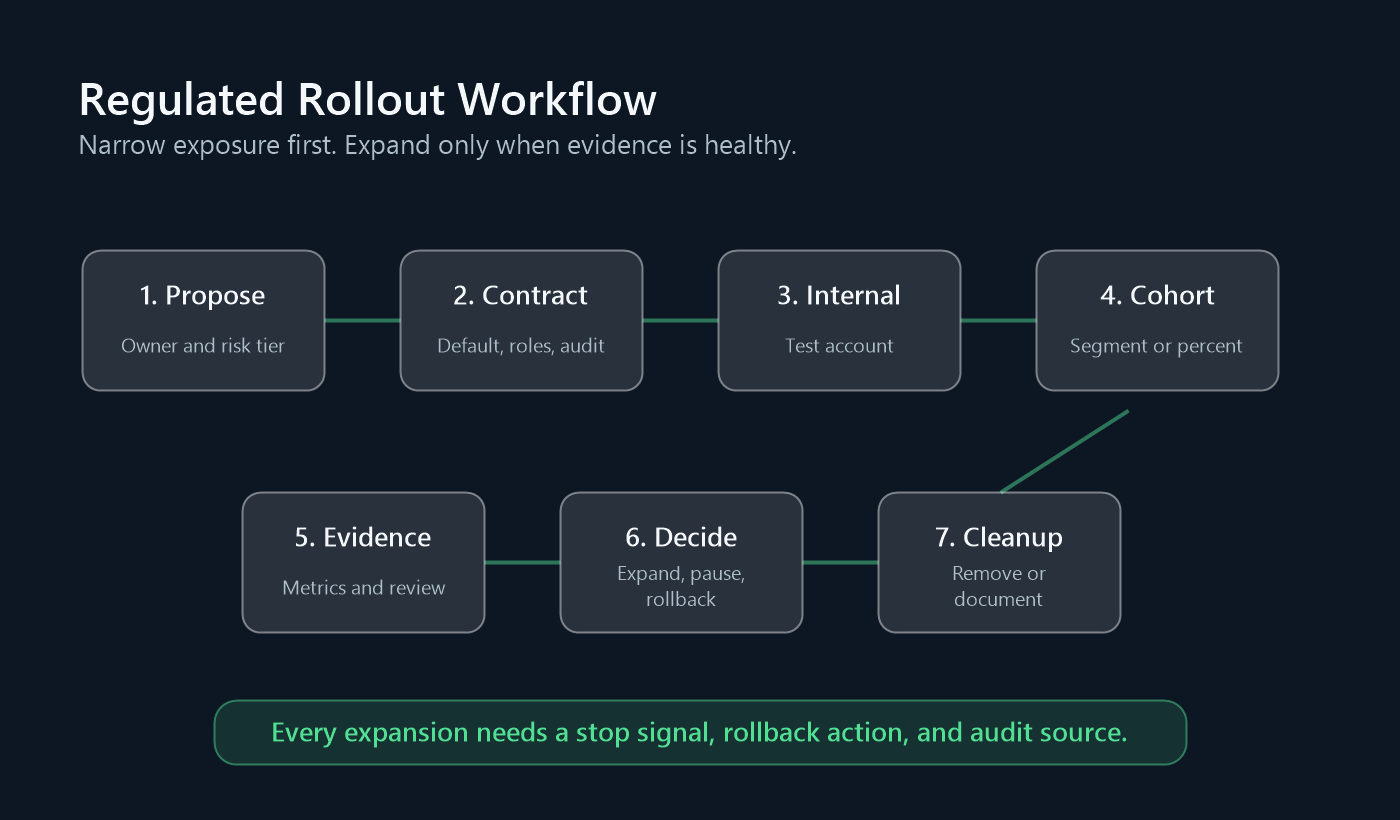
A practical FeatBit workflow looks like this:
- Register the flag with a clear key, owner, type, safe default, and cleanup expectation.
- Evaluate the flag server-side before the regulated behavior runs.
- Start with internal users or a low-risk segment.
- Expand by targeting rule, account cohort, region, or percentage only when evidence is healthy.
- Record flag changes through audit logs, webhooks, and observability events.
- Roll back by switching the flag to the safe variation or disabling targeting.
- Decide whether the flag becomes a durable control or should be cleaned up after release.
FeatBit implementation details to review include targeted progressive delivery, feature flag insights, OpenTelemetry integration, and feature flag lifecycle management.
Questions To Ask Any Feature Flag Vendor
Use these questions in a security, platform, or compliance review:
- Which data is stored in the flag control plane, and which data is sent during evaluation?
- Can the platform be self-hosted or deployed in a private boundary if required?
- Can access differ by organization, project, environment, role, and token?
- Can production changes require approval or a documented workflow?
- Can audit logs be exported to SIEM, data lake, ticketing, or incident tooling?
- Can rollout be targeted by segment, account, region, environment, and percentage?
- Can operators roll back without redeploying?
- Can evaluated variations be attached to logs, traces, metrics, or experiment events?
- Can temporary flags be identified, reviewed, archived, and removed from code?
- Does the vendor distinguish feature flag evidence from legal compliance claims?
The last question matters. A responsible vendor should help you operate release controls and produce evidence. It should not imply that toggling a feature flag automatically satisfies HIPAA, GDPR, SOC 2, the AI Act, FFIEC guidance, or any other regulatory framework.
Common Mistakes
Treating the dashboard as a trusted operator. The dashboard is only as safe as its roles, approval paths, audit records, and token policies.
Putting sensitive user data directly into targeting rules. Prefer coarse segments and precomputed eligibility where possible.
Using one global kill switch for every risk. Regulated releases often need targeted rollback by region, account cohort, environment, or workflow.
Keeping temporary controls forever. A stale rollout flag can make future audits harder because nobody remembers whether it is an active policy, an emergency switch, or forgotten debt.
Calling feature flags compliance. Feature flags support compliance evidence. They do not replace legal review, security architecture, privacy review, model-risk management, or formal certification.
FAQ
Do regulated industries need feature flags?
They do not need feature flags for every change, but they often need runtime release controls for changes that affect customer experience, critical workflows, AI behavior, or operational risk. Feature flags help separate deployment from exposure so teams can release gradually, observe impact, and roll back quickly.
Are feature flags safe for healthcare or financial services?
They can be safe when implemented with the right architecture: least-privilege access, careful targeting attributes, audit logs, data-boundary control, observability, rollback, and lifecycle cleanup. Whether a specific deployment meets healthcare, financial, or contractual requirements depends on your implementation and should be reviewed by the responsible experts.
Should regulated teams self-host feature flags?
Self-hosting is worth evaluating when release-control data, targeting attributes, audit history, or evaluation events must stay inside a specific infrastructure boundary. It also helps teams that need direct control over retention, network access, backup, SIEM export, and regional deployment. SaaS can still work when the vendor, data flow, contract, and controls fit the requirement.
What is the safest first feature flag for a regulated team?
Start with a reversible, low-blast-radius release: internal-only exposure, a safe default, clear owner, audit logging, a known rollback action, and a cleanup condition. Avoid starting with a high-risk workflow that has no fallback or unclear data classification.
Source Notes And Internal Link Plan
This article is a standalone answer to "What do regulated industries care about in feature flags?" It differs from FeatBit's AI governance with feature flags, which focuses on AI control surfaces, and from self-hosted data residency and compliance, which focuses on deployment boundary and data residency.
- Standards and regulatory context: NIST SP 800-53 Rev. 5 is used for access, audit, and configuration-control framing; HHS Summary of the HIPAA Security Rule is used for access control and audit-control context; EUR-Lex Regulation (EU) 2016/679 is used for GDPR records-of-processing context; and the European Commission AI Act overview is used for high-risk AI governance context. This article is not legal advice.
- FeatBit implementation context: IAM overview, RBAC, IAM policies, audit logs, targeting rules, percentage rollouts, webhooks, OpenTelemetry integration, and feature flag lifecycle management.
- FeatBit reader journey links: self-hosted feature flags, data residency and compliance, governance, RBAC, and audit ROI, AI governance and risk control, safe AI deployment, and feature flag lifecycle management.
Image And Open Graph Notes
- Use
cover.pngas the Open Graph image. governance-control-map.pngsupports the opening checklist by mapping regulated concerns to feature flag platform controls.regulated-rollout-workflow.pngsupports the rollout workflow by showing how proposed changes move through controlled exposure, evidence review, rollback, expansion, and cleanup.
Next Step
Take one regulated release that is planned for this quarter. Write the flag contract before implementation: owner, safe default, allowed roles, first audience, excluded segments, required evidence, rollback action, audit source, data boundary, and cleanup rule. If any field is blank, the team has not finished designing the release control.