
AI-Generated Feature Summaries: Make Flagged Releases Easier to Review
AI-generated feature summaries are useful when they turn scattered release context into a reviewable artifact: what the feature does, which flag controls it, who has seen it, what evidence exists, what changed recently, and what decision comes next. They are not a replacement for release ownership. They are a faster way to prepare the context humans need before expanding, pausing, rolling back, or cleaning up a flagged release.
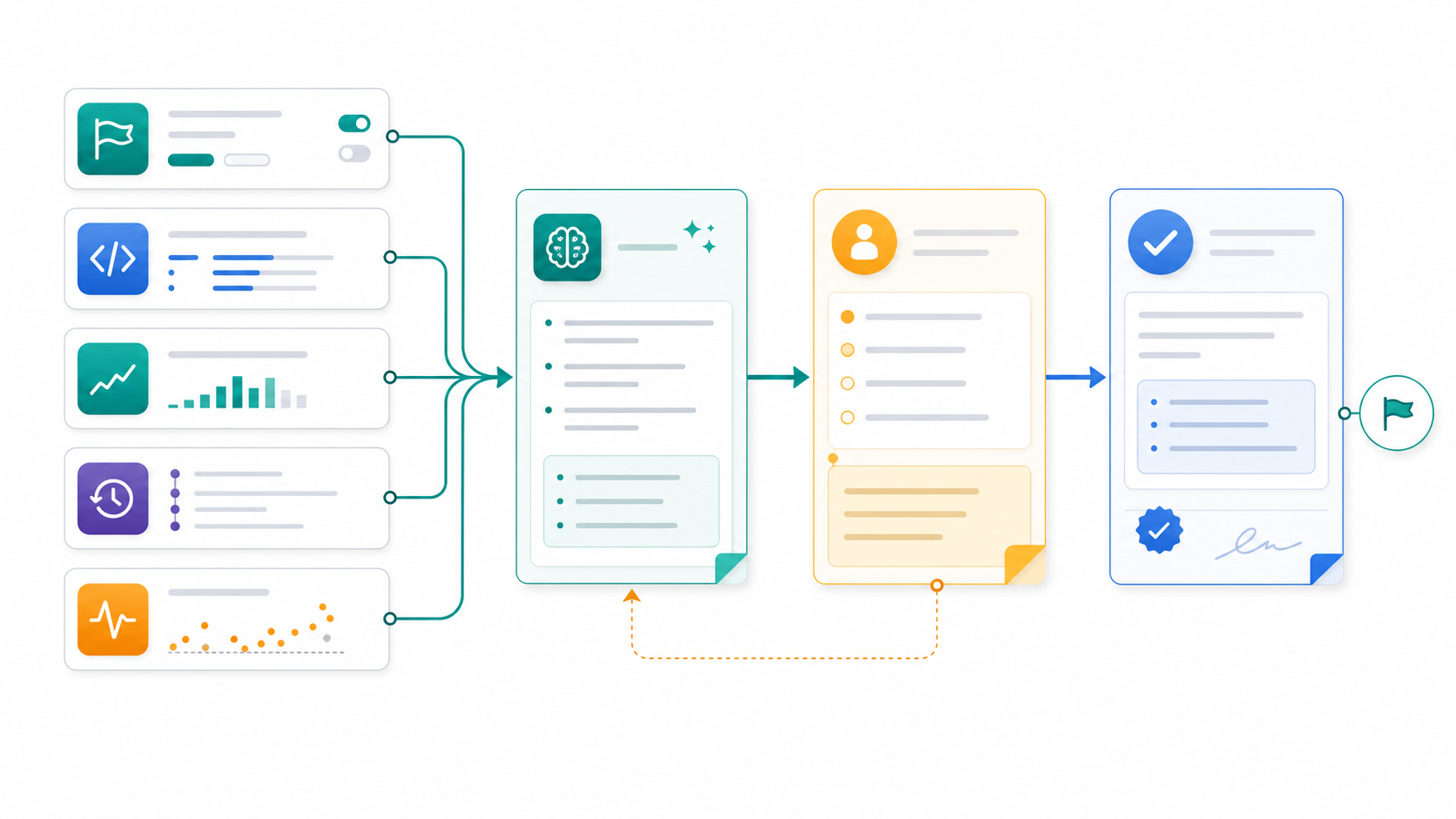
For feature flag teams, the key distinction is source quality. A summary generated only from a ticket or pull request can sound confident while missing the runtime truth. A reliable feature summary should draw from the flag configuration, code references, rollout state, audit history, exposure data, metric events, and owner notes. That makes the summary a release-decision input instead of a polished guess.
What Readers Usually Mean by AI-Generated Feature Summaries
The search phrase can mean several related jobs:
| Reader job | What the summary should help them do |
|---|---|
| Developer handoff | Explain the feature, flag key, code paths, fallback, and tests before review. |
| Release review | Summarize rollout state, audience, recent changes, evidence, and open risk before expanding traffic. |
| Product update | Convert technical release context into a product-facing summary without losing caveats. |
| Incident review | Show which flags changed before a metric moved or a support issue appeared. |
| Cleanup planning | Explain why a flag can be removed, archived, converted, or kept as an operational control. |
The common thread is not writing speed. The useful output is a compact, evidence-linked view of a feature that is still changing under runtime control.
This is why feature flags are a strong source for summaries. The flag is where release intent, targeting, variation, rollout percentage, environment state, and audit history meet. FeatBit's point of view is that flags are release-decision infrastructure, not only conditional statements in code. AI-generated summaries should preserve that decision context.
The Minimum Useful Summary
A feature summary should be short enough for a reviewer to read, but structured enough to be checked. For a flagged release, include these fields before adding prose:
feature_summary:
  feature_name: Support assistant answer draft
  flag_key: support_assistant_summary_v2
  release_question: Can the new summary prompt reduce manual editing without increasing corrections?
  controlled_behavior: Prompt route and review mode
  current_state: Internal users and 5 percent canary
  safe_fallback: Baseline prompt with required human review
  recent_changes:
    - Prompt template changed
    - Canary expanded from internal users to 5 percent
  evidence:
    exposure_event: support_summary_exposed
    primary_metric: accepted_without_edit
    guardrails:
      - correction_requested
      - escalation_created
      - latency_ms
  open_risks:
    - Enterprise accounts not yet included
    - Support playbook needs updated fallback wording
  proposed_decision: Hold at 5 percent until guardrail data is complete
  cleanup_path: Remove baseline branch only after rollout decision
That shape keeps the AI output grounded. It also gives the reviewer a way to challenge the summary: which fields are missing, which fields came from evidence, and which fields are a recommendation?
What Data Should Feed the Summary
Do not ask AI to summarize a feature from one artifact. Feature flag releases span code, configuration, metrics, and operational history.
| Source | What it contributes | Summary risk if missing |
|---|---|---|
| Flag metadata | Key, type, owner, variations, environments, and fallback | The summary may describe the product feature but not the runtime control. |
| Targeting and rollout rules | Who can see the feature and at what percentage | Reviewers cannot judge blast radius. |
| Audit log | What changed, when, and in which environment | Recent risky changes may disappear from the story. |
| Code references | Where the flag controls behavior, tests, telemetry, and cleanup | The summary may miss hidden branches or stale references. |
| Flag insights | Variation exposure over time | The summary may confuse eligibility with actual exposure. |
| Metric events | Primary metric and guardrail outcomes | The summary cannot support continue, pause, or rollback decisions. |
| Owner notes | Intent, caveats, support readiness, and cleanup condition | AI may overstate certainty or recommend the wrong next step. |
FeatBit supports several of these inputs directly. Percentage rollouts let teams expand exposure gradually. Audit logs show environment-specific flag changes. Flag insights show variation evaluations over time. The Track Insights API can send feature flag variation results and custom metrics for analytics and experimentation.
For teams using AI coding assistants, this also connects to AI-assisted flag management. The assistant can draft the summary, but the source of truth should remain the feature flag platform, repository, metrics, and owner review.
A Practical Workflow for Reviewable Summaries
Use AI-generated summaries at release checkpoints, not only at the end of a project.
- Collect the control context. Start with flag key, flag type, variations, fallback, owner, environment, targeting rules, and current rollout percentage.
- Collect the evidence context. Add exposure events, metric events, guardrails, recent audit history, incidents, support notes, and known data gaps.
- Ask for a structured draft. Require the assistant to separate facts, interpretation, recommendation, and missing evidence.
- Review with the owner. The owner confirms whether the summary matches current release intent.
- Attach the decision. Record continue, pause, rollback candidate, expand, convert, or cleanup.
- Store the summary near the workflow. Put it in the pull request, release ticket, flag description, experiment note, or cleanup request.
The most important prompt constraint is this:
Summarize only from the provided release artifacts. Separate confirmed facts from inferred interpretation. List missing evidence before making a release recommendation.
That instruction prevents the model from filling gaps with plausible release language.
A Prompt Pattern That Works
Use a prompt that limits authority and demands traceability:
Create an AI-generated feature summary for this flagged release.

Inputs:
- Flag metadata
- Targeting and rollout state
- Recent audit log entries
- Code reference map
- Exposure and metric events
- Owner notes

Output:
1. One-paragraph plain-English summary.
2. Confirmed facts with source names.
3. Release evidence and gaps.
4. Risks and rollback path.
5. Recommended next decision: continue, pause, rollback candidate, expand, convert, cleanup, or inconclusive.

Rules:
- Do not invent metrics, customers, incidents, or approval.
- If evidence is missing, say what is missing.
- Do not recommend broad rollout unless rollout evidence and guardrails are present.
This turns the summary into a checklist-backed release artifact. It also makes the output easier to audit because each claim should map back to a source.
How FeatBit Teams Can Use These Summaries
In a FeatBit workflow, AI-generated feature summaries are most useful when they sit beside runtime controls:
- Before internal rollout, summarize feature intent, owner, fallback, and test evidence.
- Before a canary, summarize targeting rules, current percentage, expected metric events, and rollback trigger.
- Before expansion, summarize exposure history, guardrail status, support feedback, and unresolved risks.
- Before an experiment decision, summarize variation meaning, exposure integrity, primary metric, and guardrails.
- Before cleanup, summarize final behavior, stale code references, remaining tests, and archive timing.
This complements FeatBit's AI control layer, safe AI deployment, and feature flag lifecycle management guidance. The summary is not the control plane. It is the human-readable decision layer built from the control plane.
If your team needs implementation detail, connect the summary to AI feature flag code references. If the feature is still under lifecycle governance, connect it to AI flag lifecycle management. If the rollout needs measurable evidence, start from measurement design for release decisions.
What to Avoid
Do not summarize from the pull request alone. A pull request explains what changed in code. It does not prove who has received the behavior or whether the rollout is healthy.
Do not hide missing evidence. A useful summary says "no guardrail metric is connected yet" instead of writing a smooth paragraph that implies readiness.
Do not let AI choose rollout expansion by itself. The summary can recommend a decision category, but the owner should approve production targeting changes.
Do not mix product marketing with release evidence. A customer-facing release note and an internal rollout summary have different jobs. Keep the internal version precise.
Do not treat summaries as compliance proof. They can help document release context, audit trail, and review decisions. They do not replace legal, security, privacy, or model-risk review.
Review Checklist
Before using an AI-generated feature summary in a release decision, check:
| Check | Pass signal |
|---|---|
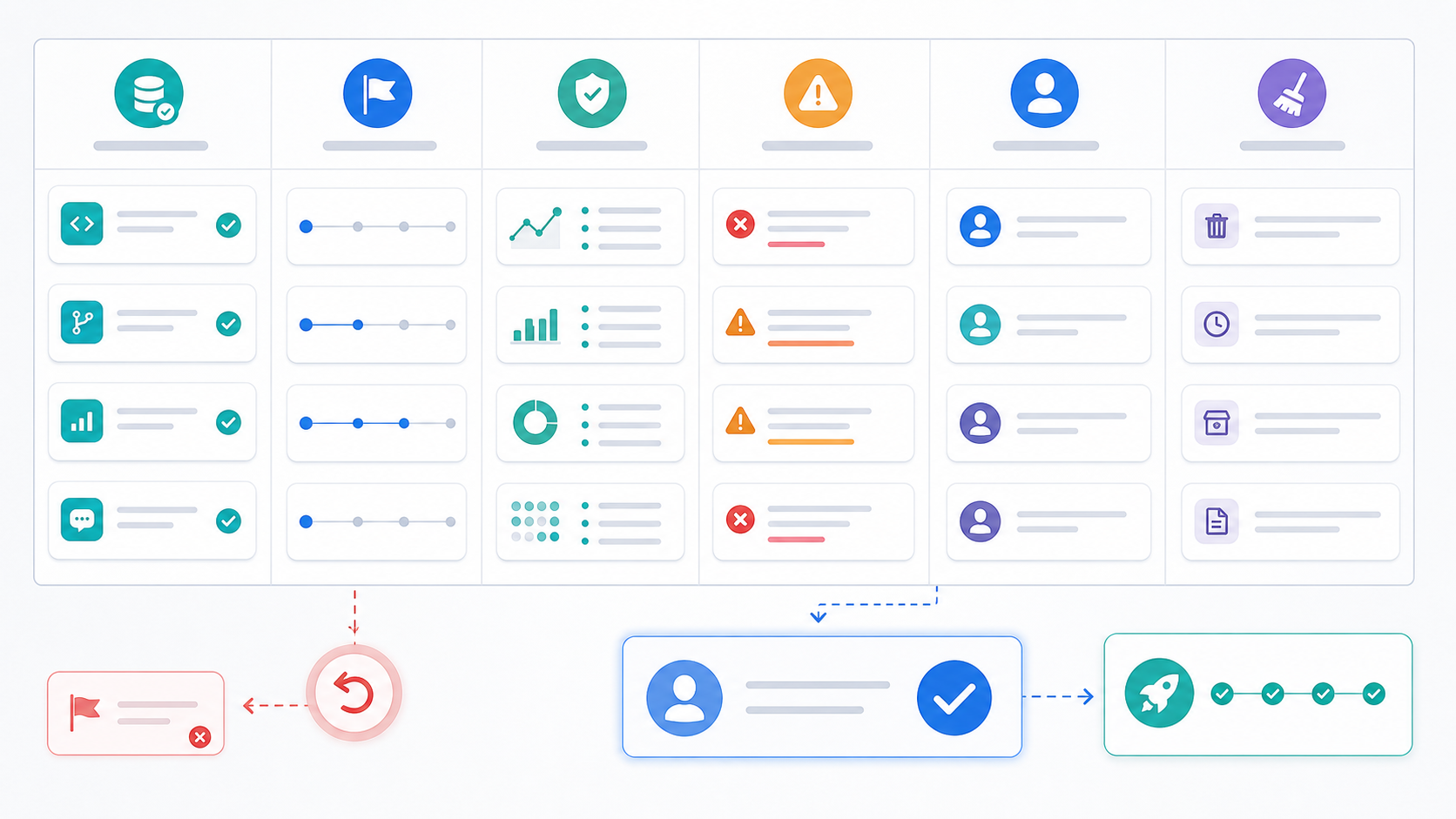
| Source coverage | The summary names flag configuration, rollout state, audit history, code references, and evidence sources. |
| Fact separation | Confirmed facts, interpretation, and recommendation are separate. |
| Rollout clarity | Audience, environment, percentage, variation, and assignment unit are visible. |
| Evidence quality | Exposure events and guardrail metrics are present, or the gap is explicit. |
| Rollback path | The safe fallback and rollback trigger are named. |
| Owner review | A human owner has accepted, corrected, or rejected the summary. |
| Cleanup path | The summary says whether the flag should be removed, converted, kept, or revisited. |
The checklist is deliberately operational. The goal is not a better paragraph. The goal is a better release conversation.
Where This Fits in the Market
Feature flag vendors are adding AI-assisted workflows around feature management. DevCycle documents CLI and MCP tooling that lets AI assistants interact with feature flags through natural language. OpenFeature defines vendor-neutral flag evaluation concepts such as flag key, default value, evaluation context, and evaluation details. These category signals matter because feature management is becoming part of AI-assisted development, not just manual dashboard work.
The FeatBit angle is to keep AI assistance subordinate to release control. AI can draft summaries, find gaps, and prepare review notes. FeatBit should remain the deterministic place where targeting, rollout, audit history, insights, experiments, and lifecycle decisions are governed.
That boundary is what makes AI-generated feature summaries valuable. They reduce the time it takes to understand a release, while preserving the human decision points that keep production changes accountable.
Source Notes
- FeatBit product context: AI Release Engineering, AI control layer, safe AI deployment, feature flag lifecycle management, percentage rollouts, audit logs, flag insights, and Track Insights API.
- Category context: DevCycle's CLI and MCP overview shows how feature flag systems are being connected to AI assistants. This article cites that as category context, not as a vendor ranking.
- Standards context: OpenFeature's Flag Evaluation API specification defines typed evaluation concepts that are useful when summaries need stable flag keys, defaults, context, and evaluation details.
- AI risk context: NIST's AI Risk Management Framework is a general AI risk-management reference. This article applies the idea only to release-summary and runtime-control workflows.
Image and Open Graph Notes
- Use
/images/blogs/ai-generated-feature-summaries/cover.pngas the Open Graph image because it represents release context being converted into a reviewed feature summary. - Use
summary-workflow.pngnear the opening because it shows how flag metadata, code references, audit history, rollout state, and metrics become a reviewed summary. - Use
review-checklist.pngin the workflow section because it reinforces the source coverage and owner review checks required before a summary influences rollout.