
AI Targeting by Segment, Region, Tier, and Risk Level
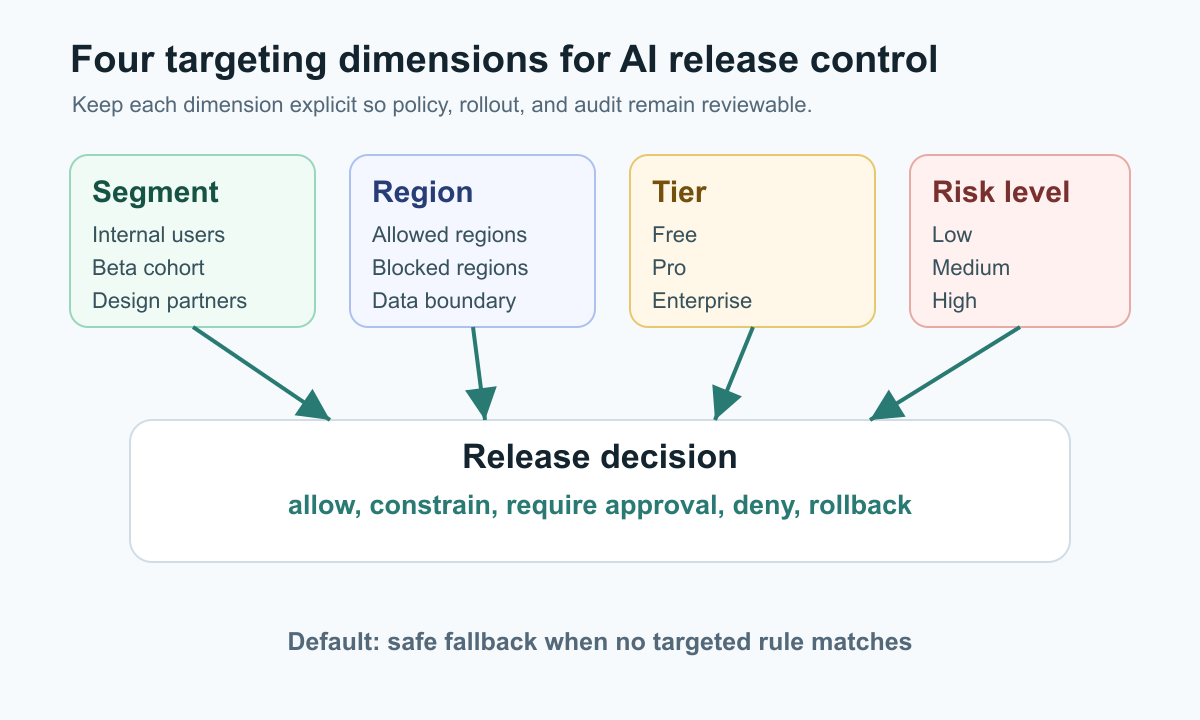
AI targeting by segment, region, tier, and risk level is the practice of deciding which users can receive an AI behavior, where that behavior can run, which commercial or permission tier can access it, and what approval or guardrail applies before the behavior reaches production traffic.
The useful version is not a giant rule list. It is a release-control model. Each targeting dimension answers a different question:
| Dimension | Release question | Example |
|---|---|---|
| Segment | Who should be exposed first? | Internal users, beta cohort, support team, trusted design partners |
| Region | Where is the behavior allowed? | United States only, European Union excluded until review, region-specific model route |
| Tier | Which product or account policy applies? | Enterprise only, free tier cost cap, paid plan beta |
| Risk level | How much control is required? | Observe only, allow, require approval, deny, rollback |
For AI systems, this matters because a prompt, model route, retrieval rule, recommendation strategy, or agent action may behave differently across user groups and jurisdictions. A single global launch switch is too coarse. A safer pattern is to use targeted release rules, explicit approvals, telemetry, and audit records so the team can expand or reduce exposure without redeploying.
What The Reader Is Really Trying To Control
The search query sounds like a feature flag configuration question, but the real task is governance design. The reader likely needs to answer:
- Can this AI capability be shown to internal users before customers?
- Should the behavior be disabled in regions where data, regulatory, localization, or support readiness is not settled?
- Should free, self-serve, and enterprise accounts receive different model routes, cost limits, or approval requirements?
- Should high-risk actions require a human approval step even when low-risk suggestions can run automatically?
- Can operators reconstruct who changed the rule, which users were exposed, and why the release expanded?
NIST's AI Risk Management Framework 1.0 describes AI risk work as governance, mapping, measuring, and managing. That framing is useful for release teams: first map where the AI behavior can create harm, then measure it under controlled exposure, then manage expansion with runtime controls. The NIST AI RMF page also notes that AI RMF 1.0 is being revised, so teams should treat it as a risk-management reference, not a static compliance checklist.
A Four-Dimension Targeting Model
Start by separating the four dimensions instead of compressing them into one flag name.
Segment
Segments define the population that should see the behavior. Useful AI segments include:
- internal staff;
- beta customers;
- design partners;
- accounts with signed AI terms;
- support agents;
- users who opted in to a preview;
- customers excluded from previews.
In FeatBit, targeting rules can match built-in or custom user attributes, and a rule can require multiple conditions to be true. The docs describe custom attributes such as plan, group, role, location, or organization as valid targeting inputs, which is the basic building block for AI release segmentation.
Region
Region should be a policy input, not a string buried in application code. It may represent user location, account residency, processing region, support coverage, or a legal deployment boundary.
Keep the wording cautious: region targeting helps enforce your release policy, but it does not prove regulatory compliance by itself. Legal, privacy, and security reviewers still need to define which regions require blocking, additional review, data isolation, or different model routing.
Tier
Tier captures commercial or entitlement policy. It can also control cost and support readiness.
For example:
- free tier gets a smaller model and stricter token budget;
- pro tier gets AI suggestions but no autonomous action;
- enterprise tier gets a private preview after account approval;
- regulated enterprise accounts stay on a reviewed model route.
Tier is not the same as risk. A high-value account can still receive a low-risk AI suggestion, and a free-tier account can still trigger high operational risk if the agent can take external action.
Risk Level
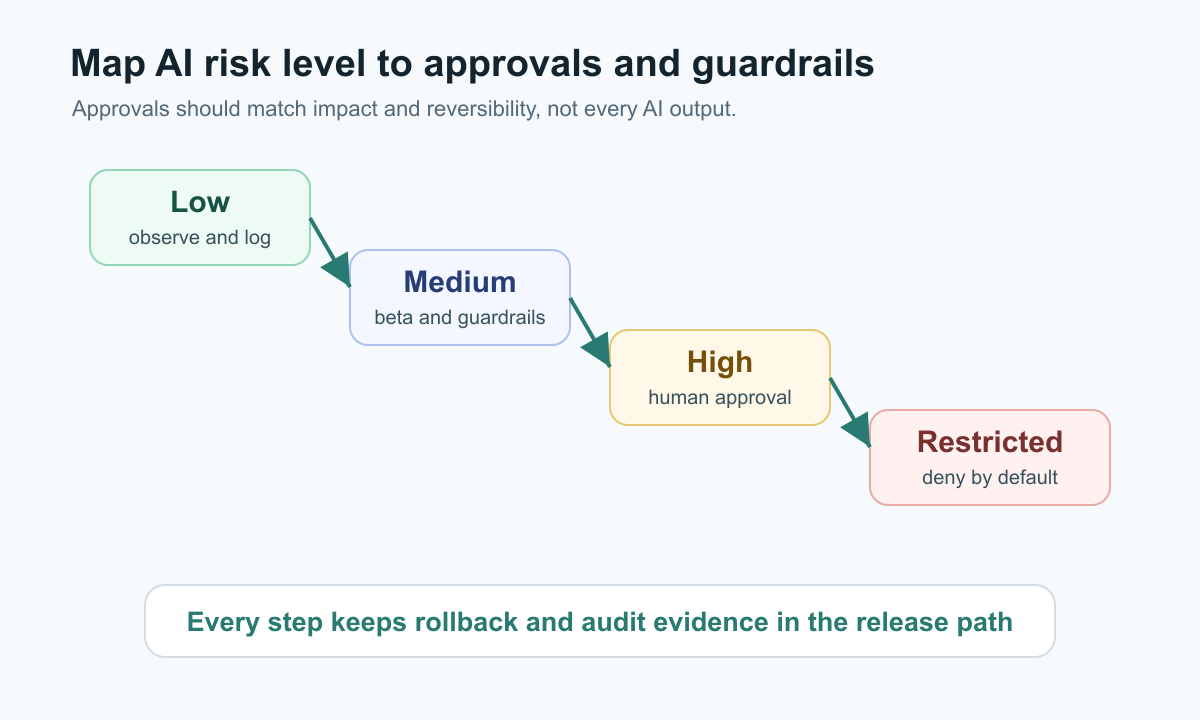
Risk level decides the guardrail behavior. It should be based on impact, reversibility, agency, data sensitivity, and evidence quality.
OWASP's 2025 Top 10 for LLM and Gen AI applications includes risks such as sensitive information disclosure, excessive agency, vector and embedding weaknesses, misinformation, and unbounded consumption. Those categories are not a release policy by themselves, but they are useful prompts for deciding which AI behaviors deserve stronger gates.
| Risk level | Typical AI behavior | Default release control |
|---|---|---|
| Low | Summarize public docs, draft copy, suggest labels | Internal rollout, normal logging |
| Medium | Rank results, recommend next action, route requests | Beta segment, metric guardrails, rollback owner |
| High | Write to customer-visible state, call external systems, use sensitive data | Human approval, narrow targeting, audit review |
| Restricted | Change permissions, move money, delete data, make regulated decisions | Deny by default or require separate policy review |
Compose Rules In A Readable Order
Do not build targeting as a maze of exceptions. Use an order that matches how reviewers think.
- Deny blocked regions and excluded accounts first.
- Allow internal and test segments with observe-only or low authority.
- Allow approved beta or enterprise cohorts for specific regions.
- Apply tier-specific model routes, cost limits, or feature modes.
- Apply risk-level guardrails such as approval, fallback, or deny.
- Send everyone else to the safe default.
FeatBit targeting rules are evaluated in order, and the first matching custom rule applies. That means rule order is part of the governance design. Put the narrowest and highest-risk exclusions before broad rollout rules.
Percentage rollout belongs inside this model, not beside it. FeatBit percentage rollouts can release a feature incrementally, and advanced rollout can dispatch by an attribute such as team-region. For AI systems, that makes it possible to expand within a trusted segment or region without turning the behavior on for every matching user at once.
Example Targeting Matrix
Use a compact matrix before creating flags. The matrix should be readable by product, engineering, security, and support.
| Segment | Region | Tier | Risk level | AI behavior | Release state |
|---|---|---|---|---|---|
| Internal staff | Any allowed region | Any | Medium | New answer-ranking model | Enabled, observe quality and latency |
| Beta customers | United States | Pro or Enterprise | Medium | AI support reply draft | Enabled for 10 percent, human send required |
| Enterprise design partners | Approved regions | Enterprise | High | Agent creates draft workflow changes | Enabled for named accounts, approval required |
| All customers | Region under review | Any | Any | Model route with unresolved policy question | Disabled until review completes |
| Free tier | Allowed regions | Free | Medium or High | Costly autonomous agent action | Disabled or constrained to read-only |
The point is not to copy these rows. The point is to make every rule explainable. If a reviewer cannot tell why a row exists, the targeting rule will be hard to audit later.
Separate Release Flags From Hard Authorization
Feature flags should not replace identity, authorization, data access control, sandboxing, model safety checks, or legal review. They control runtime exposure after those boundaries exist.
A practical decision order looks like this:
- Authenticate the user, service, or agent.
- Check hard authorization and data-access scope.
- Build the AI request context: segment, region, tier, risk level, environment, and account.
- Evaluate the targeting flag server-side.
- Apply the risk decision: allow, constrain, require approval, deny, or fallback.
- Record the decision, evaluated variation, actor, and result.
FeatBit IAM policies support deny-by-default behavior and deny-override evaluation for access permissions. That is useful for platform governance because production flag changes and segment management should be limited to people or service identities with explicit authority.
A Minimal Policy Contract
The application should evaluate AI targeting from a structured context. Avoid passing raw strings around the codebase.
type AiRiskLevel = "low" | "medium" | "high" | "restricted";

type AiTargetingContext = {
  userKey: string;
  accountId: string;
  segment: "internal" | "beta" | "design_partner" | "general";
  region: "us" | "eu" | "apac" | "blocked";
  tier: "free" | "pro" | "enterprise";
  riskLevel: AiRiskLevel;
  environment: "development" | "staging" | "production";
};

type AiReleaseDecision =
  | { action: "allow"; mode: "observe" | "preview" | "full" }
  | { action: "constrain"; mode: "read_only" | "draft_only"; reason: string }
  | { action: "require_approval"; approverGroup: string; reason: string }
  | { action: "deny"; reason: string };
The flag evaluation should return a policy mode or variation that your service maps to one of those decisions. Keep the final enforcement outside the model prompt. The model can ask for an action, but the application should decide whether that action is allowed.
Approvals Should Match Risk, Not Org Chart
Approval gates are useful when they reduce a real failure mode. They become noise when every AI output waits for a person.
Use approvals where one or more of these conditions is true:
- the AI action changes customer-visible state;
- the action is difficult to reverse;
- the behavior touches sensitive data;
- the behavior affects regulated, financial, security, or permission workflows;
- the release is entering a new region or account segment;
- telemetry is not mature enough to support automatic expansion.
For lower-risk behavior, start with observe-only logging and internal exposure. For medium risk, use beta segments and guardrail metrics. For high risk, require explicit approval until the owner has enough evidence to expand.
Audit Evidence For Each Release Decision
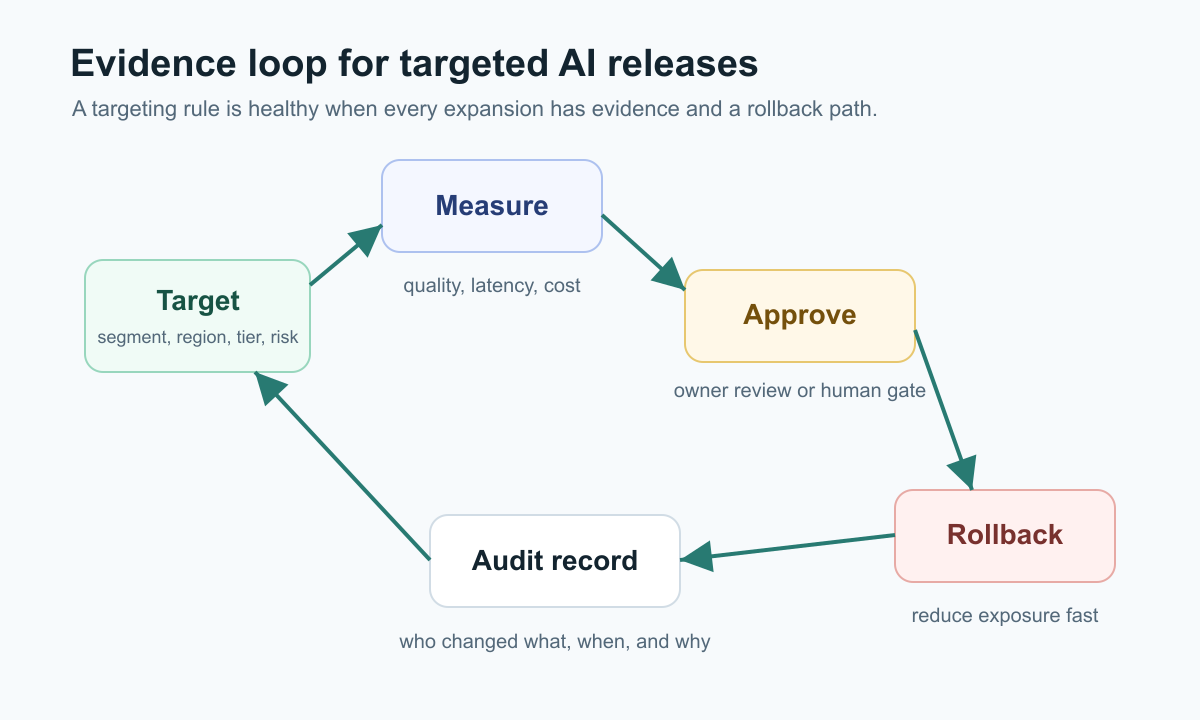
Auditability is more than knowing that a flag changed. For AI targeting, the useful evidence answers:
- which targeting rule matched;
- which segment, region, tier, and risk level were evaluated;
- which variation or policy mode was served;
- who changed the rule and when;
- what approval was required and who cleared it;
- which metric or incident signal caused expansion, pause, or rollback;
- whether the rule is temporary or a standing policy.
FeatBit's audit log tracks changes made to feature flags in an environment, and its docs describe filtering audit log entries by date and environment. That is useful release evidence, but teams should still decide what their compliance, privacy, and security programs require beyond the flag platform.
Where FeatBit Fits
FeatBit is useful in this workflow because the targeting problem is already a feature flag problem:
- FeatBit targeting rules can combine built-in and custom attributes such as role, plan, location, organization, and segment.
- Percentage rollouts let teams expand an AI behavior gradually after internal or beta exposure.
- Audit logs help teams reconstruct flag changes in an environment.
- IAM policies limit who can access and change FeatBit resources.
- The FeatBit AI governance and AI control layer pages explain the broader release-control model for AI systems.
This is also where self-hosting can matter. If AI targeting attributes, evaluation events, or audit records are sensitive, a self-hosted feature flag platform may help keep release-control data inside the infrastructure boundary your organization already governs. That is a deployment and control posture, not a blanket compliance claim.
Common Mistakes
| Mistake | Why it creates risk | Better pattern |
|---|---|---|
| One global AI launch flag | No distinction between beta, region, tier, and risk | Use a matrix and separate targeting dimensions |
| Region logic hardcoded in app branches | Policy changes require redeploy and are hard to audit | Evaluate region as a targeting attribute |
| Tier treated as risk | Commercial policy and safety policy get mixed | Evaluate tier and risk separately |
| Approval gates everywhere | Review fatigue hides the truly risky decisions | Match approval to reversibility and impact |
| Client-side evaluation for sensitive AI decisions | Users may see or influence controls that should stay server-side | Evaluate high-risk AI flags server-side |
| No cleanup rule | Temporary beta or safety flags become permanent confusion | Add owner, review date, and expected end state |
For evaluation placement, see FeatBit's guide to client-side versus server-side AI flag evaluation. For agent tool access, the AI agent tool policy blueprint shows how runtime policy should sit beside hard authorization.
Checklist For A Production AI Targeting Rule
Before enabling an AI behavior outside internal traffic, confirm:
- the behavior has an owner;
- segment, region, tier, and risk level are explicit inputs;
- blocked regions and excluded accounts are evaluated before broad allow rules;
- high-risk or restricted behavior has an approval or deny path;
- the default behavior is safe when evaluation fails;
- the release can be reduced or disabled without redeploying;
- telemetry records the served variation or policy mode;
- audit logs show who changed the targeting rule;
- the rule has a review date and cleanup or permanence decision.
FAQ
Is AI targeting the same as personalization?
No. Personalization chooses an experience that may be better for a user. AI targeting is a release-control decision that decides who may receive an AI behavior under a specific policy, risk, and evidence condition. The two can overlap, but governance targeting should be reviewable and reversible.
Should risk level be a user attribute?
Usually no. Risk level is often a property of the AI action, workflow, data sensitivity, or operational context. A user or account can contribute to risk, but the system should not reduce risk classification to a permanent user label.
Can feature flags prove AI compliance?
No. Feature flags can enforce exposure rules, approvals, rollback paths, and audit records. Compliance depends on your legal, security, privacy, and governance obligations. ISO/IEC 42001 describes an AI management system for responsible development and use of AI systems, but implementing targeting rules is only one operational control inside a broader program.
Source Notes
- NIST's AI Risk Management Framework and AI RMF 1.0 PDF are used as risk-management context for governance, mapping, measuring, and managing AI risk. The article avoids treating them as a compliance certification.
- OWASP's Top 10 for LLM and Gen AI Applications is used to frame AI application risks such as sensitive information disclosure, excessive agency, misinformation, and unbounded consumption.
- ISO's ISO/IEC 42001:2023 overview is cited only for the existence and purpose of the AI management system standard. This article does not claim certification or legal compliance.
- FeatBit product references come from the official docs for targeting rules, percentage rollouts, audit logs, and IAM policies.
Image And Open Graph Notes
cover.pngshould communicate a policy-controlled AI rollout surface rather than a decorative AI illustration.targeting-matrix.pngsupports the four-dimension targeting model.approval-ladder.pngsupports the risk-to-approval mapping.evidence-loop.pngsupports the audit and release-decision loop.