
What Targeting Dimensions Should AI Features Use?
AI features should use targeting dimensions that help the system answer four release questions: who is eligible, which AI behavior should run, how much exposure is safe, and how the team can measure or roll back the decision. A practical context schema usually includes identity, account, segment, region, plan, product surface, workflow, risk level, environment, and rollout assignment. It should not include raw prompts, sensitive payloads, secrets, or arbitrary model output.
The goal is not to collect every attribute available in the application. The goal is to pass the smallest stable context that lets the feature flag make a repeatable release decision.
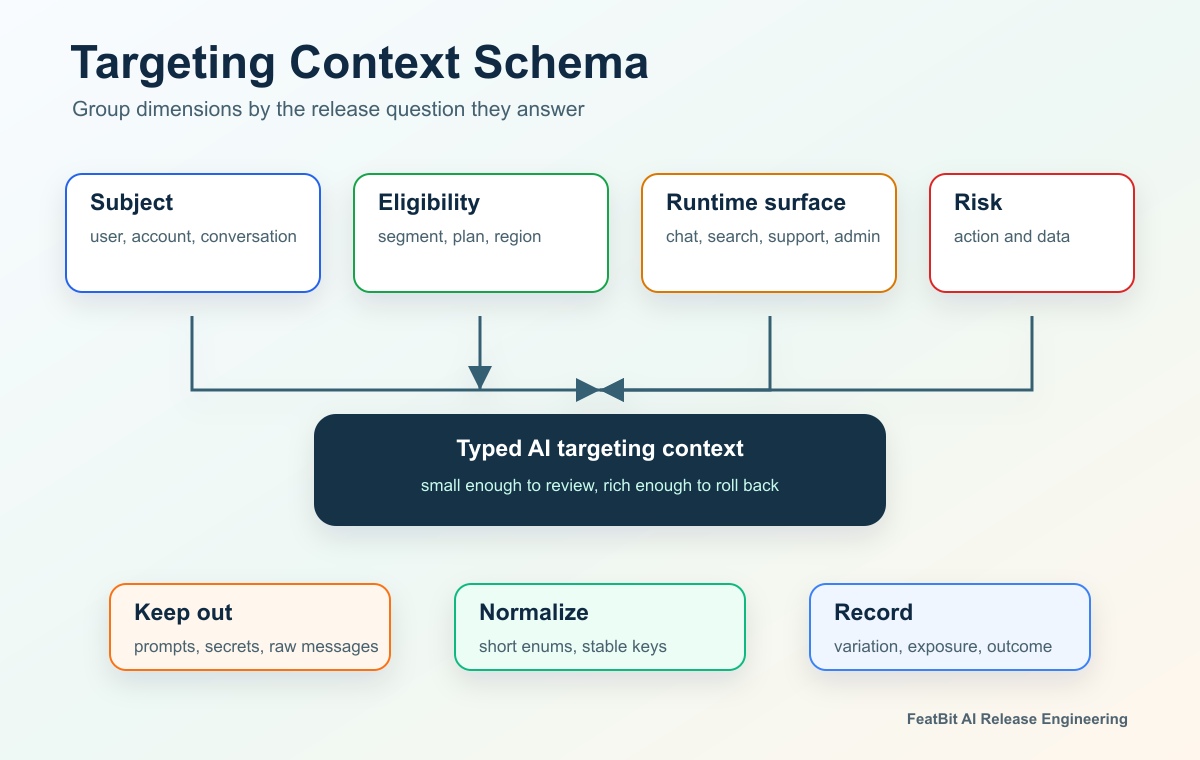
The Short Answer
Use these dimensions as the starting set:
| Dimension | What it answers | Example values |
|---|---|---|
| Identity or assignment key | Which subject should receive a stable decision? | user_123, acct_456, conversation_789 |
| Account or tenant | Which organization owns the experience and policy? | acct_456, workspace_alpha |
| Segment or cohort | Who should see the AI feature first? | internal, beta, design partner, general availability |
| Region or data boundary | Where is the feature allowed to run? | us, eu, apac, blocked |
| Plan or entitlement | Which commercial or permission tier applies? | free, pro, enterprise, regulated account |
| Product surface | Where will the AI behavior appear? | chat, search, support, admin console, internal tool |
| Workflow or task class | What job is the AI feature performing? | summarize, recommend, draft, classify, take action |
| Risk level | How strong should the guardrail be? | low, medium, high, restricted |
| Environment and version | Which release context is being evaluated? | staging, production, app version, SDK version |
| Rollout or experiment unit | What unit should stay consistent? | user, account, conversation, workflow |
FeatBit's companion article on AI targeting by segment, region, tier, and risk level covers the governance matrix. This article is narrower: it helps engineering teams design the evaluation context they pass into feature flags, experiments, and runtime AI controls.
Start With The Release Decision
Every targeting dimension should earn its place by supporting a decision. If a dimension does not change eligibility, variation choice, measurement, rollback, or auditability, it probably does not belong in the flag evaluation context.
| Release decision | Useful dimensions | Why they matter |
|---|---|---|
| Internal preview | environment, segment, employee status, product surface | Keeps early AI behavior away from broad customer traffic. |
| Beta access | account, segment, plan, region, consent or enrollment | Limits exposure to users who are eligible for a preview. |
| Model or prompt rollout | assignment key, workflow, surface, region, app version | Keeps assignment stable and lets teams compare behavior by context. |
| Agent authority | workflow, risk level, role, account policy, approval state | Separates low-risk suggestions from high-impact actions. |
| Regional rollout | region, data boundary, language readiness, support coverage | Allows expansion only where policy and support are ready. |
| Incident rollback | variation, segment, region, account, surface, risk level | Lets operators contain the affected slice instead of disabling everything. |
This is why "targeting dimensions" is a better phrase than "user attributes" for AI features. Some dimensions describe the user, but others describe the account, request, workflow, product surface, runtime environment, or release state.
Choose A Stable Assignment Key
The assignment key is the most important targeting dimension because it decides what stays consistent.
Use a user key when the AI behavior should follow a person across sessions. Examples include a writing assistant style, onboarding coach, recommendation profile, or persistent model route for a logged-in user.
Use an account or tenant key when consistency matters at the organization level. This is common in B2B products where multiple users share workflows, permissions, data boundaries, or account-level contracts.
Use a conversation, session, case, or workflow key when the AI behavior belongs to one bounded task. A support conversation, tutoring session, search refinement loop, or agent run often needs consistency inside the task, not across the user's entire account history.
OpenFeature's evaluation context specification describes a targeting key that identifies the subject of a flag evaluation, and custom fields that can be used for rule-based targeting, overrides, and fractional evaluation. That framing is useful for AI features because the assignment subject is not always the end user.
Use Dimensions That Explain Eligibility
Eligibility dimensions decide whether the AI feature should run at all.
Common eligibility dimensions include:
segment: internal, beta, design partner, customer, excluded.plan: free, pro, enterprise, trial, regulated account.region: user region, account residency, processing region, or blocked region.surface: chat, search, support, admin, API, internal tool.environment: development, staging, production.appVersion: mobile app version, browser extension version, or service version.consentState: opted in, preview accepted, AI terms accepted, not eligible.
Keep these values normalized. Use a short enum where possible instead of free-form strings. If the application sends US, United States, usa, and us, the targeting rule becomes harder to reason about and easier to misconfigure.
GrowthBook's targeting documentation makes a category-wide point that applies here: targeting conditions depend on attributes passed into the SDK, such as user ID, country, plan type, or custom properties. The operational lesson is simple: the targeting UI can only be as clean as the context schema your application provides.
Use Risk Dimensions For Guardrails, Not Personalization
Risk dimensions decide what control should apply after eligibility is clear.
For AI features, useful risk dimensions often include:
| Risk dimension | What it should represent | Better than |
|---|---|---|
actionRisk |
Impact of the AI action | A vague isHighRiskUser label |
dataSensitivity |
Sensitivity of the data involved | Sending raw document text to the flag system |
reversibility |
Whether the AI action can be undone | A generic dangerous boolean |
humanReviewRequired |
Whether approval is required before action | Hidden prompt instructions |
toolAuthority |
Read-only, draft, approval-required write, or direct write | A broad agentEnabled switch |
Risk is usually a property of the workflow and action, not a permanent property of the user. The same customer may safely receive an AI summary but need human approval before an agent updates a billing record. Model the risk level as part of the request context, then enforce the final decision in application code.
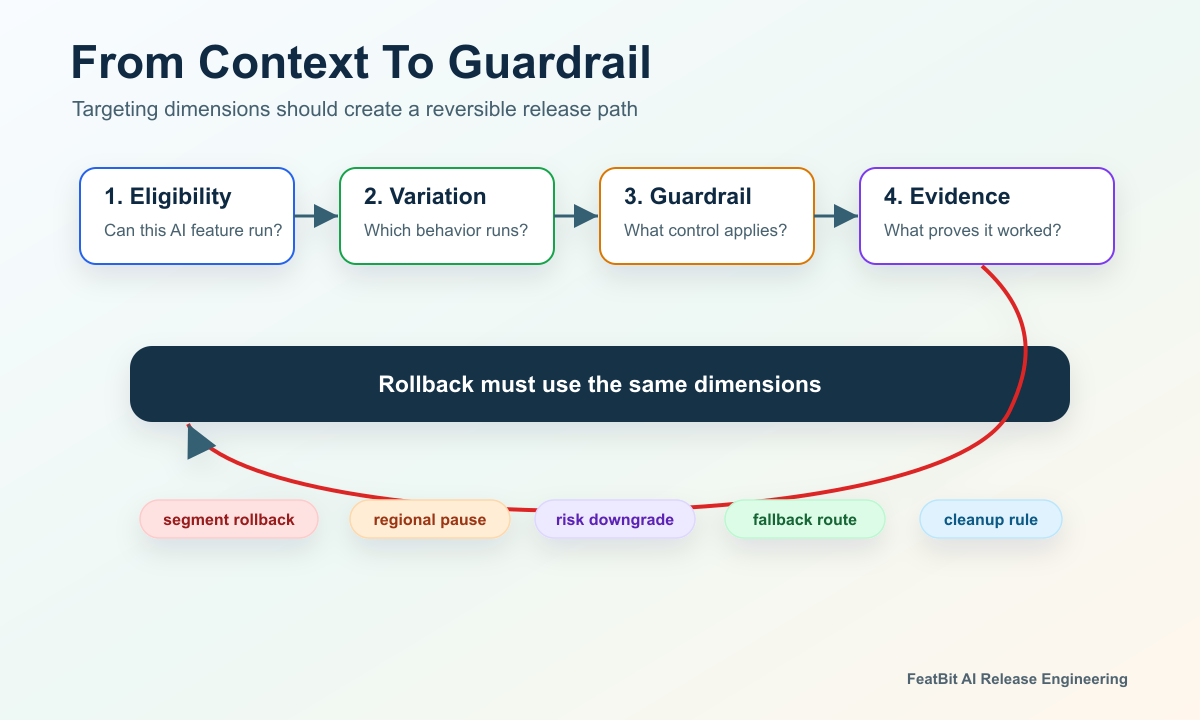
Keep Sensitive Data Out Of Targeting
A targeting context should be useful without becoming a shadow data store.
Avoid putting these values into flag evaluation:
- raw prompts;
- full user messages;
- uploaded documents;
- secrets, API keys, tokens, or provider credentials;
- personally sensitive data that is not needed for the decision;
- model-generated explanations that change on every request;
- large arrays or payloads that make rules slow and hard to audit.
Use derived, low-risk values instead. For example, pass dataSensitivity: "restricted" instead of the document text. Pass workflow: "support_refund_request" instead of the full conversation. Pass toolAuthority: "approval_required_write" instead of a raw tool manifest.
This keeps feature flag targeting focused on release control. The application, policy engine, model gateway, authorization layer, and audit system can still inspect richer data where that is appropriate.
A Practical Context Schema
The schema should be typed, reviewed, and stable enough that rule changes do not depend on hidden application behavior.
type AiFeatureRisk = 'low' | 'medium' | 'high' | 'restricted';

type AiFeatureTargetingContext = {
  key: string;
  assignmentUnit: 'user' | 'account' | 'conversation' | 'workflow';
  userId?: string;
  accountId?: string;
  conversationId?: string;
  segment: 'internal' | 'beta' | 'design_partner' | 'general';
  region: 'us' | 'eu' | 'apac' | 'blocked';
  plan: 'free' | 'pro' | 'enterprise';
  surface: 'chat' | 'search' | 'support' | 'admin' | 'internal_tool';
  workflow: 'summarize' | 'recommend' | 'draft' | 'classify' | 'act';
  actionRisk: AiFeatureRisk;
  toolAuthority: 'none' | 'read_only' | 'draft' | 'approval_required_write';
  environment: 'development' | 'staging' | 'production';
  appVersion?: string;
};
Then evaluate the flag close to the AI behavior:
const fallbackPolicy = {
  mode: 'off',
  modelRoute: 'safe_baseline',
  toolAuthority: 'none',
};

const policy = await flags.jsonVariation(
  'support_ai_assistant_policy',
  aiTargetingContext,
  fallbackPolicy
);
The flag should return a named policy or variation. The application should validate that policy before it assembles a prompt, chooses a model route, enables a tool, records exposure, or sends the response.
Connect Dimensions To Exposure Evidence
The same dimensions that control targeting should also help explain the result.
At minimum, record:
- flag key;
- variation or policy mode;
- assignment unit and assignment key;
- segment, region, plan, surface, workflow, and risk level;
- exposure timestamp;
- model route, prompt profile, retrieval profile, or tool mode if those are part of the variation;
- outcome and guardrail events that use the same identifiers.
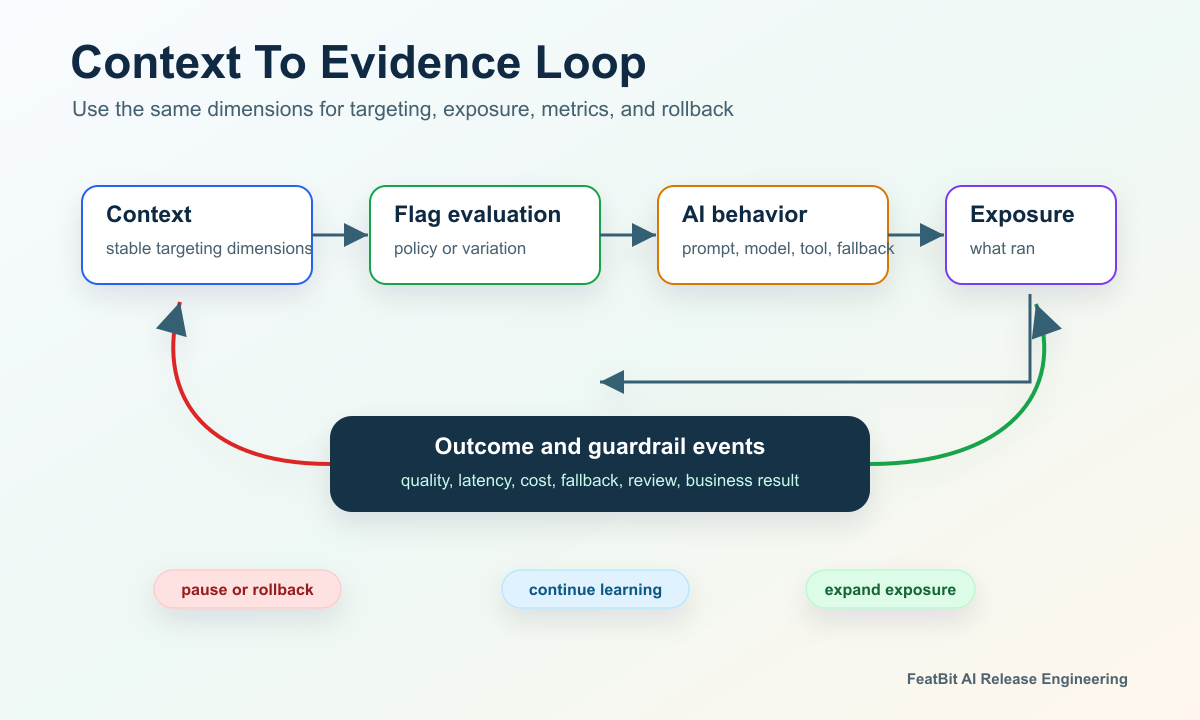
This prevents a common AI release failure: the system targets by one dimension, exposes by another, and measures by a third. If a support assistant is assigned by conversation but outcomes are reported only by user, the team may struggle to decide whether the treatment helped the conversation-level job.
FeatBit's Track Insights API can report feature flag evaluation events and custom metric events. That matters for AI features because the exposure record should join the served variation to quality, latency, cost, fallback, review, or business outcome events.
How FeatBit Fits
FeatBit is useful here because AI targeting dimensions map directly to feature flag primitives:
- user attributes carry built-in and custom context;
- targeting rules evaluate conditions over those attributes;
- percentage rollouts expand exposure gradually;
- flag insights help teams inspect variation delivery;
- audit logs help reconstruct control-plane changes;
- server-side evaluation for AI feature flags keeps sensitive AI decisions out of browser-exposed code.
Use FeatBit as the release-control layer. Keep hard authorization, data access checks, prompt assembly, tool execution, and model safety enforcement in the application services that own those responsibilities.
Common Mistakes
| Mistake | Why it hurts AI releases | Better pattern |
|---|---|---|
| Passing every user attribute | Rules become hard to review and may expose unnecessary data. | Pass the smallest stable context needed for release control. |
| Using only user ID | The model route may need account, workflow, region, or risk context. | Choose dimensions based on the release decision. |
| Mixing assignment units | Experiments and rollouts become hard to interpret. | Pick user, account, conversation, or workflow and keep it consistent. |
| Putting prompts in flag values or context | Sensitive or bulky AI data moves into the control plane. | Store reviewed profile names or safe configuration IDs. |
| Treating risk as personalization | Guardrails become user labels instead of action controls. | Model risk as workflow, action, data, and reversibility context. |
| Evaluating client-side for sensitive AI controls | Users may see or influence controls that belong on the server. | Evaluate high-risk AI flags server-side. |
Starting Checklist
Before creating targeting rules for an AI feature, confirm:
- The release decision is named in plain language.
- The assignment unit matches the user experience and metric.
- Eligibility dimensions are normalized and documented.
- Risk dimensions describe the workflow or action, not only the user.
- Sensitive payloads, prompts, and secrets are excluded from targeting.
- The fallback policy is safe and tested.
- Exposure and outcome events use the same flag key, variation, and assignment unit.
- Operators can reduce exposure by segment, region, account, surface, or risk level.
- The flag has an owner, review date, and cleanup or permanence rule.
The bottom line: AI features should use targeting dimensions that make release decisions explainable, measurable, and reversible. Start with a stable assignment key, add only the dimensions that change eligibility or guardrails, keep sensitive AI payloads outside flag evaluation, and connect every served variation to the evidence the team will use to expand, pause, or roll back.
Source Notes
- FeatBit implementation context comes from the official docs for user attributes, targeting rules, percentage rollouts, flag insights, audit logs, and Track Insights API.
- OpenFeature's evaluation context specification is used for vendor-neutral context concepts such as targeting key, custom fields, and context levels.
- Category references: LaunchDarkly's flag targeting documentation, GrowthBook's targeting conditions documentation, Unleash's activation strategies documentation, and Statsig's feature gate rule criteria documentation show common industry patterns around contexts, attributes, constraints, and conditions. They are used as category context, not as vendor rankings.
- Related FeatBit reading: AI targeting by segment, region, tier, and risk level, what AI configuration can one feature flag control, local evaluation for model gating, and should AI experiments randomize by user or conversation.
Image And Open Graph Notes
- Use
cover.pngas the Open Graph image because it summarizes AI targeting as a context-to-decision schema. - Use
context-schema-map.pngnear the opening because it shows the recommended targeting dimensions in one view. - Use
evaluation-decision-ladder.pngin the guardrail section because it connects dimensions to eligibility, variation choice, evidence, and rollback. - Use
context-to-evidence-loop.pngin the exposure evidence section because it shows how targeting context becomes measurable release evidence.