
How Drift Monitoring and Feature Flags Work Together in AI Rollouts
Drift monitoring tells an AI team that production behavior is changing. Feature flags give the team a controlled way to decide what to do about that change.
The two capabilities solve different parts of the same operational problem. Monitoring watches input distribution, output quality, latency, cost, fallback rate, user feedback, or other rollout-health signals. Feature flags control exposure: who receives a prompt, model, retrieval profile, guardrail mode, tool policy, or fallback behavior. When they share the same flag and variation labels, a drift alert can become a release decision instead of a dashboard surprise.
For FeatBit readers, the practical pattern is: detect drift, join the signal to the variation that caused it, reduce or redirect exposure with a flag, then decide whether to continue, pause, roll back, or investigate.
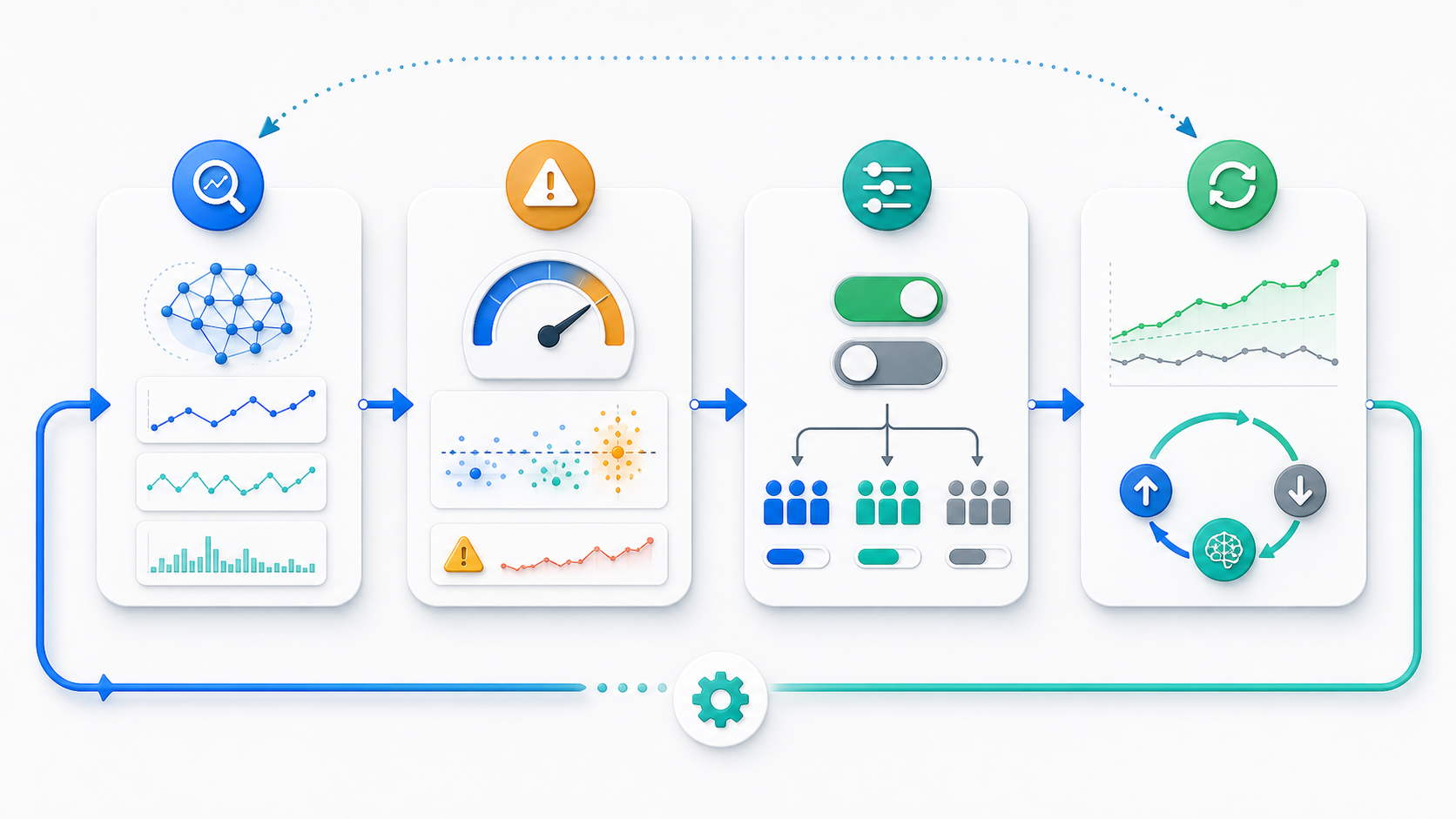
Drift Monitoring Detects Change, Flags Control Exposure
Drift is a signal that the assumptions behind an AI behavior may no longer match production reality. It can appear in several ways:
| Drift signal | What changed | Why the flag matters |
|---|---|---|
| Input drift | User questions, account mix, language mix, document types, or request classes changed | Target or exclude the affected segment while the team checks impact |
| Quality drift | Review scores, answer acceptance, corrections, unsafe-output reviews, or complaints changed | Roll back the prompt, model route, retrieval profile, or guardrail mode that is causing the signal |
| Latency drift | Time to first token, p95 latency, timeout rate, or queue depth changed | Reduce exposure, route to a faster profile, or activate fallback for high-risk cohorts |
| Cost drift | Token usage, provider cost, retry rate, or tool-call volume changed | Limit expensive behavior to eligible segments or switch low-value traffic to a cheaper profile |
| Assignment drift | Metrics no longer match the variation that actually ran | Fix exposure tracking before making a release decision |
Google Cloud's model monitoring documentation describes training-serving skew as production feature distributions moving away from training data, and inference drift as production feature distributions changing over time. It also notes that drift alerts can be sent when a configured threshold is exceeded. That is useful detection, but it is not the same as a release action.
A feature flag turns the response into an operational control:
- keep the candidate behavior on for internal users while disabling customer exposure;
- reduce rollout from 20 percent to 5 percent while the team investigates;
- target rollback to one region, plan, tenant, language, workflow, or request class;
- switch a JSON variation from
reasoning_profile_v2tosafe_fallback_v1; - preserve an audit trail of the exposure decision.
This is the same operating idea behind FeatBit's AI control layer: the AI behavior is a runtime control surface, not only a deployed artifact.
Why Monitoring Alone Is Not Enough
A drift dashboard can show that something changed. It may not answer the release owner's next question: which production decision caused this signal, and what can we change right now?
The gap appears when a team ships AI behavior through ordinary config, environment variables, or redeploys:
- A prompt change ships to all traffic.
- A monitoring system detects lower answer quality for one segment.
- The team cannot tell whether the issue came from prompt text, model route, retrieval changes, traffic mix, or a downstream data source.
- Rollback requires code changes, redeployment, or manual incident coordination.
Feature flags do not replace observability, evals, or model monitoring. They add the missing control plane. The flag key and variation become the join key between exposure and evidence.
OpenFeature's evaluation context concept is useful here because it describes contextual data used for dynamic flag evaluation, including a targeting key for deterministic percentage rollout. In an AI rollout, that context might include account, region, plan, language, workflow, risk tier, or assignment unit. The exact fields should be stable, low-risk, and appropriate for the decision.
A Practical Drift-To-Flag Workflow
Use this loop when a new AI behavior is being introduced through a feature flag.
1. Name The Control Surface
Create a flag that describes the production behavior being controlled. Good AI rollout flags are usually about a decision point, not a vague feature name:
support-answer-policy
ticket-summary-model-route
retrieval-profile-for-enterprise-search
agent-tool-policy-for-refunds
The variations should map to behavior the application can execute:
{
  "variation": "citation_first_v3",
  "promptProfile": "support_citation_first_v3",
  "modelRoute": "balanced_support",
  "retrievalProfile": "verified_docs_rerank_v2",
  "fallback": "baseline_support_v2"
}
This makes rollback concrete. The team is not turning off "AI." It is moving a specific audience from one named behavior to another.
2. Attach Flag Labels To Every Relevant Signal
Drift monitoring becomes more actionable when each signal carries release context:
{
  "event": "ai_rollout_health_signal",
  "flagKey": "support-answer-policy",
  "variation": "citation_first_v3",
  "assignmentUnit": "account",
  "unitId": "acct_1842",
  "surface": "support_chat",
  "region": "us",
  "qualityScore": 0.71,
  "latencyMs": 2360,
  "inputTokens": 1840,
  "fallbackUsed": false
}
That event shape is only an example. The important rule is that monitoring, product analytics, evals, and traces should preserve the flag key, variation, and assignment unit that selected the AI behavior.
FeatBit's Track Insights API, flag insights, targeting rules, and percentage rollouts are the FeatBit-side primitives that support this pattern. External observability tools can own traces, logs, model metrics, and alerting. FeatBit owns the exposure decision.
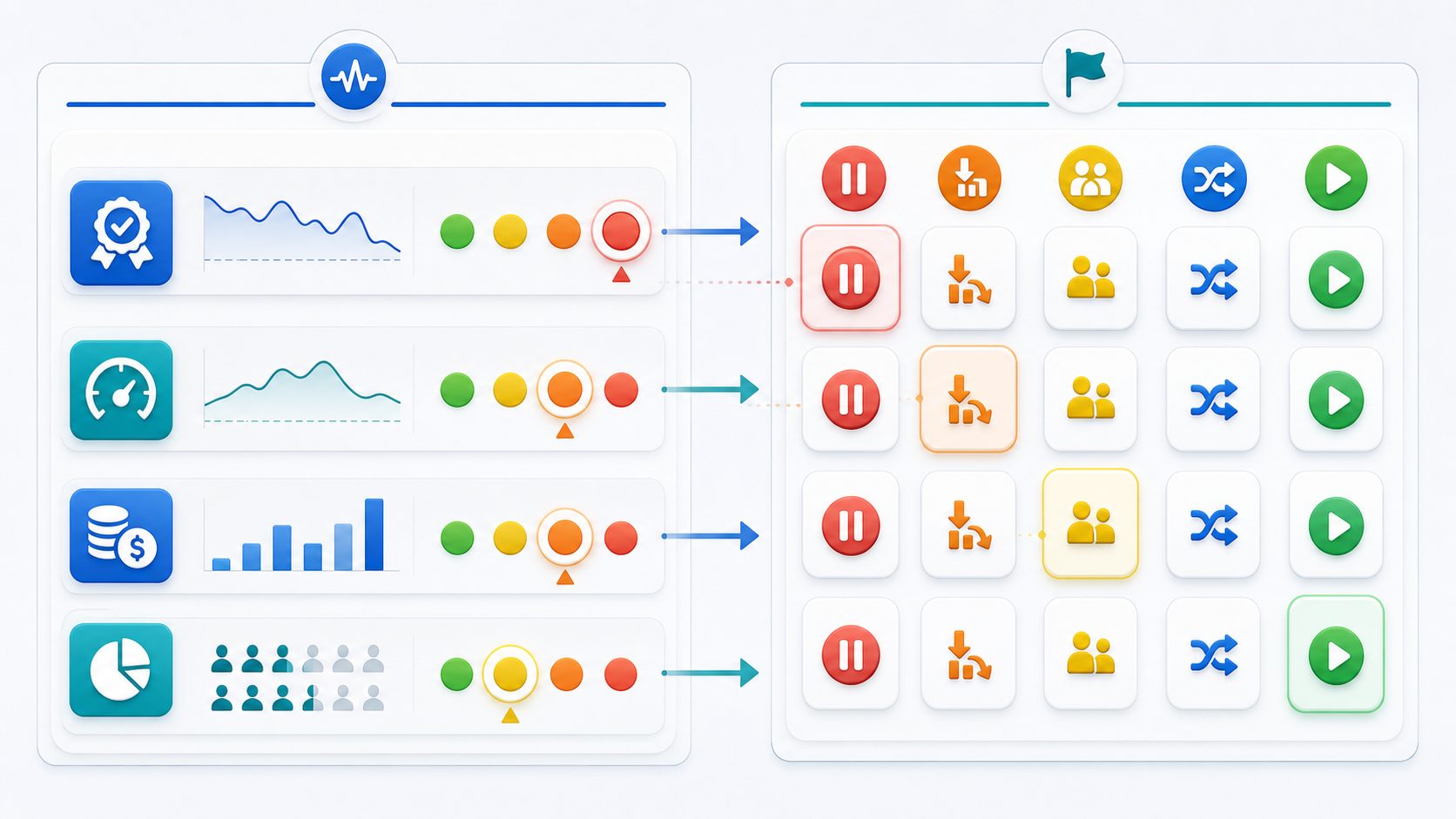
3. Define Thresholds As Actions, Not Only Alerts
Do not stop at "alert when quality drops." Write the action rule before the rollout expands.
| Signal condition | Feature flag action | Decision state |
|---|---|---|
| Mild quality dip in one segment | Pause expansion and keep the segment on the baseline variation | Investigate |
| Latency breach for high-value accounts | Target those accounts to a faster model route | Contain |
| Cost per successful task rises above budget | Reduce rollout percentage or route low-value traffic to a cheaper profile | Limit |
| Unsafe-output review rate crosses the stop threshold | Roll back the candidate variation for all eligible traffic | Rollback candidate |
| Metrics are healthy for the full observation window | Increase exposure or promote the candidate | Continue |
This turns monitoring from passive observation into a release control system. FeatBit's measurement design guidance uses the same principle: define the primary metric, guardrails, and decision rule before exposure reaches broad production traffic.
4. Contain First, Diagnose Second
When drift looks risky, the first action is containment. Diagnosis can come after the blast radius is reduced.
Useful flag actions include:
- set the default variation back to the known baseline;
- reduce the candidate rollout percentage;
- exclude the affected segment with a targeting rule;
- route only high-risk traffic to deterministic fallback;
- disable a tool policy or agent capability while leaving safer behavior online;
- keep internal users on the candidate so engineers can reproduce the issue.
This is why FeatBit separates deployment from release. A team can ship code once, then adjust exposure while production evidence changes. The same idea appears in FeatBit's safe AI deployment and AI rollback strategy guidance.
5. Preserve The Decision Record
Drift monitoring and feature flags should leave enough evidence for a future reviewer to understand what happened:
- what drift signal appeared;
- which flag and variation were live;
- which audience was exposed;
- which action was taken;
- who approved or executed the change;
- what evidence was used to continue, pause, roll back, or promote;
- whether the flag should be cleaned up after the decision.
NIST's AI Risk Management Framework frames AI risk management around Govern, Map, Measure, and Manage functions. In practical release work, flags help make the "manage" part concrete: the team can change exposure while preserving the measured evidence that justified the action.
What Should Trigger A Flag Action
Not every drift signal should flip a flag. Some signals are noisy. Some indicate missing instrumentation. Some require retraining, prompt repair, data pipeline fixes, or product design changes rather than exposure changes.
Use feature flag action when at least one of these is true:
- the drift is tied to a recently changed prompt, model, retrieval profile, guardrail, agent tool policy, or AI config;
- the affected audience can be identified through stable targeting context;
- a baseline or fallback variation exists;
- the behavior can be contained without making the product worse for everyone;
- the team has agreed on thresholds that separate continue, pause, rollback candidate, and investigate states.
Do not use a flag action as a substitute for fixing a broken model, broken data pipeline, or unsafe workflow. Use the flag to reduce risk while the fix is made.
How This Works In FeatBit
FeatBit is not an AI monitoring product or model observability platform. It is the runtime release-control layer that works with those systems.
A FeatBit-based drift response can look like this:
- The application evaluates
support-answer-policyon the server before calling the model. - The selected variation decides the prompt profile, model route, retrieval profile, and fallback.
- The application sends evaluation and health events with the same flag key and variation.
- Drift monitoring detects that
citation_first_v3has higher latency and lower accepted-answer rate for enterprise accounts in one region. - The release owner updates FeatBit targeting to route that segment back to
baseline_support_v2. - The team investigates retrieval logs and eval samples while the rest of the rollout remains stable.
- After the fix, the team reopens exposure to the affected segment gradually.
This is different from a generic "monitor AI and alert people" workflow. The flag is the response lever. It lets the team change who receives the behavior without a redeploy.
For architecture details, see FeatBit's guide to local evaluation for model gating. For broader signal design, see AI Insights for feature-flagged AI releases.
Common Mistakes
Monitoring drift without exposure labels. If a dashboard cannot tell which flag variation ran, it cannot support a confident rollout decision.
Treating cost as a standalone drift signal. Lower cost can be good, but not if answer quality, retry rate, support escalation, or user trust gets worse.
Changing too many variables at once. If a variation changes prompt, model, retrieval, temperature, and tool policy together, name it as a bundled policy. Do not claim the model alone caused the result.
Using per-request randomness for rollout. AI users often experience multi-turn sessions. Choose an assignment unit, such as user, account, conversation, or workflow, that matches the metric.
Rolling forward when instrumentation is broken. Missing exposure events, mismatched variation names, or inconsistent assignment units should pause expansion until measurement is trustworthy.
Leaving the emergency flag forever. If the drift response proves the candidate is unsafe, remove the losing path or convert the flag into an intentional long-lived operational control with an owner and review rule.
Starting Checklist
Before connecting drift monitoring to feature flags, answer these questions:
- What AI behavior does the flag control?
- What is the safe baseline or fallback variation?
- What assignment unit keeps exposure stable?
- Which targeting attributes are safe and necessary?
- Which drift signals matter for this rollout: input mix, quality, latency, cost, safety, fallback, or product outcome?
- Which signal should pause expansion?
- Which signal should trigger targeted rollback?
- Can the team reduce exposure without redeploying?
- Can monitoring data be joined to the flag key, variation, audience, and rollout stage?
- Who owns the decision and cleanup?
The answer to "How do drift monitoring and feature flags work together?" is operational: monitoring detects that AI behavior or traffic has changed; feature flags let the team adjust exposure, switch fallback behavior, preserve attribution, and make a release decision before the drift becomes a broad incident.
Source Notes
- Drift terminology: Google Cloud's model monitoring overview and feature skew and drift documentation describe skew and drift detection for production model inputs. These sources support the monitoring concepts, not FeatBit product claims.
- Flagging context: OpenFeature's evaluation context documentation provides vendor-neutral language for contextual flag evaluation and targeting keys.
- AI risk context: NIST's AI Risk Management Framework is used for the general Govern, Map, Measure, and Manage framing. This article does not make a compliance claim.
- FeatBit implementation context: FeatBit docs for targeting rules, percentage rollouts, flag insights, Track Insights API, and flag triggers support the release-control workflow described here.
Image And Open Graph Notes
- Use
cover.pngas the Open Graph image because it shows monitoring signals and feature flag rollout controls around one AI behavior. - Use
drift-to-flag-loop.pngnear the opening because it visually explains the detect, decide, act, and learn loop. - Use
signal-action-matrix.pngin the threshold section because it maps rollout-health signals to feature flag actions.