
Deploy Once, Release AI-Built Features Independently
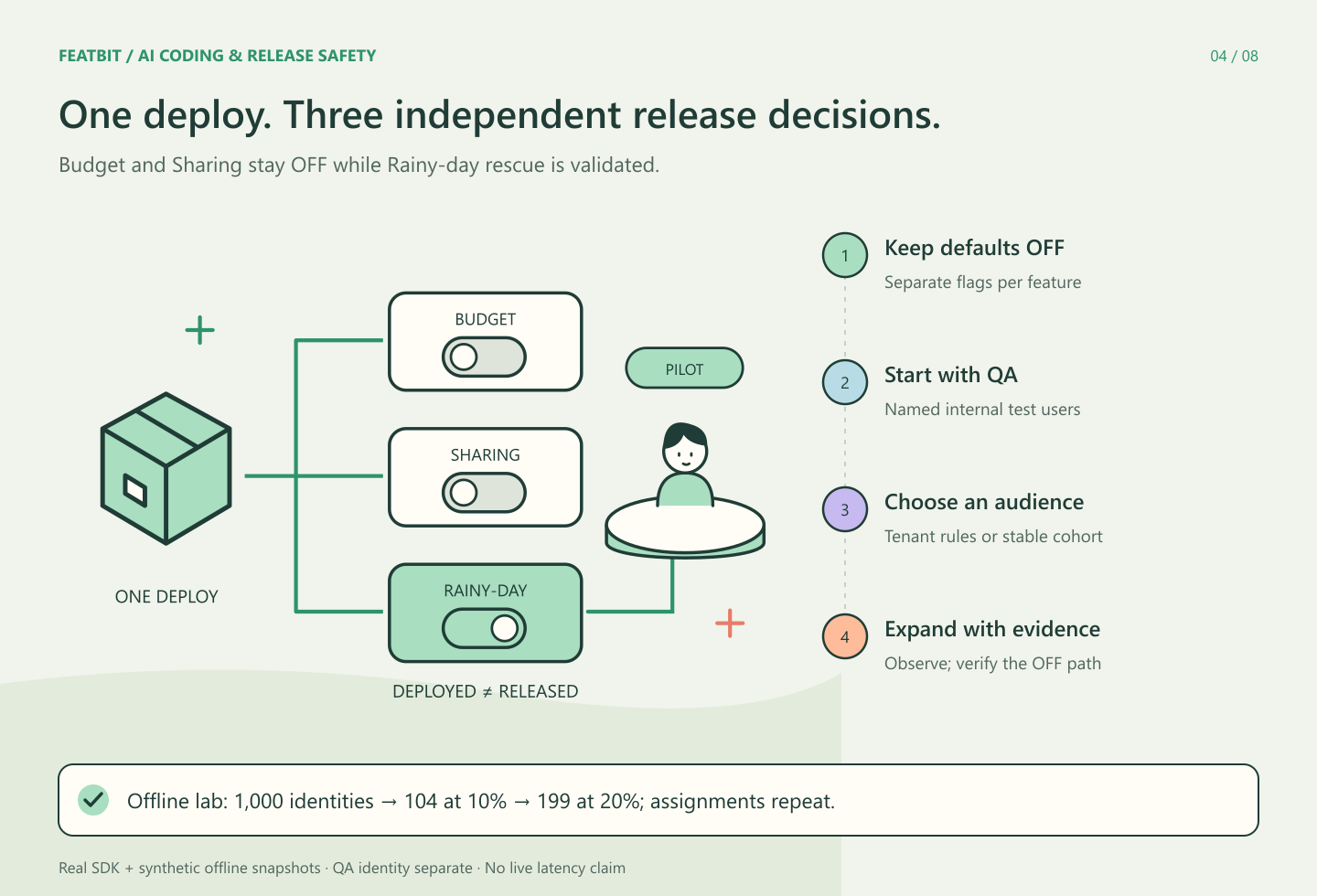
Deploy the code for several AI-built features together, then release each behavior through its own runtime boundary. A feature can move from internal validation to a customer group or a gradual rollout while the other features remain unavailable.
This works when the implementation is compatible while disabled, every new effect is controlled, and a stable path remains reachable. A flag around a button alone does not provide that isolation.
The tutorial uses three new travel features: Budget, Sharing, and Rainy-day rescue. All three are deployed; only Rainy-day rescue is selected for release. You can download the TypeScript lab and reproduce the recorded results.
The scenario and what was verified
Rainy-day rescue suggests indoor alternatives to a standard itinerary. Budget and Sharing are separate features with their own default-OFF decisions. The normal itinerary remains usable without indoor alternatives.
The lab runs the actual @featbit/node-server-sdk@1.3.0 against synthetic offline bootstrap data. It creates a fresh offline client for each configuration snapshot. It does not modify a hosted environment, send analytics, or measure live update latency. Its writes and notifications are inert local arrays.
This distinction makes the example reproducible without presenting a simulated product screen as proof of a production release. The machine-readable verification record documents the local checks and their output.
Give each feature an explicit contract
Register keys, defaults, owners, and cleanup conditions before wiring exposure. In the standalone package, the registry is:
export const featBitFlags = {
  budget: { key: "travel-budget", fallback: false },
  sharing: { key: "travel-sharing", fallback: false },
  rainyDay: { key: "travel-rainy-day", fallback: false },
} as const;
The actual website keeps its registry in flags.ts, evaluation in server.ts, and identity helpers in user.ts. The downloadable lab follows that separation without adding demo flags to the website's production environment.
For Rainy-day rescue, write down what ON permits: loading indoor alternatives, saving an indoor plan, and issuing the related notification. Define OFF as the existing standard itinerary without those new operations. Do not describe it as reverting every historical consequence.
If Sharing depends on Rainy-day rescue's data, they are not yet operationally independent. Either remove that dependency, specify a compatible state matrix, or release the dependent behaviors together. The same reasoning applies to shared schemas and initialization code that executes before a flag check.
Evaluate once, then pass the decision to the behavior
The server evaluates each registered flag once for a request, with the same stable user identity used for targeting. UI components receive values rather than SDK credentials.
The business boundary looks like this shortened excerpt from travel.ts:
export function serveItinerary(flags: TravelFlags, state: LabState, broken = false) {
  const result = { itinerary: "standard", budget: flags.budget, sharing: flags.sharing };
  if (!flags.rainyDay) return { ...result, indoor: [] as string[] };

  state.indoorRequests += 1;
  if (broken) throw new Error("Injected indoor-provider failure");
  return { ...result, indoor: ["Museum", "Covered market"] };
}
The guard precedes the new provider call. The save and notification example has its own guarded entry point using the request's decision. A production job should obtain a decision at its defined admission or execution boundary; it should not assume a browser's older decision is current.
The lab verifies default behavior with no configured client, a thrown evaluator, and an unknown flag. That does not simulate a real network partition: an already initialized live SDK may continue evaluating cached rules rather than switching every flag to its fallback. Consult the Node SDK documentation for the actual runtime model.
Choose an audience strategy
Internal users, a selected customer group, and percentage exposure are different tools. A feature does not have to traverse all three in a fixed order.
| Snapshot | Rainy-day rescue audience | Budget / Sharing | Evidence to collect before changing exposure |
|---|---|---|---|
| Deployed, not released | Nobody | OFF / OFF | Both stable and new paths build; disabled behavior is compatible |
| Internal | The named QA identity | OFF / OFF | Acceptance criteria, tenant boundaries, dependency behavior |
| Selected customer | Northstar and Travel advisor | OFF / OFF | That group's workflow and support feedback |
| Canary | Stable 10% rule, plus the explicit QA target | OFF / OFF | Errors, latency, side effects, missing telemetry |
| Expanded | Stable 20% rule, plus QA | OFF / OFF | Healthy evidence from the agreed observation window |
| Contained | Nobody after the OFF decision is applied | OFF / OFF | New-path calls and effects stop as intended |
Northstar is a fictional company used in the fixture. The rule requires both the company and role; another Northstar user with the wrong role is excluded. In a real application, obtain targeting attributes from trusted server context. Attributes used for release selection are not a substitute for authorization.
For the 1,000 synthetic identities cohort-0 through cohort-999, the recorded 10% rule admitted 104, and the 20% rule admitted 199. The sample excludes the separate QA identity. Repeating the 10% evaluation produced the same set, and that set remained within the 20% set.
A percentage is a deterministic bucketing rule, not a promise that every finite population contains exactly that percentage. Keep the same flag key, identity, and bucketing attribute when interpreting cohort continuity.
Inject a failure and verify containment
The lab's failure flag deliberately makes the indoor provider path throw. With Rainy-day rescue ON, the failure is observable. Replaying the OFF configuration makes a new request return the standard itinerary without calling that provider, even while the injected failure remains present.
Budget and Sharing stay OFF throughout. The exercise verifies that no new indoor request, save, or notification starts through the guarded OFF path. It also checks the harder boundary: a request that already captured ON can still complete a save later, and previous saves remain present.
In production, account for SDK synchronization, long-lived clients, queues, and work already executing. Define how to drain or cancel work and how to repair prior effects. The rollback and hotfix guide turns those questions into an incident procedure.
Run the example and adapt it
Extract the package into a fresh folder with a supported Node.js runtime, then run:
npm install
npm run verify
The verification covers 16 groups of checks across release behavior, data contracts, event validation, and cost arithmetic. It is local execution evidence, not a customer benchmark.
To adapt the pattern to your environment, use the current FeatBit SDK connection guide. Register the flags in a dedicated environment, configure a long-lived server client, rehearse targeting and OFF in staging, and connect actual health signals. Configure and verify any automated response separately; the lab's snapshots do not implement a live automatic rollback service.
Decide separately whether the feature is valuable
Healthy behavior supports continued exposure. It does not establish that indoor suggestions improve the product. That requires a hypothesis, a meaningful outcome, and interpretable evidence, covered in measuring an AI-built feature's business impact.
For the broader rollout sequence, see canary, experiment, and full-release decisions. For the production operating model, start with FeatBit feature release management. The immediate objective is precise: deploy compatible code, expose the chosen behavior, and keep a verified way to control its next execution.