
Remote Variables for AI Features: Control Prompts, Models, and Rollouts Without Redeploys
Remote variables are runtime values attached to a feature flag, remote config entry, or flag variation. Instead of hard-coding a prompt version, model route, retrieval profile, token budget, guardrail mode, or rollout setting, the application evaluates a control at request time and receives the approved value for that user, account, workflow, or traffic slice.
For AI features, the useful question is not only "can this value change remotely?" The safer question is: "Can this variable be targeted, measured, rolled back, audited, and cleaned up like a release decision?"
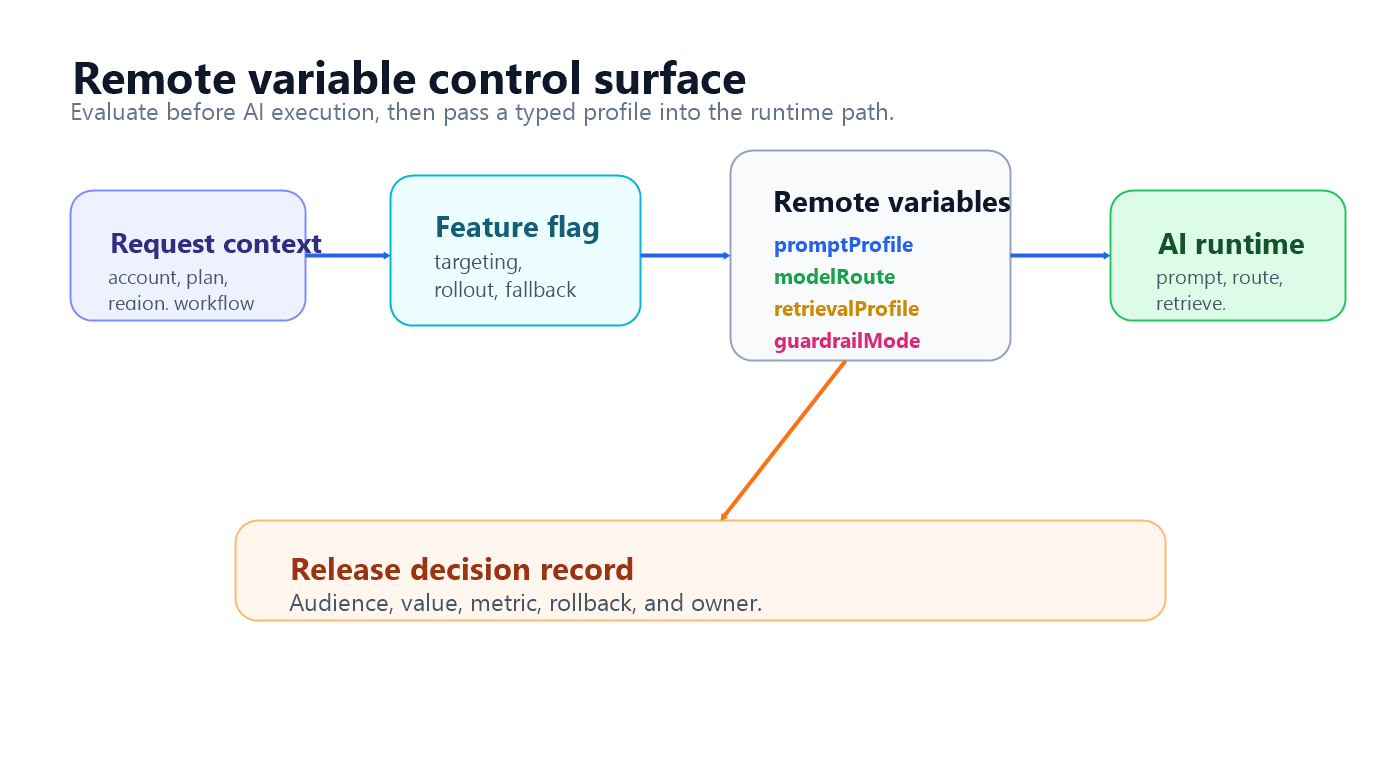
What Remote Variables Mean
The term "remote variables" usually appears around feature flags and remote config. Optimizely's Feature Experimentation documentation uses the term flag variables and describes them as values grouped with a flag variation so teams can update behavior remotely instead of redeploying application code. Its image carousel example shows variables for button text, color, URLs, and layout values that change based on the variation a user receives.
The same pattern applies to AI systems, but the variables are more operationally sensitive. A remote variable might select:
| AI surface | Example remote variable | Why it matters |
|---|---|---|
| Prompt profile | support_citation_first_v4 |
Changes answer structure, tone, refusal behavior, or citation requirements. |
| Model route | balanced_support_model |
Changes quality, latency, cost, provider dependency, or failure mode. |
| Retrieval profile | verified_docs_rerank_v2 |
Changes grounding, source scope, latency, and data-boundary assumptions. |
| Guardrail mode | strict_review_thresholds |
Changes blocking, escalation, human review, or fallback behavior. |
| Token and timeout budget | enterprise_support_budget |
Changes cost, reliability, and truncation risk. |
| Fallback path | human_escalation |
Defines what happens when the AI path is slow, unsafe, or uncertain. |
| Rollout stage | internal_canary |
Controls who sees the candidate behavior first. |
FeatBit's remote config documentation describes the general pattern: non-boolean values can alter application behavior in real time when an on/off flag is not enough. FeatBit's create flag variations documentation covers boolean and multivariate variations, including string, number, and JSON values.
Remote Variables Are Not Just Environment Variables
Environment variables are deployment-time configuration. They are good for stable infrastructure settings, secrets pointers, service endpoints, and defaults that should move with an environment.
Remote variables are runtime release controls. They are useful when the value should vary by audience, rollout stage, experiment assignment, or incident state.
| Question | Environment variable | Remote variable |
|---|---|---|
| When is it changed? | During deployment or environment management. | During a controlled runtime release. |
| Who receives the value? | Usually the whole deployed environment. | A targeted user, account, segment, region, plan, workflow, or percentage. |
| What evidence is available? | Deployment logs and application telemetry. | Variation exposure, rollout stage, metrics, audit trail, and rollback record. |
| How does rollback work? | Reconfigure and redeploy or restart. | Return the affected audience to the baseline variation. |
| Best use | Infrastructure default or stable application setting. | AI behavior that needs targeting, measurement, or fast reversal. |
That difference is why AI teams should be careful with the phrase "remote variable." A remote prompt value without targeting, validation, observability, and rollback is just live editing. A remote variable behind a feature flag can become release-decision infrastructure.
What Belongs Behind Remote Variables For AI
Use remote variables when a value changes product behavior and the team needs control over exposure.
Good candidates include:
- prompt or instruction profile identifiers;
- model route, provider profile, reasoning mode, or cost tier;
- retrieval source, index, reranker, memory scope, or max chunk count;
- guardrail threshold, escalation rule, or human-review mode;
- token budget, timeout budget, retry policy, or fallback path;
- agent tool mode, such as disabled, read-only, draft, approval-required, or write-enabled;
- experiment variant names and rollout stage labels.
Keep values in code when they are stable invariants, schemas, security boundaries, hard compliance rules, or low-level implementation details that should not be tuned live. Remote variables should reduce release risk, not create a hidden production control panel.
Use Typed Profiles Instead Of Loose Knobs
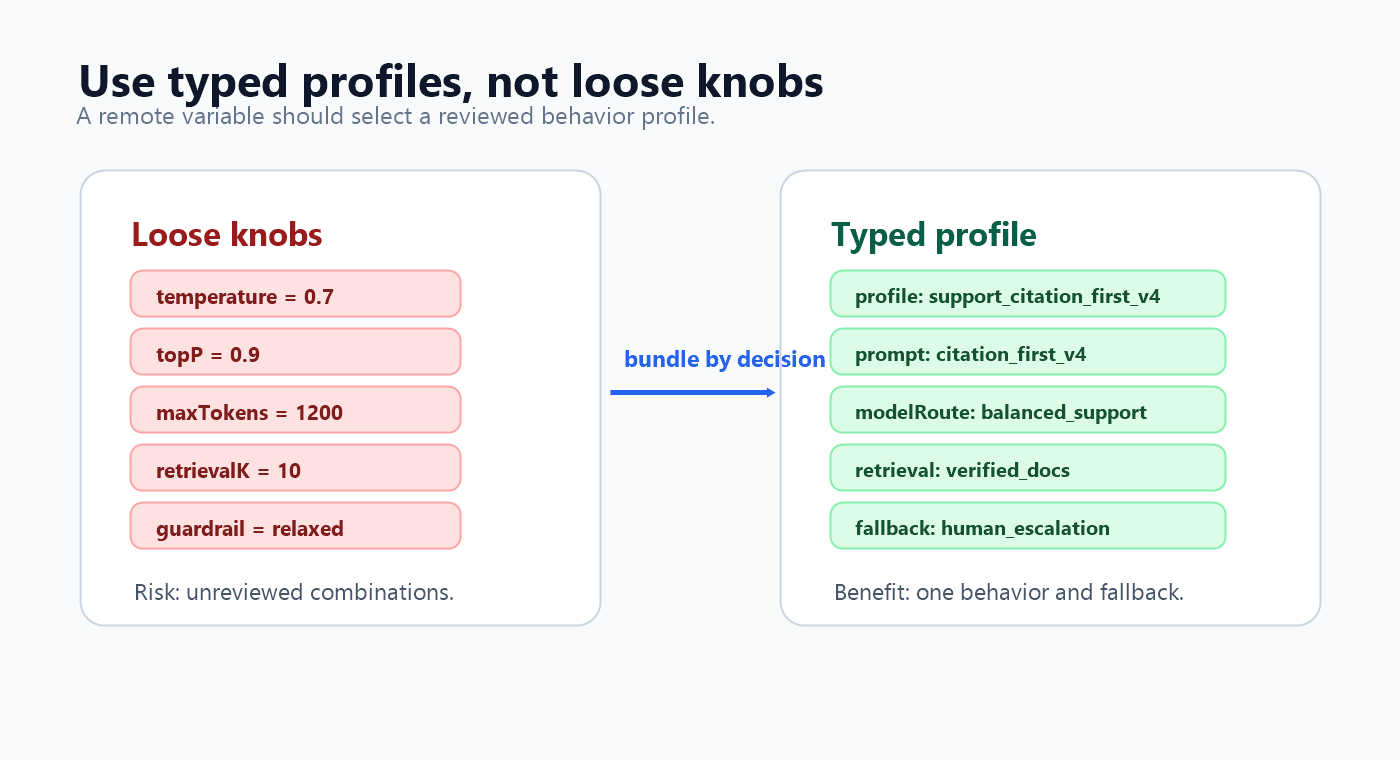
The safest pattern is usually one typed profile variable rather than many independent variables.
Avoid this:
support_prompt = "citation_first_v4"
support_model = "model_b"
support_temperature = 0.7
support_max_tokens = 1200
support_retrieval_k = 10
support_guardrail = "relaxed"
Each value may look reasonable, but the combination may never have been reviewed. For AI behavior, a better pattern is a named profile that reviewers can approve as one release decision.
{
  "profile": "support_citation_first_v4",
  "owner": "support-platform",
  "promptProfile": "citation_first_v4",
  "modelRoute": "balanced_support",
  "retrieval": {
    "sourceScope": "verified_docs",
    "maxChunks": 6,
    "reranker": "baseline"
  },
  "guardrails": {
    "mode": "standard",
    "fallback": "human_escalation"
  },
  "budgets": {
    "timeoutMs": 9000,
    "maxOutputTokens": 900
  }
}
The profile still gives the application remote variables. The difference is that the variables are packaged as a reviewed behavior, not exposed as unrelated knobs.
A Runtime Workflow For Remote Variables
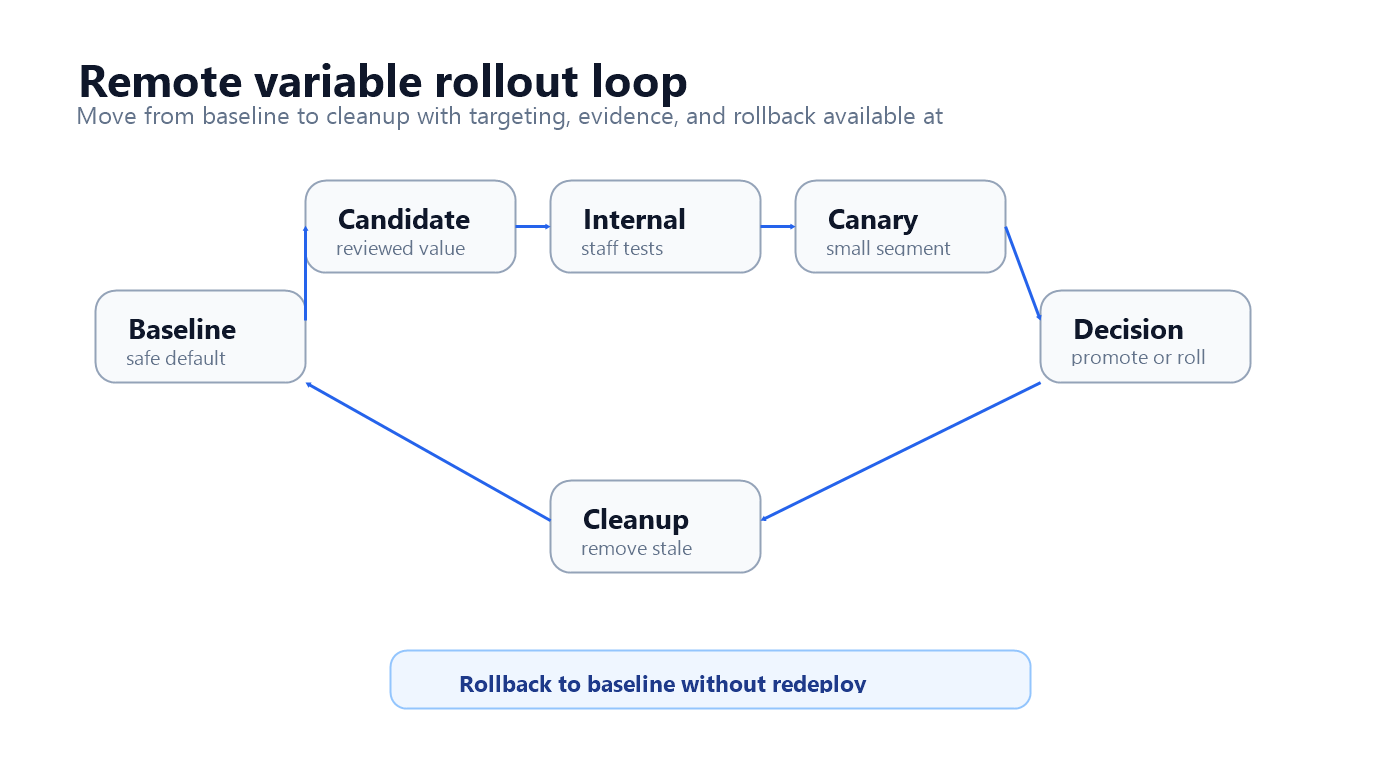
Treat each meaningful remote variable change as a small release.
| Stage | What happens | Evidence to capture |
|---|---|---|
| Baseline | Keep the current profile as the safe fallback. | Known behavior, current metrics, owner, and schema. |
| Candidate | Create a reviewed remote variable value or JSON profile. | Change summary, intended effect, affected AI surfaces. |
| Internal target | Serve the candidate to employees, test accounts, or low-risk workflows. | Trace quality, validation errors, obvious failure modes. |
| Canary | Expand to a small eligible segment. | Quality, latency, cost, fallback, escalation, and safety signals. |
| Experiment or rollout | Compare variants or progressively expand the candidate. | Primary outcome plus guardrails. |
| Decision | Promote, pause, narrow, roll back, or iterate. | Decision rule, owner approval, and rollout history. |
| Cleanup | Remove losing values or convert the winner into durable config. | Lifecycle record and archived flag state. |
This workflow is narrower than a full AI platform and broader than a settings page. The remote variable is a runtime release object.
Implementation Shape
Evaluate the remote variable before the AI request uses it. For sensitive AI behavior, this usually belongs in a server, model gateway, worker, or agent orchestrator rather than a browser component.
type SupportAiProfile = {
  profile: string;
  promptProfile: string;
  modelRoute: string;
  retrieval: {
    sourceScope: "verified_docs" | "all_help_center" | "enterprise_sources";
    maxChunks: number;
  };
  guardrails: {
    mode: "standard" | "strict" | "fallback_first";
    fallback: "baseline_model" | "human_escalation" | "cached_answer";
  };
  budgets: {
    timeoutMs: number;
    maxOutputTokens: number;
  };
};

const fallbackProfile: SupportAiProfile = {
  profile: "support_baseline_v1",
  promptProfile: "baseline_v3",
  modelRoute: "balanced_support",
  retrieval: {
    sourceScope: "verified_docs",
    maxChunks: 4,
  },
  guardrails: {
    mode: "standard",
    fallback: "human_escalation",
  },
  budgets: {
    timeoutMs: 8000,
    maxOutputTokens: 700,
  },
};

async function answerSupportQuestion(request: SupportRequest) {
  const evaluationContext = {
    keyId: request.accountId,
    plan: request.plan,
    region: request.region,
    workflow: "support_answer",
    riskTier: request.riskTier,
  };

  const profile = await flags.jsonVariation<SupportAiProfile>(
    "support-ai-remote-profile",
    evaluationContext,
    fallbackProfile
  );

  const validatedProfile = validateSupportAiProfile(profile, fallbackProfile);

  const response = await runAiSupportFlow({
    question: request.question,
    promptProfile: validatedProfile.promptProfile,
    modelRoute: validatedProfile.modelRoute,
    retrieval: validatedProfile.retrieval,
    guardrails: validatedProfile.guardrails,
    budgets: validatedProfile.budgets,
  });

  await trackRemoteVariableExposure({
    accountId: request.accountId,
    flagKey: "support-ai-remote-profile",
    profile: validatedProfile.profile,
    latencyMs: response.latencyMs,
    fallbackUsed: response.fallbackUsed,
  });

  return response;
}
The exact SDK method name depends on your stack. The release-control principles are stable:
- evaluate once before prompt assembly, model routing, retrieval, tool invocation, or fallback selection;
- validate the remote value against a schema;
- keep a safe fallback in code;
- attach the served profile to telemetry and experiment events;
- roll back by targeting the affected audience to the baseline variation.
For request-path placement, FeatBit's guide to server-side evaluation for AI feature flags expands the same pattern.
How FeatBit Fits The Pattern
FeatBit's role is the release-control layer around the AI behavior your application implements. It does not need to be the prompt editor, model registry, retrieval engine, or LLM proxy.
Use FeatBit to:
- define string, number, or JSON variations for remote variable values;
- target variations by user, account, segment, environment, region, plan, workflow, or percentage rollout;
- start with internal users or a small canary before broad exposure;
- record flag changes through audit history;
- connect exposure and custom metric events through experimentation or Track Insights;
- roll back a specific audience without redeploying;
- manage the lifecycle of temporary AI release controls.
This is the same operating idea behind FeatBit's AI control layer, safe AI deployment, and feature flag lifecycle management guidance: AI behavior should be targetable, observable, reversible, and cleaned up after the decision.
Common Mistakes
Using remote variables as unreviewed live editing. If anyone can change a prompt, model, threshold, or retrieval scope without ownership and evidence, the variable is a production risk.
Creating one variable per low-level knob. Many independent variables create combinations that were never tested together. Prefer typed profiles for reviewed behaviors.
Evaluating after the AI call. A variable that resolves after prompt assembly or model routing cannot control the cost, latency, retrieval, or fallback behavior that matters.
Skipping exposure events. If the system cannot join the served variable to outcomes, the team cannot know whether the change helped.
Leaving temporary variables forever. Prompt, model, retrieval, and experiment variables should end in a decision: promote, segment, roll back, iterate, or remove.
FAQ
Are remote variables the same as remote config?
They are closely related. Remote config is the broader practice of changing application behavior through runtime values. Remote variables are often the specific values attached to a flag or variation. In AI systems, both should be treated as release controls when they affect user-visible behavior, cost, latency, safety, or trust.
Should prompts be stored directly in remote variables?
Sometimes, but a prompt profile identifier is often safer than a large raw prompt string. A profile identifier lets code, review, evals, and version control own the prompt body while the flag decides who receives the profile. A raw prompt value can be useful for low-risk iteration, but it needs stricter validation and review.
When should one AI remote variable become multiple flags?
Split controls when ownership, risk, metrics, rollout pace, rollback behavior, or lifecycle differs. For example, a prompt profile, model route, agent tool authority, and incident fallback may need separate controls even when they all affect the same assistant.
Bottom Line
Remote variables are useful for AI features when they control a reviewed runtime behavior, not when they become a loose set of live knobs. Put prompts, model routes, retrieval profiles, guardrails, budgets, and fallbacks behind typed values that can be targeted, measured, rolled back, audited, and cleaned up.
That is the difference between changing a variable remotely and operating AI behavior as a release decision.
Source Notes
- Optimizely terminology context: Optimizely's Create flag variables documentation describes variables as a way to remotely configure a flag and group values in a flag variation. Its image carousel example shows variables changing UI content and behavior based on the variation a user receives.
- FeatBit implementation context: remote config, create flag variations, targeting rules, percentage rollouts, flag insights, Track Insights API, and feature flag lifecycle management.
- Vendor-neutral targeting context: OpenFeature's evaluation context specification explains contextual data used during flag evaluation. This article uses that concept to describe audience-aware AI variable selection.
- Related FeatBit reading: dynamic config for AI applications, what AI configuration one feature flag can control, AI safe deployment, and self-hosted feature flags.
Image And Open Graph Notes
- Use
/images/blogs/remote-variables-ai-feature-flags/cover.pngas the Open Graph image because it frames remote variables as runtime release controls for AI behavior. - Use
variable-map.pngnear the opening because it shows where remote variables are evaluated before AI execution. - Use
typed-profile-checklist.pngin the typed profile section because it summarizes the profile pattern visually. - Use
rollout-loop.pngin the workflow section because it shows the operational loop from baseline to cleanup.