
Helix AI Example: Safely Release an AI Assistant with Feature Flags
A useful Helix AI example is not just "put the assistant behind an on/off switch." It is a release-control design where the team can decide who receives the AI behavior, which prompt and model profile runs, which retrieval source and tool tier are available, what evidence proves the rollout is healthy, and how to roll back without redeploying.
In this article, Helix AI is a worked example name for a fictional B2B AI assistant. It is not a customer story, benchmark, or claim about a specific vendor product. The example is useful because it makes the release problem concrete: an AI assistant can be valuable for support, reporting, or workflow help, but every prompt, model, retrieval, and tool change can alter production behavior after deployment.
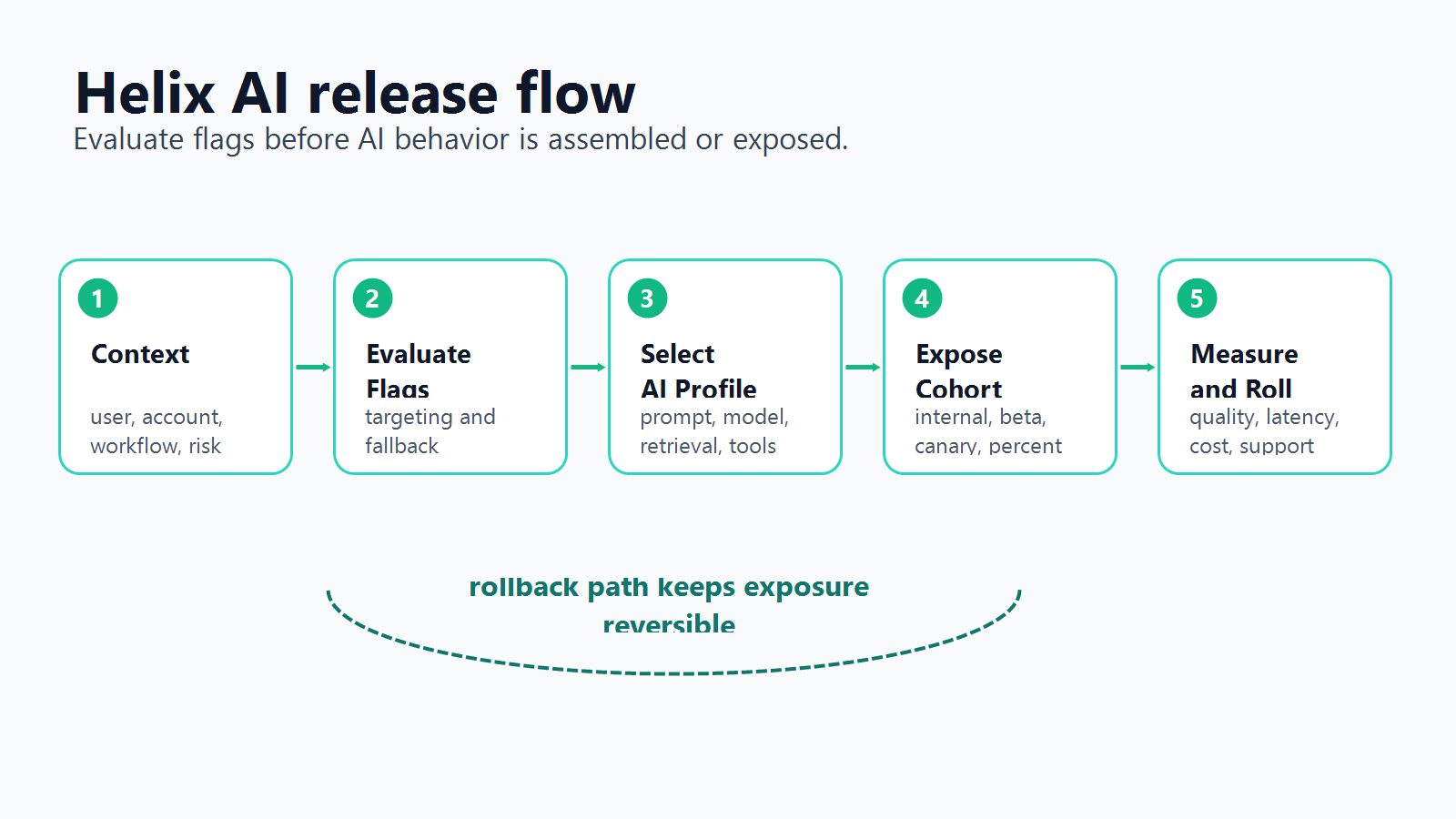
The Helix AI Scenario
Imagine Helix AI is an assistant inside a SaaS application. It can answer product questions, summarize account activity, draft support replies, and prepare workflow actions for a human reviewer.
The first release should not expose every capability to every user. A safer launch starts with a narrow release contract:
| Release decision | Example value |
|---|---|
| First audience | Internal users, then selected beta accounts |
| Default mode | search_only or draft_only |
| Prompt profile | stable_support_v1 or candidate_support_v2 |
| Model profile | conservative, balanced, or high_reasoning |
| Retrieval profile | approved_docs, account_docs, or regional_docs |
| Tool tier | none, read_only, draft_write, or approved_action |
| Approval mode | Required for external or account-changing actions |
| Rollback state | normal, fallback, tool_denied, or off |
That contract turns Helix AI from a single feature into a set of release decisions. FeatBit's AI control layer framing applies here: every AI decision point that can change user-visible behavior should be targetable, observable, and reversible.
Where Feature Flags Belong
The safest place to evaluate the Helix AI flags is before the assistant assembles the request or crosses an execution boundary.
For a server-side assistant flow, the application should:
- Build an evaluation context from the user, account, environment, region, plan, workflow, session, and risk level.
- Evaluate Helix AI release flags on the server.
- Assemble the prompt, model route, retrieval scope, and tool list from the evaluated result.
- Enforce tool and approval decisions outside the model prompt.
- Attach evaluated flag variations to logs, traces, review records, and metric events.
- Expand, pause, or roll back based on evidence.
OpenFeature describes an evaluation context as contextual data used for dynamic flag evaluation. For AI assistants, the context should include AI-specific attributes such as workflow, assistant mode, tool risk, environment, account, and region. Without those attributes, the team can only make broad global rollout decisions.
A Small Flag Set for the First Release
Start with a small flag set that maps to independent decisions. Too many flags create policy debt. Too few leave operators with one global switch.
| Flag key | Type | What it controls | Safe fallback |
|---|---|---|---|
helix-ai-enabled |
Boolean | Whether the assistant is available for this context | false |
helix-ai-mode |
String | off, search_only, draft_only, approval_required, or fallback |
search_only |
helix-prompt-profile |
String | Which instruction profile is active | stable_support_v1 |
helix-model-profile |
JSON or string | Model route, budget, timeout, and quality profile | conservative |
helix-retrieval-profile |
String | Which source set the assistant can use | approved_docs |
helix-tool-tier |
String | Whether tools are hidden, read-only, draft-write, or approval-gated | none |
helix-approval-required |
Boolean | Whether a human must approve side effects | true |
helix-incident-mode |
Boolean | Whether fallback behavior should override normal rollout | false |
This mirrors the broader architecture in feature flags for AI agents, but the Helix example is narrower. The reader job is to see a complete feature-flag use case, not to design a full agent platform.
The Runtime Control Matrix
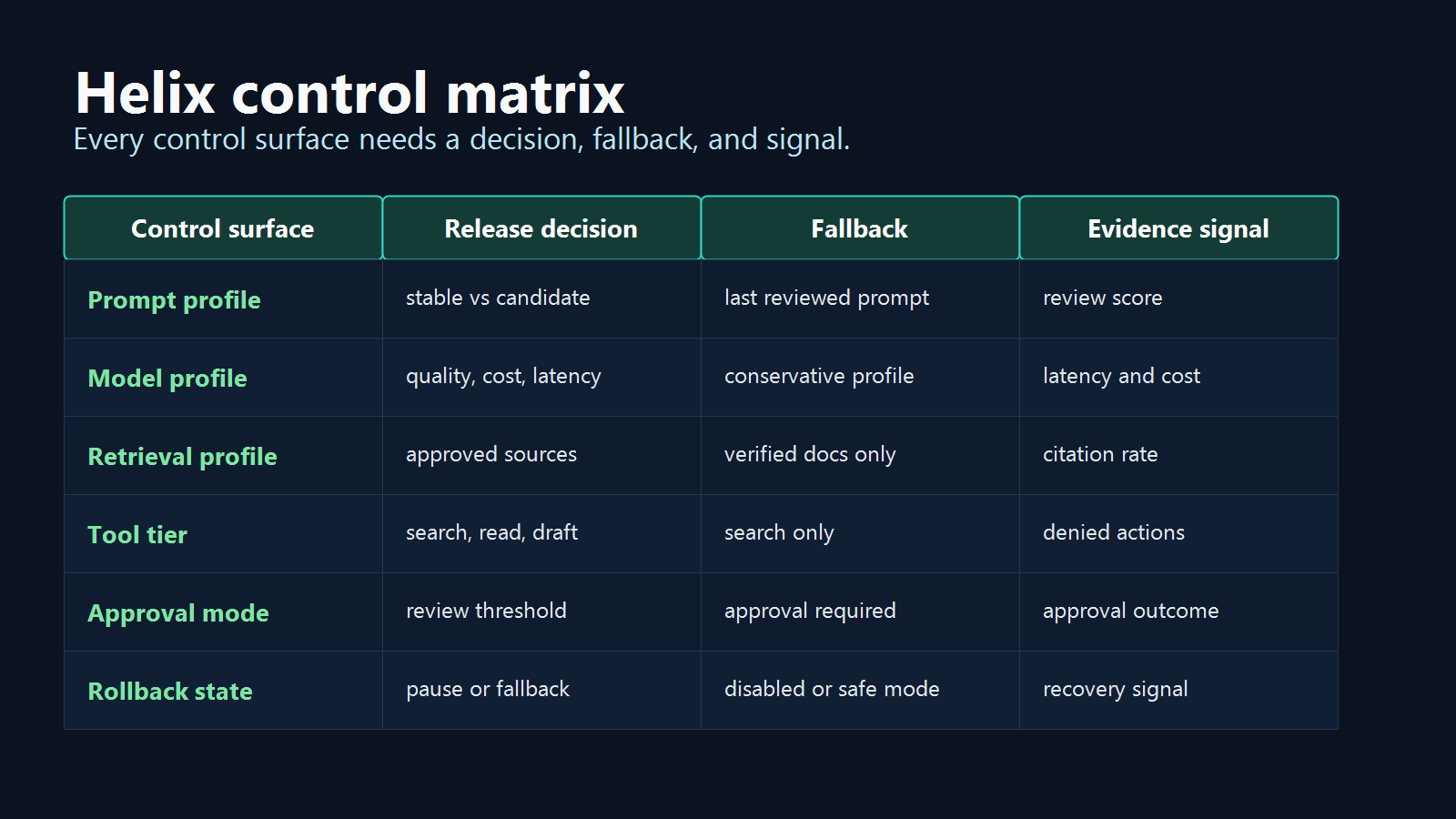
Each control surface needs three things before wider rollout: a release decision, a fallback, and an evidence signal.
| Control surface | Release decision | Fallback | Evidence signal |
|---|---|---|---|
| Prompt profile | Which instruction profile should run for this audience? | Last reviewed prompt | Review score, correction rate, support feedback |
| Model profile | Which quality, latency, and cost profile is acceptable? | Conservative model profile | Latency, cost, error rate, evaluator result |
| Retrieval profile | Which source set can the assistant use? | Approved docs only | Citation rate, unresolved answer rate, fallback rate |
| Tool tier | Which tools can the assistant see or use? | Search-only or no tools | Denied actions, approval outcomes, incident signal |
| Approval mode | Which contexts require human review? | Approval required | Review queue result, escalation rate |
| Rollback state | Which behavior should operators reduce first? | Fallback or off | Recovery signal after rollback |
The important boundary is tool execution. A model can receive the selected policy, but the backend should still enforce tool and approval decisions before any side effect. The Model Context Protocol authorization specification is a useful reminder that runtime flags do not replace hard authorization, scoped credentials, token audience validation, or API permissions.
Example Evaluation Contract
The Helix AI application can keep the evaluated result small and explicit.
type HelixAiContext = {
  userId: string;
  accountId: string;
  environment: "dev" | "staging" | "production";
  region?: string;
  plan?: "free" | "team" | "enterprise";
  workflow: "support_answer" | "account_summary" | "report_builder" | "ticket_draft";
  riskLevel: "low" | "medium" | "high";
};

type HelixAiControls = {
  enabled: boolean;
  mode: "off" | "search_only" | "draft_only" | "approval_required" | "fallback";
  promptProfile: string;
  modelProfile: string;
  retrievalProfile: string;
  toolTier: "none" | "read_only" | "draft_write" | "approved_action";
  approvalRequired: boolean;
  incidentMode: boolean;
};
Then evaluate once before the assistant runs:
async function getHelixAiControls(ctx: HelixAiContext): Promise<HelixAiControls> {
  const enabled = await flags.boolean("helix-ai-enabled", ctx, false);
  const incidentMode = await flags.boolean("helix-incident-mode", ctx, false);

  if (!enabled || incidentMode) {
    return {
      enabled,
      mode: incidentMode ? "fallback" : "off",
      promptProfile: "stable_support_v1",
      modelProfile: "conservative",
      retrievalProfile: "approved_docs",
      toolTier: "none",
      approvalRequired: true,
      incidentMode,
    };
  }

  return {
    enabled,
    mode: await flags.string("helix-ai-mode", ctx, "search_only"),
    promptProfile: await flags.string("helix-prompt-profile", ctx, "stable_support_v1"),
    modelProfile: await flags.string("helix-model-profile", ctx, "conservative"),
    retrievalProfile: await flags.string("helix-retrieval-profile", ctx, "approved_docs"),
    toolTier: await flags.string("helix-tool-tier", ctx, "none"),
    approvalRequired: await flags.boolean("helix-approval-required", ctx, true),
    incidentMode,
  };
}
The exact SDK shape depends on the stack. The pattern matters more than the syntax: evaluate once in a trusted runtime, pass evaluated values into the AI orchestration layer, and keep fallback values explicit. FeatBit's guide to server-side evaluation for AI feature flags expands this placement decision.
Rollout Stages for Helix AI
A practical rollout can move through five stages:
| Stage | Exposure | What to learn | Rollback action |
|---|---|---|---|
| Internal search-only | Employees and test accounts | Whether answers cite the right sources and avoid unsupported actions | Disable Helix AI or return to approved docs only |
| Beta draft-only | Selected accounts | Whether drafts are useful before human review | Return to search-only |
| Canary tool tier | Small percentage of beta traffic | Whether read-only or draft-write tools behave as expected | Lower helix-tool-tier |
| Progressive rollout | Wider segment or percentage | Whether quality, cost, latency, and support signals stay healthy | Reduce rollout percentage or activate fallback |
| Full release or permanent control | Stable audience | Which flags are temporary release controls and which are permanent operating controls | Archive temporary flags or document permanent controls |
FeatBit's safe AI deployment and AI agent deployment loop pages use the same operating idea: build the control point, expose it gradually, evaluate production behavior, and roll back before the issue reaches everyone.
What to Measure
Helix AI should not expand only because the assistant is technically working. Expansion should depend on release evidence.
Track signals such as:
- evaluated flag key and variation for each assistant session;
- workflow, account, region, environment, plan, and risk level;
- prompt, model, retrieval, tool tier, approval, and fallback profile;
- answer quality review, evaluator score, correction rate, and unresolved-answer rate;
- latency, cost, error rate, retry rate, and timeout rate;
- denied tool calls, approved actions, and human review outcomes;
- support ticket impact, user feedback, and rollback events.
FeatBit flag insights, Track Insights API, audit logs, and OpenTelemetry integration are the relevant product primitives for connecting exposure to evidence.
Common Mistakes in AI Feature Flag Examples
Using one global AI switch. A global enable flag helps, but it cannot roll back one prompt, model route, retrieval source, or tool tier.
Evaluating sensitive flags in the browser. AI behavior flags often control prompts, model routes, retrieval scope, cost, and tool access. Evaluate those decisions server-side unless the choice is purely presentational.
Treating feature flags as authorization. Runtime flags release approved capabilities. They should sit beside IAM, API scopes, MCP authorization, sandboxing, and tool-router enforcement.
Skipping the context schema. A Helix AI rollout needs context such as account, environment, region, workflow, plan, and risk level. FeatBit's guide to AI feature targeting context gives a deeper context checklist.
Ignoring cleanup. Temporary rollout flags need an owner, review date, and end state. Permanent operational controls need documentation. FeatBit's feature flag lifecycle management guidance helps keep those paths separate.
Why This Is a Standalone Example
The Helix AI example is narrower than a broad AI control layer article. It gives teams a concrete, copyable release shape:
- a named AI assistant scenario;
- a small first flag set;
- an evaluation contract;
- a rollout ladder;
- a control matrix;
- a measurement plan;
- a cleanup rule.
That makes it useful for teams searching for AI feature flag use cases. The point is not that every assistant should be called Helix. The point is that every production AI assistant should have a named release decision, targeted exposure, observable evidence, and a rollback path before the behavior reaches broad traffic.
Source Notes and Internal Link Plan
This article uses vendor and standards sources as category context. It does not make comparative performance, pricing, security, compliance, or market-ranking claims.
- DevCycle's public site and DevCycle MCP documentation are used as market-language context for AI-assisted feature flag workflows and AI/MCP interest in the feature management category.
- OpenFeature's evaluation context documentation supports the context-based flag evaluation model.
- The Model Context Protocol authorization specification supports the distinction between runtime release controls and hard authorization boundaries.
- FeatBit implementation context: targeting rules, percentage rollouts, flag insights, Track Insights API, audit logs, and OpenTelemetry integration.
- FeatBit reader journey links: AI control layer, safe AI deployment, AI agent deployment loop, feature flags for AI agents, server-side evaluation for AI feature flags, AI feature targeting context, and feature flag lifecycle management.
- Image and Open Graph recommendation: use
cover.pngas the social preview. Usehelix-ai-release-flow.pngnear the opening workflow andhelix-control-matrix.pngnear the decision framework because both summarize decisions that are also explained in crawlable text.
Next Step
Pick one AI assistant workflow and write its Helix-style release contract: audience, mode, prompt profile, model profile, retrieval profile, tool tier, approval rule, evidence signal, rollback state, owner, and cleanup condition. If any field is unclear, keep the assistant in search-only or internal-only mode until the release decision is explicit.